
<?xml version="1.0" encoding="utf-8"?>
<feed xmlns="http://www.w3.org/2005/Atom">
  <title>Jackie Liu&#39;s Blog</title>
  <subtitle>Born to be proud</subtitle>
  <link href="/atom.xml" rel="self"/>
  
  <link href="http://mjackie.github.io/"/>
  <updated>2019-03-08T11:34:37.457Z</updated>
  <id>http://mjackie.github.io/</id>
  
  <author>
    <name>Jackie Liu</name>
    
  </author>
  
  <generator uri="http://hexo.io/">Hexo</generator>
  
  <entry>
    <title>Leetcode 指南</title>
    <link href="http://mjackie.github.io/Tech/cjw7jxoch001tidkf2pej70lh/"/>
    <id>http://mjackie.github.io/Tech/cjw7jxoch001tidkf2pej70lh/</id>
    <published>2019-03-08T11:28:00.000Z</published>
    <updated>2019-03-08T11:34:37.457Z</updated>
    
    <content type="html"><![CDATA[<p>自己日常刷题经过是这样的：</p>
<ol>
<li>拿到题目，看一眼<code>Difficulty</code>，然后自己思考一下解题思路。如果解不出来，就记下在哪里卡住了，难点在哪。</li>
<li>如果对应的题目有<code>Solution</code>，就看<code>Solution</code>，没有的话就点<code>Discuss</code>，按<code>Most Votes</code>排序，看排名最高的解法。</li>
<li>对比一下自己的解法与最优的解法的差别，总结一下为什么没想起来，记录下来这个思考的过程。</li>
<li>关掉别人的代码，开始Coding，Debug，Submit。</li>
</ol>
<a id="more"></a>
<p>附上自己总结的几条经验：</p>
<ul>
<li><p>先刷两个Top专题。Leetcode 上有个<code>List</code>选项，里边有两个专题，分别是<code>Top 100 Liked Questions</code>和<code>Top Interview Questions</code>。这两个List中有很多重复的题，加起来一共150道左右。都是经典的题目，将这150道刷完基本上所有的题型都见过了，而且多数经典题目都会涉及，是提升最快的一个方法。</p>
</li>
<li><p>注意记录、总结与复习。自己写过的代码一定要保存下来，刷题的时候也要记下主要思路和注意点，这样在复习的时候也能对比发现自己哪里还能改进，之前犯得错误有没有重犯。可以将相互关联的题目对比着一起看，方便总结与记忆。一定要时常复习刷过的题，复习比一味的追求数量更重要。</p>
</li>
<li><p>做好Easy，没必要死扣Hard。LeetCode上很多Easy的题目看似简单，实则想要写出Perfect的代码并非易事。多思考如何优化Easy，Medium的解法实际上比花精力解Hard题更能提高自己。况且面试的时候Hard被问的概率太小了。</p>
</li>
<li><p>切忌眼高手低。不要想着自己知道思路解法了就是会了，一定要亲自Coding，手撸出来。我在刷的过程中就经常在Debug的时候才发现自己忘记考虑了某些条件。不把代码写出来，只看别人的答案对自己是没有多大的提高的，只有亲自AC了题目，才能算做过一道题。</p>
</li>
</ul>
<p>最后附上我的刷题仓库，欢迎Start <a href="https://github.com/mJackie/leetcode" target="_blank" rel="noopener">https://github.com/mJackie/leetcode</a></p>
]]></content>
    
    <summary type="html">
    
      &lt;p&gt;自己日常刷题经过是这样的：&lt;/p&gt;
&lt;ol&gt;
&lt;li&gt;拿到题目，看一眼&lt;code&gt;Difficulty&lt;/code&gt;，然后自己思考一下解题思路。如果解不出来，就记下在哪里卡住了，难点在哪。&lt;/li&gt;
&lt;li&gt;如果对应的题目有&lt;code&gt;Solution&lt;/code&gt;，就看&lt;code&gt;Solution&lt;/code&gt;，没有的话就点&lt;code&gt;Discuss&lt;/code&gt;，按&lt;code&gt;Most Votes&lt;/code&gt;排序，看排名最高的解法。&lt;/li&gt;
&lt;li&gt;对比一下自己的解法与最优的解法的差别，总结一下为什么没想起来，记录下来这个思考的过程。&lt;/li&gt;
&lt;li&gt;关掉别人的代码，开始Coding，Debug，Submit。&lt;/li&gt;
&lt;/ol&gt;
    
    </summary>
    
      <category term="Tech" scheme="http://mjackie.github.io/categories/Tech/"/>
    
    
      <category term="Leetcode" scheme="http://mjackie.github.io/tags/Leetcode/"/>
    
      <category term="JAVA" scheme="http://mjackie.github.io/tags/JAVA/"/>
    
  </entry>
  
  <entry>
    <title>2018总结</title>
    <link href="http://mjackie.github.io/Life/cjw7jxocb001gidkf81o1hssv/"/>
    <id>http://mjackie.github.io/Life/cjw7jxocb001gidkf81o1hssv/</id>
    <published>2018-12-31T00:00:00.000Z</published>
    <updated>2018-12-31T10:12:15.022Z</updated>
    
    <content type="html"><![CDATA[<p>光阴似箭，箭箭穿心，时间过得真块。今天是2018年12月31日，这个时间点上总结过去的一年，看看哪些做的好，哪些做的不好。希望这个习惯可以作为每年的惯例，能够坚持下去。<br>钱包里一直塞着去年元旦时写的几个目标，前几天拿出来右看了一眼，真正做到的还不到两条，甚是可笑。也不能说是自己没有达到预期，而应该怪目标定得有些不切实际，毕竟计划赶不上变化。如果用简短的几个字来概括过去一年的主题的话，那应该是“第一次”。</p>
<ul>
<li><code>第一次面试实习</code><br>春节过完年回来开始忙着写简历与面试，从面试中也提前体验了一把准备面试与面试的过程，发现了自己专业技能上很多的不足。从面试到实习还是很感谢这段经历，不仅提前了解了面试的流程与侧重点，还体验了互联网公司工作的氛围，也经历的第一次找房租房生活的体验。不管是每周二早上6点多起床赶班车，晚上在公司看课程直播，还是一个人冒雪下班骑单车，都成了自己难忘的经历。研一的下学期也伴随着实习的结束而接近尾声。要感谢leader祥林哥，给了一个准备不充分的面试者实习的机会，也把我带进了计算广告，推荐系统的大门。</li>
</ul>
<a id="more"></a>
<ul>
<li><code>第一次当学生干部</code><br>从本科到研一，自己的学生工作经验应该说还是有些欠缺的，并不足以担负起协会会长的职务。回所以后阴差阳错的当上了职协的会长，研会的副主席。说几点自身的体会：一是要自信，在其位，谋其事，要肩负起相应的责任；二是要学会授权和信任，不可能自己一个人把所有的事都做了，要学会分配任务，交给合适的人去做，并且相信别人；三是要会办事,适度的来事，不要太固执己见了，不是说就不理想主义了，而是要联系实际。感谢周老师，不管什么时候周妈妈都像自己的朋友一样，亲近而温和。</li>
<li><code>第一次做数据挖掘比赛</code><br>除了白天跟着许老师做项目，玩上和业余时间就开始做比赛。每天起床先看一眼排行榜都成了自己的习惯。OGeek那一个多月的时间里真的是有些着魔了，干什么都想着比赛怎么上分。经历了第一次在所里通宵，第一次用GPU跑模型。虽然结果不总是尽如人意，还是收获满满的。不仅将所学的知识付诸实现，还提升了自己的技术能力，结交了许多新的朋友。</li>
<li><code>第一次投论文</code><br>大四做的毕设内容，一直拖着，来来回回修改了5，6遍，好在现在终于投出去了。感谢瀚文老师，小孟老师的建议与耐心指导，辛苦亚文师妹带病改稿。要重视写本子的能力，表达与写作能力是需要长期培养的，不要以为技术人员做好相应的工作就好了。不管是写作，ppt，还是汇报与讲解，要学会阐述自己的工作内容，这点甚至有时比工作本身都重要。</li>
</ul>
<p>除了工作与学习，这一年来业余时间的两大爱好健身和台球也都有进步。水平是一点一点进步的，不可能一口吃个胖子。感谢自己这一年以来能够坚持健身，虽然还不够系统，中间也断断续续，但已经可以明显感觉到自己体质的提升了，感谢胖虎和卡戴珊。今年还学会了游泳，第一次在深水区游泳，第一次在海里游泳。</p>
<p>今年读的书有点少了，印象最深刻的是最近还在读的《邓小平时代》。几年前就看过一些，当时没有坚持读完，感觉像是在写流水账。今年重看时已经发现作者不加评论与主观态度正是这本书的优点所在，只陈述事实，背后的缘由与因果由读者自己思考体会。借着改革开放40周年，发自内心的感受到邓小平的伟大。《通往财富自由之路》也很不错，虽然书名有些俗，每次拿着这本书的时候都被别人嘲笑。</p>
<p>今年发现了一名自己非常喜欢额歌手——满江，声音温暖而有力量，《Mr.Man》、《阳光下》非常好听。《知识就是力量》这个节目很不错，从头到尾追完了。</p>
<p>总的来说，自我感觉这一年能量密度还是很高的，不管是专业知识的学习，还是思想上的一些变化。但仍有许多做的不够好的地方：回所以后没有按时早起；在所里工作效率有点低，老跑神；时间分配做的不好，特别是在多任务的情况下。</p>
<p>最后写几个明年的目标和计划吧：</p>
<ol>
<li>LeetCode刷够300道。</li>
<li>看完台大李宏毅的《深度学习》，系统的学习下深度学习，MIT《Deep Learning》</li>
<li>坚持健身，开春以后开始跑步，学会自由泳</li>
<li>提升写作能力，持续更博，刷知乎</li>
<li>坚持读书，不少于5本</li>
<li>培养一个新的爱好</li>
</ol>
]]></content>
    
    <summary type="html">
    
      &lt;p&gt;光阴似箭，箭箭穿心，时间过得真块。今天是2018年12月31日，这个时间点上总结过去的一年，看看哪些做的好，哪些做的不好。希望这个习惯可以作为每年的惯例，能够坚持下去。&lt;br&gt;钱包里一直塞着去年元旦时写的几个目标，前几天拿出来右看了一眼，真正做到的还不到两条，甚是可笑。也不能说是自己没有达到预期，而应该怪目标定得有些不切实际，毕竟计划赶不上变化。如果用简短的几个字来概括过去一年的主题的话，那应该是“第一次”。&lt;/p&gt;
&lt;ul&gt;
&lt;li&gt;&lt;code&gt;第一次面试实习&lt;/code&gt;&lt;br&gt;春节过完年回来开始忙着写简历与面试，从面试中也提前体验了一把准备面试与面试的过程，发现了自己专业技能上很多的不足。从面试到实习还是很感谢这段经历，不仅提前了解了面试的流程与侧重点，还体验了互联网公司工作的氛围，也经历的第一次找房租房生活的体验。不管是每周二早上6点多起床赶班车，晚上在公司看课程直播，还是一个人冒雪下班骑单车，都成了自己难忘的经历。研一的下学期也伴随着实习的结束而接近尾声。要感谢leader祥林哥，给了一个准备不充分的面试者实习的机会，也把我带进了计算广告，推荐系统的大门。&lt;/li&gt;
&lt;/ul&gt;
    
    </summary>
    
      <category term="Life" scheme="http://mjackie.github.io/categories/Life/"/>
    
    
  </entry>
  
  <entry>
    <title>利用perl+extjs开发web应用</title>
    <link href="http://mjackie.github.io/Tech/cjw7jxocw002uidkf90izzept/"/>
    <id>http://mjackie.github.io/Tech/cjw7jxocw002uidkf90izzept/</id>
    <published>2018-10-07T00:00:00.000Z</published>
    <updated>2018-12-22T09:17:33.336Z</updated>
    
    <content type="html"><![CDATA[<p>组里的网络测试仪整个框架是用perl+extjs实现的。项目很大，看了好久了解了整体框架结构。perl+extjs的实现主要有以下几个好处：</p>
<ul>
<li>轻量级，web服务端与业务逻辑紧耦合，无需web服务器去承载应用</li>
<li>调用外部命令行程序方便</li>
<li>采用ajax技术，省去了频繁的页面跳转</li>
<li>extjs封装了大量的组件，界面效果风格一致，省去了前端页面开发工作</li>
</ul>
<a id="more"></a>
<p>入口程序为 <code>server.pl</code> , 启动web服务，监听端口，轮训请求，两个主要函数如下：</p>
<pre><code>sub ServerInit
{
    my $group = shift;
    my $server_sock = undef;

    if($group eq &quot;GUI&quot;)
    {
        $server_sock = &amp;guiServerInit($ServerParams-&gt;{CONFIG});
        GuiServer-&gt;removeShm();
    }
    elsif($group eq &quot;PKTGEN&quot;)
    {$server_sock = &amp;pktgenInit($ServerParams-&gt;{CONFIG});}
    elsif($group eq &quot;CLUSTER_TEST&quot;)
    {$server_sock = &amp;clusterMasterInit($ServerParams-&gt;{CONFIG});}
    elsif($group eq &quot;ATTACKENGINE&quot;)
    {$server_sock = AttackEngineServer::init($ServerParams-&gt;{CONFIG});}

    if( defined($server_sock) )
    {$ServerParams-&gt;{&quot;$group&quot;}-&gt;{&quot;socket&quot;} = $server_sock;}
    else
    {
        printf(&quot;Can not setup $group socket at--[%s, %s]\n&quot;, __FILE__, __LINE__);
        return 0;
    }
    $ServerParams-&gt;{&quot;SELECT&quot;}-&gt;add($ServerParams-&gt;{&quot;$group&quot;}-&gt;{&quot;socket&quot;});

    return 1;
}


sub mainLoop
{
    my @ready;
    my $sock;
    my $sel = $ServerParams-&gt;{&quot;SELECT&quot;};
    my $GUIConnections = $ServerParams-&gt;{&quot;GUI&quot;}-&gt;{&quot;connections&quot;};
    my $PKTGENConnections = $ServerParams-&gt;{&quot;PKTGEN&quot;}-&gt;{&quot;connections&quot;};
    my $ATTACKENGINEConnections = $ServerParams-&gt;{&quot;ATTACKENGINE&quot;}-&gt;{&quot;connections&quot;};
    my $CLUSTERConnections = $ServerParams-&gt;{&quot;CLUSTER_TEST&quot;}-&gt;{&quot;connections&quot;};
    my $STATConnections =  $ServerParams-&gt;{&quot;PKTGEN&quot;}-&gt;{&quot;connections&quot;};
    my $tmpSock;
    my $tid; 
    #starts looping
    while(1)
    {
        #select: BLOCK, selection loop may be interrupted by signals.
        @ready = $sel-&gt;can_read();

        foreach my $fh (@ready)
        {
            if($fh == $ServerParams-&gt;{&quot;GUI&quot;}-&gt;{&quot;socket&quot;})
            {
                #accept the connection
                $sock = $fh-&gt;accept();
                #setup buffer for this connection
                $GUIConnections-&gt;{&quot;$sock&quot;} = {
                    &quot;buffer&quot; =&gt; &quot;&quot;
                };
                #add this socket into selection loop
                $sel-&gt;add($sock);
            }
            #Connection from PKTGEN
            elsif($fh == $ServerParams-&gt;{&quot;PKTGEN&quot;}-&gt;{&quot;socket&quot;})
            {
                $sock = $fh-&gt;accept();
                $PKTGENConnections-&gt;{&quot;$sock&quot;} = {
                    &quot;tid&quot; =&gt; &quot;-1&quot;,
                    &quot;buffer&quot; =&gt; &quot;&quot;
                };
                $sel-&gt;add($sock);
            }
            elsif($fh == $ServerParams-&gt;{&quot;ATTACKENGINE&quot;}-&gt;{&quot;socket&quot;})
            {
                $sock = $fh-&gt;accept();
                $sel-&gt;add($sock);
                $ATTACKENGINEConnections-&gt;{&quot;$sock&quot;} = {};
            }
            elsif($fh == $ServerParams-&gt;{&quot;CLUSTER_TEST&quot;}-&gt;{&quot;socket&quot;})
            {
                # connection request from cluster master
                $sock = $fh-&gt;accept();
                $sel-&gt;add($sock);
                $CLUSTERConnections-&gt;{&quot;$sock&quot;} = {
                    status =&gt; &quot;CONNECTED&quot;,
                    buffer =&gt; &quot;&quot;,
                    &apos;length&apos; =&gt; 0,
                    DFA =&gt; &quot;AUTH&quot;
                };
            }
            elsif(&amp;WhichConnection($fh, &quot;GUI&quot;)) #for GUI requests
            {
                if(! &amp;processGUIRequest_keepalive($fh, $GUIConnections))
                {
                    $sel-&gt;remove($fh);
                    close($fh); 
                    delete $GUIConnections-&gt;{&quot;$fh&quot;};
                }
            }
            elsif(&amp;WhichConnection($fh, &quot;CLUSTER_TEST&quot;))
            {
                if(! &amp;processClusterMasterRequest($fh, $CLUSTERConnections))
                {
                    $sel-&gt;remove($fh);
                    close($fh);
                }
            }
            #stat. from pkt-gens
            elsif(&amp;WhichConnection($fh, &quot;PKTGEN&quot;)) #for PKTGEN running statistics
            {
                if(! &amp;processPKTGENMsg_keepalive($fh, $PKTGENConnections))
                {
                    $sel-&gt;remove($fh);
                    close($fh); 
                    delete $PKTGENConnections-&gt;{&quot;$fh&quot;};
                }
            }
            elsif(&amp;WhichConnection($fh, &quot;ATTACKENGINE&quot;))
            {
                if(! AttackEngineServer::processAttackEngineResponse($fh, $ATTACKENGINEConnections-&gt;{&quot;$fh&quot;}))
                {
                    $sel-&gt;remove($fh);
                    close($fh); 
                    delete $ATTACKENGINEConnections-&gt;{&quot;$fh&quot;};
                }
            }
            else
            {
                #TODO: error
                print(&quot;Isolated connection!!!!!!!Never should be here. Need debugging.&quot;);
                #throw this connection away
                $sel-&gt;remove($fh);
                close($fh);
            }
        }
        # can write
    }
}
</code></pre><p>业务逻辑代码靠 GuiServer.pm 承载，并返回内容，主要函数如下：</p>
<pre><code>sub guiServerInit
{
    my $config = shift;

    $config_defs-&gt;{config} = $config;
    $config_defs-&gt;{path} = $config-&gt;{database}-&gt;{xmlDatabasePath};
    $config_defs-&gt;{maxHistory} = $config-&gt;{web}-&gt;{maxHistory};
    $config_defs-&gt;{webRoot} = $config-&gt;{web}-&gt;{webRoot};
    $config_defs-&gt;{cacheEnabled} = $config-&gt;{web}-&gt;{cacheEnabled};
    $config_defs-&gt;{sessionExpires} = $config-&gt;{web}-&gt;{sessionExpires};
    $config_defs-&gt;{port} = $config-&gt;{web}-&gt;{port};

    $config_defs-&gt;{protocolTemplates} = $config-&gt;{msgCompiler}-&gt;{protocolTemplates};

    $config_defs-&gt;{webVersion} = $config-&gt;{web}-&gt;{version} ? $config-&gt;{web}-&gt;{version} : &quot;0.1&quot;;
    $config_defs-&gt;{msgCompilerVersion} = $config-&gt;{msgCompiler}-&gt;{version} ? $config-&gt;{msgCompiler}-&gt;{version} : &quot;0.1&quot;;
    $config_defs-&gt;{pktgenVersion} = $config-&gt;{pktgenVersion}-&gt;{version} ? $config-&gt;{pktgenVersion}-&gt;{version} : &quot;0.1&quot;;


    $config_defs-&gt;{protocolScripts} = $config-&gt;{msgCompiler}-&gt;{protocolScripts};
    $config_defs-&gt;{attackScripts} = $config-&gt;{msgCompiler}-&gt;{attackScripts};
    $config_defs-&gt;{database} = Database-&gt;getDatabaseConnection() or return undef;
    $config_defs-&gt;{totParser} = ToTParser-&gt;new($config_defs-&gt;{protocolTemplates}, $config_defs-&gt;{protocolScripts});
    #$config_defs-&gt;{&quot;physicalPortManager&quot;} = PhysicalPortManager-&gt;new(&quot;$config_defs-&gt;{path}/System/physicalPortManagement.config&quot;,&quot;$config_defs-&gt;{path}/System/ui_physicalPortMapping.config&quot;);
    $config_defs-&gt;{&quot;physicalPortManager&quot;} = PhysicalPortManager-&gt;new(&quot;$config_defs-&gt;{path}&quot;);
    #$config_defs-&gt;{&quot;physicalPortManager&quot;} = shared_clone(PhysicalPortManager-&gt;new(&quot;$config_defs-&gt;{path}&quot;));

    #$config_defs-&gt;{&quot;ManagementIPConfig&quot;} = ManagementIPConfig-&gt;new($MANAGEMENTPORT);
    $config_defs-&gt;{&quot;ManagementIPConfig&quot;} = ManagementIPConfig-&gt;new($config_defs-&gt;{path});

    # set session time
    $config_defs-&gt;{sessions} = Session-&gt;new($config_defs-&gt;{sessionExpires});
    $config_defs-&gt;{preferences} = Preference-&gt;new($config_defs-&gt;{path});
    $config_defs-&gt;{packetGenerator}={};
    $config_defs-&gt;{packetGenerator}-&gt;{port} =  $config-&gt;{packetGenerator}-&gt;{port};

    $config_defs-&gt;{DocGenerator} =  $config-&gt;{DocGenerator};

    $config_defs-&gt;{PcapBuffer} =  $config-&gt;{PcapBuffer};

    # printf(&quot;INIT GUI LOG FILE: $config-&gt;{web}-&gt;{logFile}\n&quot;);
    if($config-&gt;{web}-&gt;{logFile} ne &quot;&quot;)
    {
        open($config_defs-&gt;{GUILOGFILE}, &quot;&gt;$config-&gt;{web}-&gt;{logFile}&quot;) || die &quot;failed to open gui log file!\n&quot;;
        guiLog(&quot;GUI LOG FILE\n&quot;);
    }
    #print(Dumper($config_defs));
    return IO::Socket::INET-&gt;new(LocalPort=&gt; $config_defs-&gt;{port}, Reuse =&gt; 1, Listen =&gt; SOMAXCONN);
}

sub parseGUIRequest_keepalive
{
    my ($sock, $request, $cleanSockFun) = @_;
    my ($ret, $params, $file);

    while(length($request-&gt;{&quot;buffer&quot;}) &gt; 0)
    {
        if(! defined($request-&gt;{&quot;state&quot;}))
        {$request-&gt;{&quot;state&quot;} = &quot;WAIT_FOR_HEADER&quot;;}

        if($request-&gt;{&quot;state&quot;} eq &quot;WAIT_FOR_HEADER&quot;)
        {
            # whether http header is ready
            $ret = index($request-&gt;{&quot;buffer&quot;}, &quot;\r\n\r\n&quot;);
            if($ret &lt;= 0) # negative
            {return &quot;MORE_DATA&quot;;}

            # cut request header
            $request-&gt;{&quot;header&quot;} = substr($request-&gt;{&quot;buffer&quot;}, 0, $ret + 4);

            guiLog(Dumper($request-&gt;{&quot;header&quot;}));

            substr($request-&gt;{&quot;buffer&quot;}, 0, $ret + 4) = &quot;&quot;;

            if($request-&gt;{&quot;header&quot;} =~ m/^.*Accept-Language: ([^\r\n]+)\r\n/s)
            {
                #Accept-Language: zh-CN,zh;q=0.8
                @{$request-&gt;{languages}} = split(/ *, */, $1);
            }

            # parse header
            $request-&gt;{&quot;header&quot;} =~ m/^.*(GET|get|POST|post)\s+(\S+).*/s;
            $request-&gt;{&quot;method&quot;} = uc($1);
            $request-&gt;{&quot;uri&quot;} = $2;
            $request-&gt;{&quot;header&quot;} =~ m/^.*Connection: (\S+)\r\n.*/s;
            $request-&gt;{&quot;connection&quot;} = $1;

            # parse cookie
            if($request-&gt;{&quot;header&quot;} =~ m/^.*Cookie: ([^\r\n]+)\r\n/s)
            {$request-&gt;{&quot;cookies&quot;} = $1;}

            # check Modifed-Since
            if($request-&gt;{&quot;header&quot;} =~ m/^.*If-None-Match/s)
            {
                print(&quot;TODO: return 304 not modifed\n&quot;);
                print(Dumper($request-&gt;{header}));
            }

            $request-&gt;{&quot;uri&quot;} =~ /^([^?]+)(\?(.+))?/;
            $request-&gt;{&quot;path&quot;} = $1;
            if($3){
                %{$params} = split(/&amp;|=/, $3);
            }
            foreach my $pp (keys(%{$params}))
            {$request-&gt;{&quot;params&quot;}-&gt;{$pp} = &amp;urlDecode($params-&gt;{$pp});}

            $request-&gt;{&quot;state&quot;} = &quot;HEADER_READY&quot;;
        }

        if($request-&gt;{&quot;state&quot;} eq &quot;HEADER_READY&quot;)
        {
            if($request-&gt;{&quot;method&quot;} eq &quot;GET&quot;)
            {$request-&gt;{&quot;state&quot;} = &quot;REQUEST_READY&quot;;}
            else
            {
                if($request-&gt;{&quot;header&quot;} =~ m/^.*Content-Length:\s+(\d+).*/s)
                {$request-&gt;{&quot;length&quot;} = $1;}
                if($request-&gt;{&quot;length&quot;} &lt; 0) # wrong http post request, ignore it.
                {return &quot;END&quot;;}
                else
                {
                    if($request-&gt;{&quot;path&quot;} =~ /^\/upload\//i || $request-&gt;{&quot;path&quot;} =~ /^\/import\//i)
                    {$request-&gt;{&quot;state&quot;} = &quot;FILE_UPLOADING&quot;;}
                    elsif(length($request-&gt;{&quot;buffer&quot;}) &gt;= $request-&gt;{&quot;length&quot;})
                    {
                        $request-&gt;{&quot;data&quot;} = substr($request-&gt;{&quot;buffer&quot;}, 0, $request-&gt;{&quot;length&quot;});
                        substr($request-&gt;{&quot;buffer&quot;}, 0, $request-&gt;{&quot;length&quot;}) = &quot;&quot;;
                        $param = {};
                        %{$params} = split(/&amp;|=/, $request-&gt;{&quot;data&quot;});
                        foreach my $pp (keys(%{$params}))
                        {
                            my $tmpParam=&amp;urlDecode($params-&gt;{$pp});
                            $tmpParam =~ s/^\s+|\s+$//g;#remove head and tail backspeace,equal to string trim
                            $request-&gt;{&quot;params&quot;}-&gt;{$pp} = $tmpParam;
                        }
                        $request-&gt;{&quot;state&quot;} = &quot;REQUEST_READY&quot;;
                    }
                    else
                    {return &quot;MORE_DATA&quot;;}
                }
            }
        }
        # http request is ready
        if($request-&gt;{&quot;state&quot;} eq &quot;REQUEST_READY&quot;)
        {
            #print(&quot;\n++++++++++\n&quot;.$request-&gt;{&quot;path&quot;}.&quot;\n+++++++++++\n&quot;);

            # forward to ajax,

            if($request-&gt;{&quot;path&quot;} =~ /^\/ajax\//)
            {$ret = &amp;ajaxRequest($sock, $request);}
            elsif($request-&gt;{&quot;path&quot;} =~ /^\/attackQuery\//)
            {$ret = &amp;attackQuery($sock, $request);}
            elsif($request-&gt;{&quot;path&quot;} =~ /^\/testsQuery\//)
            {$ret = &amp;testsQueryProc($sock, $request);}
            elsif($request-&gt;{&quot;path&quot;} =~ /^\/login\//)
            {$ret = &amp;loginProc($sock, $request);}
            elsif($request-&gt;{&quot;path&quot;} =~ /^\/logout\//)
            {$ret = &amp;logoutProc($sock, $request);}
            elsif($request-&gt;{&quot;path&quot;} =~ /^\/session.js$/)
            {$ret = &amp;sessionJSProc($sock, $request);}
            elsif($request-&gt;{&quot;path&quot;} =~ /^\/command\//)
            {$ret = &amp;commandProc($sock, $request);}
            elsif($request-&gt;{&quot;path&quot;} =~ /^\/export\//)
            {$ret = &amp;exportProc($sock, $request);}
            elsif($request-&gt;{&quot;path&quot;} =~ /^\/testReportsDoc\//)
            {$ret = &amp;testReportsDocProc($sock, $request, $cleanSockFun);}
            elsif($request-&gt;{&quot;path&quot;} =~ /^\/monitor\//)
            {$ret = &amp;monitorProc($sock, $request);}
            elsif($request-&gt;{&quot;path&quot;} =~ /^\/util\//)
            {$ret = &amp;utilProc($sock, $request);}
            elsif($request-&gt;{&quot;path&quot;} =~ /^\/exportPcap\//)
            {$ret = &amp;exportPcapProc($sock, $request, $cleanSockFun);}
            elsif($request-&gt;{&quot;path&quot;} =~ /^\/onlineHelp\//)
            {$ret = &amp;onlineHelpProc($sock, $request);}
            elsif($request-&gt;{&quot;path&quot;} =~ /^\/loadresourcefile\//)
            {$ret = &amp;loadResourceFileProc($sock, $request);}
            elsif($request-&gt;{&quot;path&quot;} =~ /^\/license\//)
            {$ret = &amp;licenseProc($sock, $request);}
            else
            {$ret = &amp;staticFileProc($sock, $request);}

            if(! defined($ret))
            {printf(&quot;connection closed!\n&quot;); return undef;}

            foreach my $e (keys(%{$request}))
            {
                if($e eq &quot;state&quot; || $e eq &quot;buffer&quot;)
                {next;}
                delete $request-&gt;{$e};
            }
            # waiting for next round
            $request-&gt;{&quot;state&quot;} = &quot;WAIT_FOR_HEADER&quot;;

        }

        if($request-&gt;{&quot;state&quot;} eq &quot;FILE_UPLOADING&quot;)
        {
            if(&amp;fileUploadProc($sock, $request))
            {
                foreach my $e (keys(%{$request}))
                {
                    if($e eq &quot;state&quot; || $e eq &quot;buffer&quot;)
                    {next;}
                    delete $request-&gt;{$e};
                }
                $request-&gt;{&quot;state&quot;} = &quot;WAIT_FOR_HEADER&quot;;
            }
        }
        if(defined($request-&gt;{&quot;connection&quot;})){
            if($request-&gt;{&quot;connection&quot;} =~ /close/i)
                {printf(&quot;Connection to be closed!\n&quot;); return &quot;END&quot;;}
        }

    }
    return &quot;MORE_DATA&quot;;
}
</code></pre><p>extjs 在前端通过ajax发起请求，与后端进行交互，示例代码如下：</p>
<pre><code>// 左侧导航历史结果列表数据
var historyresultStore = new Ext.data.JsonStore({
            // store configs
            autoDestroy : true,
            storeId : &apos;historyresultStore&apos;,
            proxy : {
                type : &apos;ajax&apos;,
                url : &apos;/loadresultlist/&apos;,
                reader : {
                    type : &apos;json&apos;,
                    root : &apos;history&apos;,
                    idProperty : &apos;id&apos;
                }
            },
            fields : [&apos;name&apos;, &apos;time&apos;, &apos;url&apos;]
        });
// 左侧导航历史结果列表数据的容器
var historychart = Ext.create(&apos;Ext.grid.Panel&apos;, {
    title : &apos;历史结果&apos;,
    id : &apos;historychart&apos;,
    store : Ext.data.StoreManager.lookup(&apos;historyresultStore&apos;),
    columns : [{
                header:&apos;&apos;,
                xtype:&apos;rownumberer&apos;,
                align:&apos;center&apos;
            },{
                text : &apos;名称&apos;,
                dataIndex : &apos;name&apos;,
                align:&apos;center&apos;
            },{
                text : &apos;时间&apos;,
                dataIndex : &apos;time&apos;,
                align:&apos;center&apos;
            }],
    width : &quot;100%&quot;,
    forceFit : true,
    listeners : {
        &apos;itemcontextmenu&apos; : function(view, record, item, index, e, eOpts) {
            // 禁用浏览器的右键相应事件
            e.preventDefault();
            e.stopEvent();
            // var nodename = record.raw.name;
            delete_menu.showAt(e.getXY());
        }
    },
    viewConfig : {
        listeners : {
            scope : this,
            itemdblclick : function(view, record, item, index, e) {
                var filename = record.data.url;
                Ext.Ajax.request({
                    url : &quot;/getrunlog/&quot;,
                    method : &apos;get&apos;,
                    params : {
                        name : filename
                    },
                    success : function(response, opts) {
                        // 清空tabs内容
                        Ext.getCmp(&apos;tabs&apos;).removeAll();
                        if(Ext.getCmp(&apos;Onlynavigationpanel&apos;)!=undefined){Ext.getCmp(&apos;Onlynavigationpanel&apos;).destroy();}            
                        var testreport = Ext.create(&apos;Mytestreport&apos;);
                        Ext.getCmp(&apos;tabs&apos;).add(testreport);
                        Ext.getCmp(&apos;tabs&apos;).doLayout(true);
                        Ext.getCmp(&apos;testreport&apos;).body
                                .update(&apos;&lt;iframe scrolling=&quot;auto&quot; frameborder=&quot;0&quot; width=&quot;100%&quot; height=&quot;100%&quot; src=&quot;../../testResult/&apos;
                                        + filename
                                        + &apos;/index.html&quot;&gt;&lt;/iframe&gt;&apos;);
                        // runlog.collapse();
                        testreport.expand();
                        // Ext.getCmp(&apos;runlog&apos;).body.update(response[&quot;responseText&quot;]);
                    },
                    failure : function(response, opts) {
                        Ext.MessageBox.alert({
                                    title : &apos;提示信息&apos;,
                                    msg : &quot;运行日志获取失败！&quot;,
                                    buttons : Ext.Msg.OK
                                });
                    }
                });

            }
        }
    }

});
// console.log(historyresultStore);
historyresultStore.load();
</code></pre>]]></content>
    
    <summary type="html">
    
      &lt;p&gt;组里的网络测试仪整个框架是用perl+extjs实现的。项目很大，看了好久了解了整体框架结构。perl+extjs的实现主要有以下几个好处：&lt;/p&gt;
&lt;ul&gt;
&lt;li&gt;轻量级，web服务端与业务逻辑紧耦合，无需web服务器去承载应用&lt;/li&gt;
&lt;li&gt;调用外部命令行程序方便&lt;/li&gt;
&lt;li&gt;采用ajax技术，省去了频繁的页面跳转&lt;/li&gt;
&lt;li&gt;extjs封装了大量的组件，界面效果风格一致，省去了前端页面开发工作&lt;/li&gt;
&lt;/ul&gt;
    
    </summary>
    
      <category term="Tech" scheme="http://mjackie.github.io/categories/Tech/"/>
    
    
      <category term="perl" scheme="http://mjackie.github.io/tags/perl/"/>
    
      <category term="js" scheme="http://mjackie.github.io/tags/js/"/>
    
  </entry>
  
  <entry>
    <title>压力测试与jmeter</title>
    <link href="http://mjackie.github.io/Tech/cjw7jxocr002jidkfta4m2pp7/"/>
    <id>http://mjackie.github.io/Tech/cjw7jxocr002jidkfta4m2pp7/</id>
    <published>2018-09-06T00:00:00.000Z</published>
    <updated>2018-12-22T09:17:42.676Z</updated>
    
    <content type="html"><![CDATA[<p>组里项目项目需要接触的web压力测试相关的内容，在这里总结一波。</p>
<h4 id="基本概念"><a href="#基本概念" class="headerlink" title="基本概念"></a>基本概念</h4><p>性能测试从广义上讲分为压力测试、负载测试、强度测试、并发(用户)测试、大数据量测试、配置测试、可靠性测试等。压力测试是通过对被测系统不断加压，来发现该系统在什么条件下变得不可承受，从而获得系统能提供的最大服务级别的测试。查出程序对异常情况的抵抗能力，找出性能瓶颈。从本质上说，测试者是想破坏程序。目前一般压力测试都借助自动测试工具。 </p>
<a id="more"></a>
<h4 id="性能测试常见术语"><a href="#性能测试常见术语" class="headerlink" title="性能测试常见术语"></a>性能测试常见术语</h4><p>性能测试中常见的术语主要有吞吐量、吞吐率、请求响应时间、事务响应时间、 并发、并发用户数量、点击率、资源利用率等</p>
<ul>
<li>吞吐量：指在一次性能测试过程中网络上传输数据量的总和</li>
<li>吞吐率(Throughput)：单位时间内网络上传输的吞吐量，是衡量网络性能的重要指标</li>
<li>请求响应时间：指从客户端发送一个请求开始计时到客户端接收到从服务器端返回最后一个 响应结果为止所消耗的时间 </li>
<li>并发用户数量：并发主要针对服务器而言，是否并发的关键是看用户的操作是否对服务器产生了 影响。因此，并发用户数量是指在同一时刻与服务器进行交互的在线用户数量。这些 用户的特征是和服务器发生了交互，这种交互既可以是单向的数据传送，也可以是双 向的数据传送</li>
<li>事务(Transaction): 用户在网页上的每一个操作都可以定义为一个事务。事务有可能是由一个请求组成，也可能是由几个请求组成。例如，我们在脚本中有一个数据 查询操作，为了衡量服务器执行查询操作的性能，我们把这个操作定义为一个事务。事务响应时间就是指用户为完成某个事务所需要的时间。它是衡量系统性能的重要指标</li>
</ul>
<h4 id="Jmeter"><a href="#Jmeter" class="headerlink" title="Jmeter"></a>Jmeter</h4><p>调研了主流的压力测试工具：微软的loadrunner和apache的jmeter。最终选用了jmeter，一是因为jemeter是apache下的开源项目，方便改写和二次开发，二是jmeter对于Web压力测试这块功能和组件非常完善，基本可以满足已有的各种需求。</p>
<p>jmeter可用来测试静态资源请求和Web动态应用程序的性能。通过向预部署系统施加不同强度的工作负载来评估系统性能和用户体验。支持多种应用/服务类型压力、性能测试：</p>
<ul>
<li>Web - HTTP, HTTPS (Java, NodeJS, PHP, ASP.NET, …)</li>
<li>SOAP / REST Webservices</li>
<li>FTP</li>
<li>Database via JDBC</li>
</ul>
<p>jmeter 可以通过GUI界面编写相应的脚本，进行测试。在高并发性能测试下，一般通过命令行参数来指定相应的配置文件，启动测试。jemeter支持测试报告模板编辑与导出功能，可生成html格式的测试报告文件。</p>
<p>jmeter依靠用户编写的测试例脚本来执行相应的测试，配置文件实际上是xml格式，但以<code>.jmx</code>结尾。测试例脚本由各个组件组成，每个组件都可以配置相应的参数。</p>
<p>测试组边包括线程组，控制器，监听器，定时器，断言，配置元件，属性和变量几个大类，每个大类下又包括多个组件。</p>
]]></content>
    
    <summary type="html">
    
      &lt;p&gt;组里项目项目需要接触的web压力测试相关的内容，在这里总结一波。&lt;/p&gt;
&lt;h4 id=&quot;基本概念&quot;&gt;&lt;a href=&quot;#基本概念&quot; class=&quot;headerlink&quot; title=&quot;基本概念&quot;&gt;&lt;/a&gt;基本概念&lt;/h4&gt;&lt;p&gt;性能测试从广义上讲分为压力测试、负载测试、强度测试、并发(用户)测试、大数据量测试、配置测试、可靠性测试等。压力测试是通过对被测系统不断加压，来发现该系统在什么条件下变得不可承受，从而获得系统能提供的最大服务级别的测试。查出程序对异常情况的抵抗能力，找出性能瓶颈。从本质上说，测试者是想破坏程序。目前一般压力测试都借助自动测试工具。 &lt;/p&gt;
    
    </summary>
    
      <category term="Tech" scheme="http://mjackie.github.io/categories/Tech/"/>
    
    
      <category term="计算机网络" scheme="http://mjackie.github.io/tags/%E8%AE%A1%E7%AE%97%E6%9C%BA%E7%BD%91%E7%BB%9C/"/>
    
  </entry>
  
  <entry>
    <title>逻辑回归&amp;特征框架分享</title>
    <link href="http://mjackie.github.io/Tech/cjw7jxod7003pidkfvz0eqj51/"/>
    <id>http://mjackie.github.io/Tech/cjw7jxod7003pidkfvz0eqj51/</id>
    <published>2018-06-23T06:50:00.000Z</published>
    <updated>2018-06-29T07:10:49.160Z</updated>
    
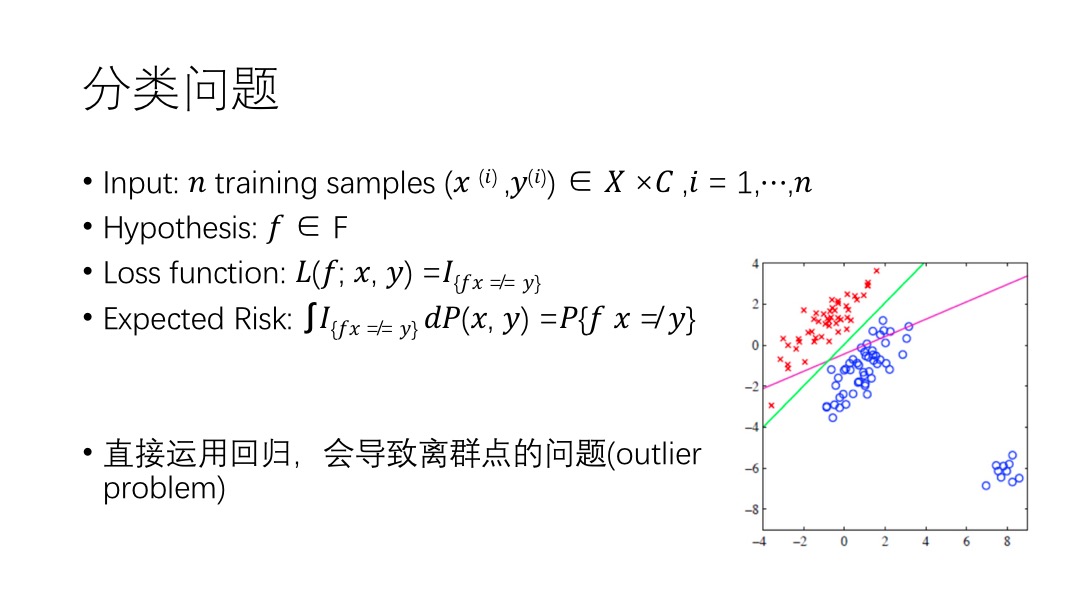
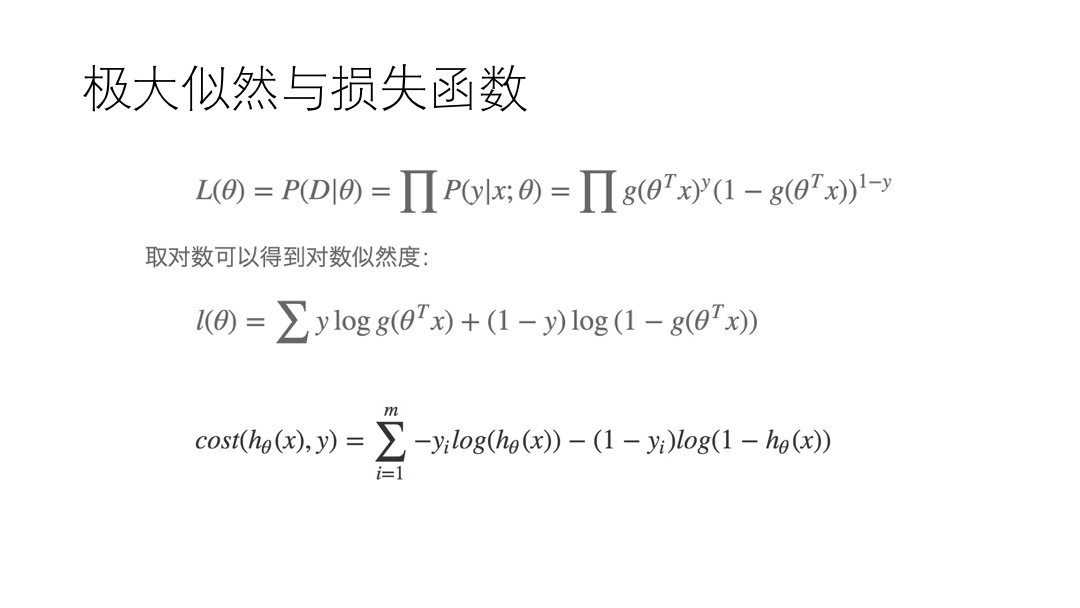
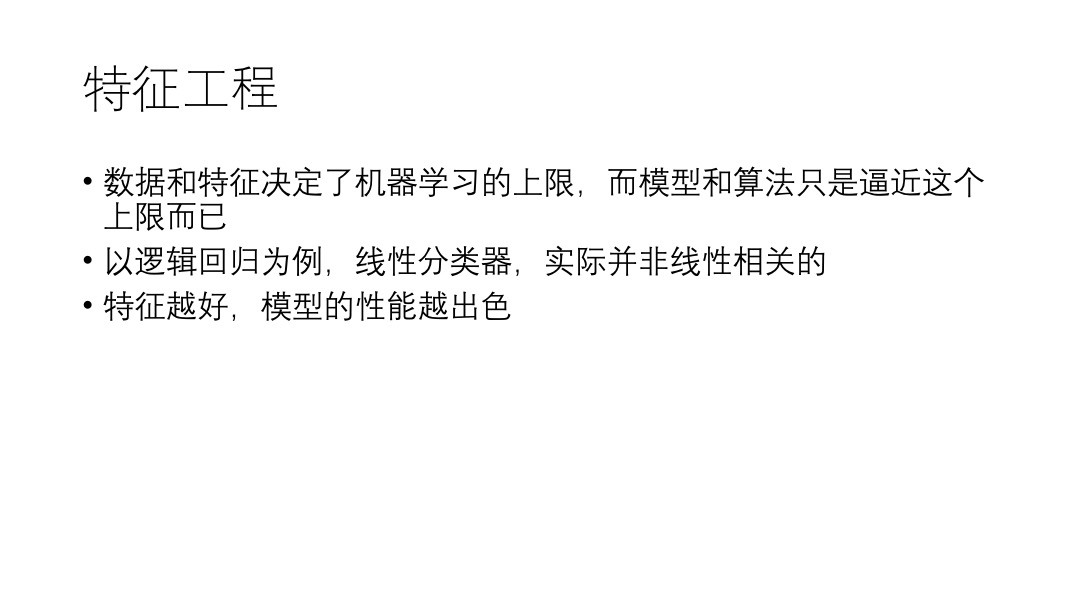
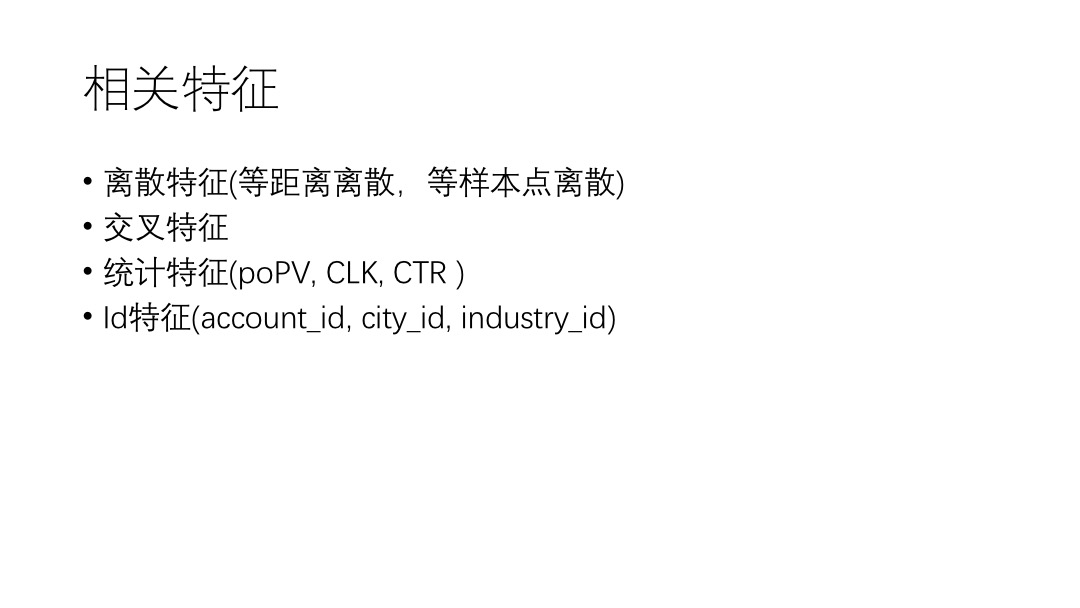
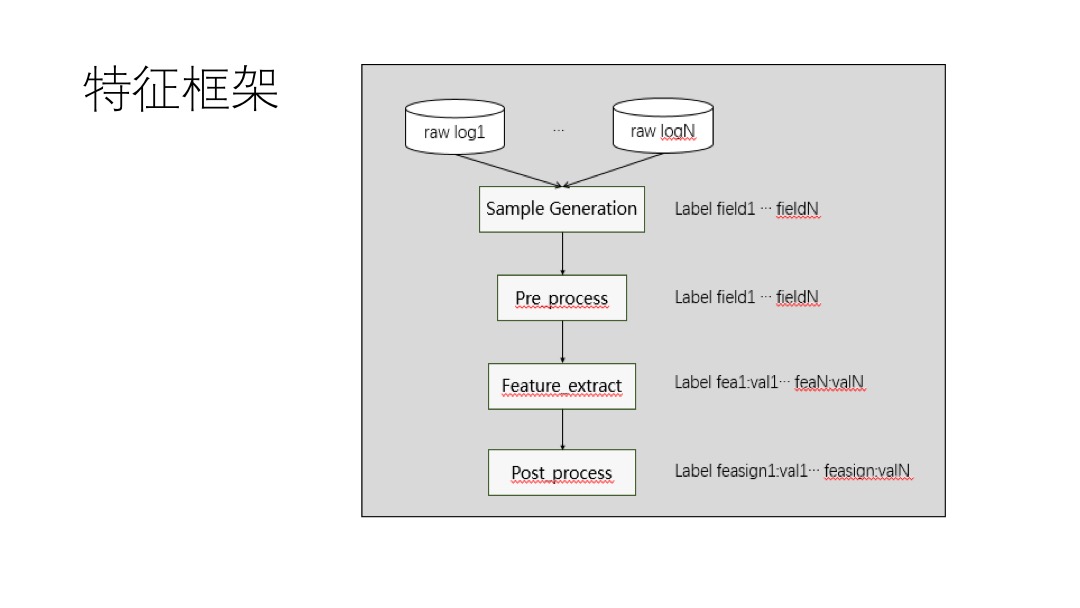
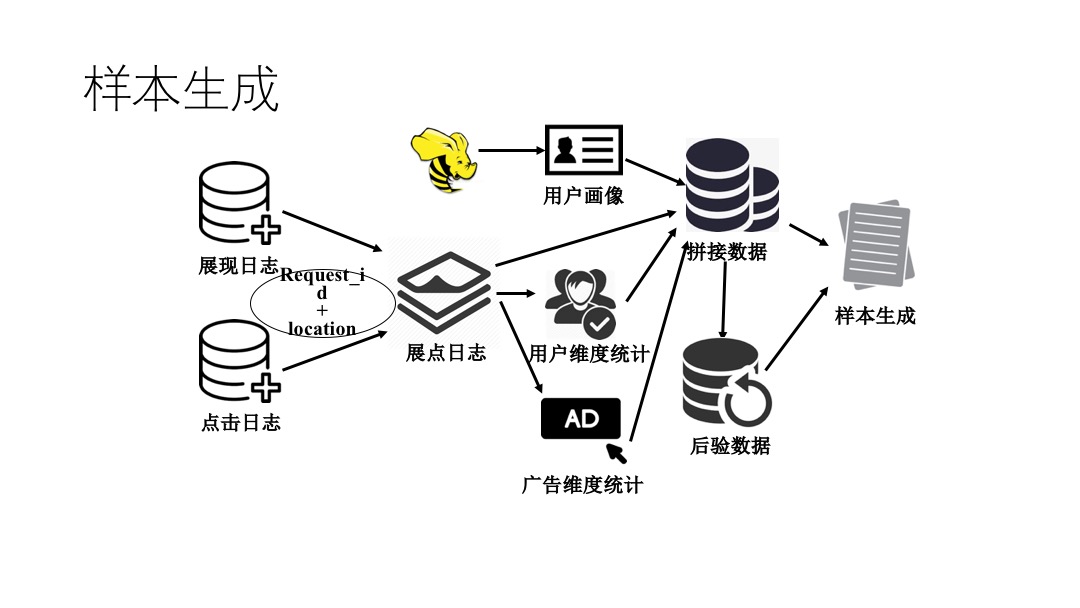
    <content type="html"><![CDATA[<p><img src="/post_image/LRppt/幻灯片01.jpeg" alt="image"></p>
<a id="more"></a>
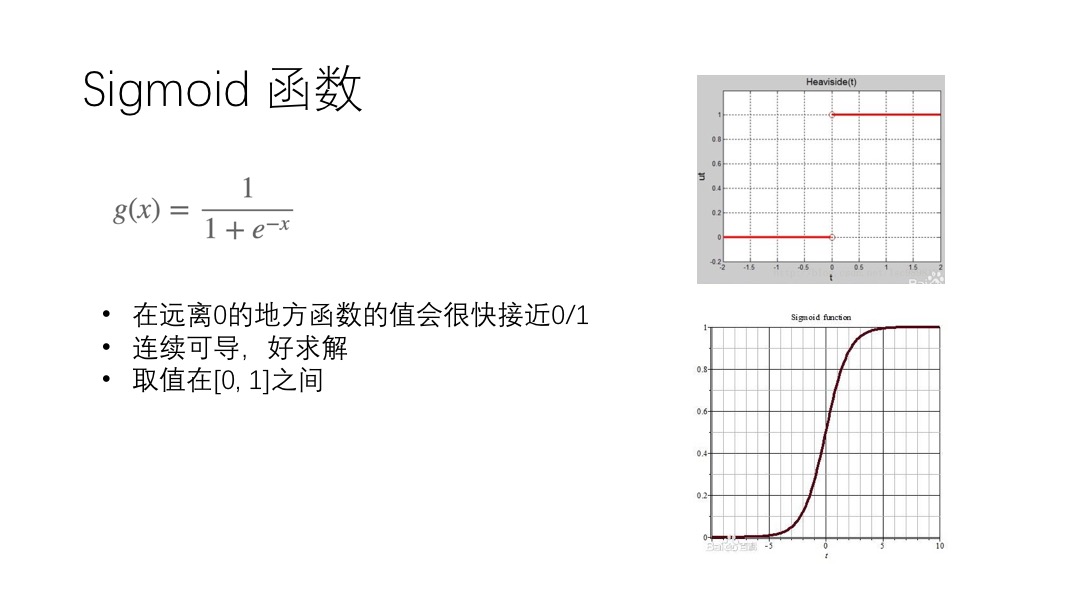
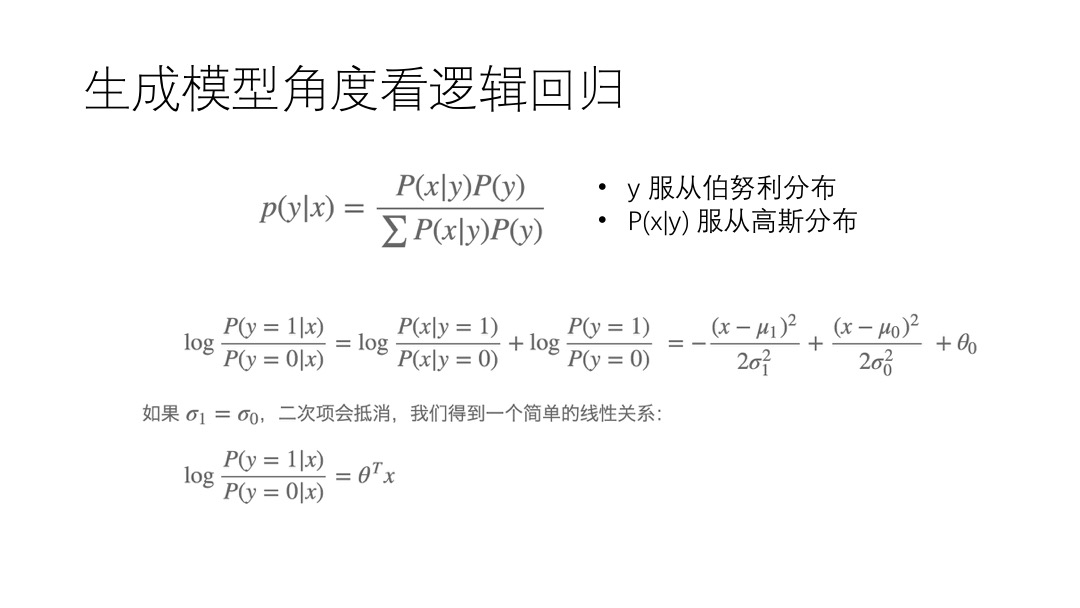
<p><img src="/post_image/LRppt/幻灯片02.jpeg" alt="image"></p>
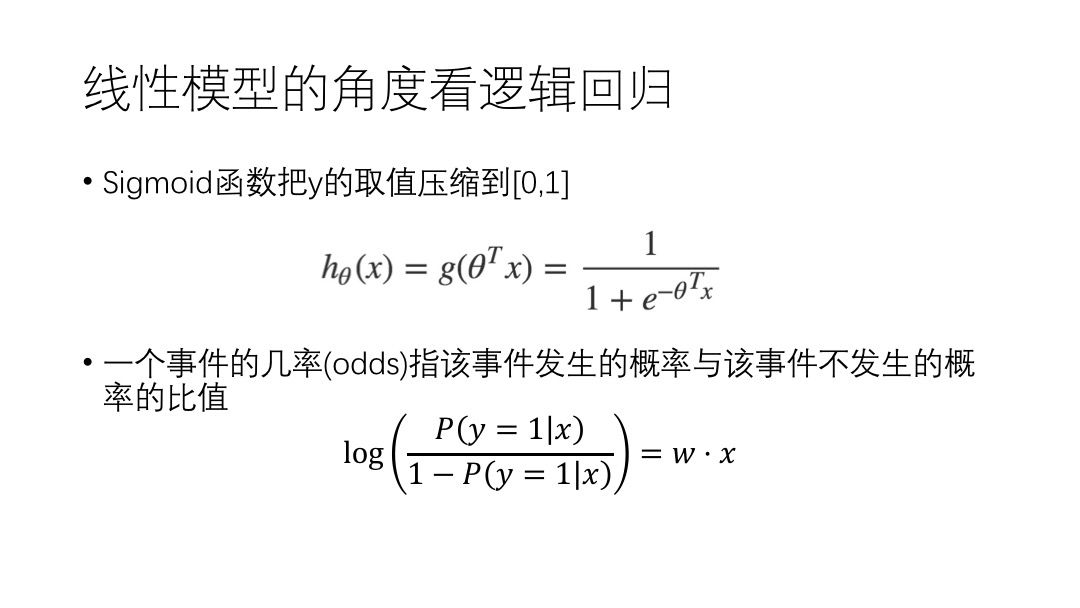
<p><img src="/post_image/LRppt/幻灯片03.jpeg" alt="image"></p>
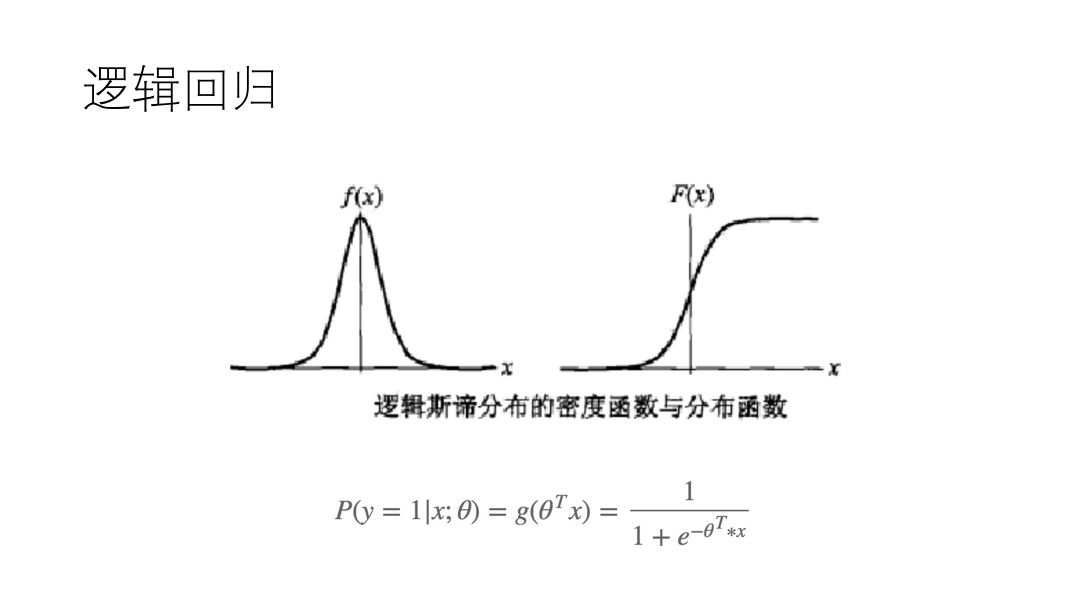
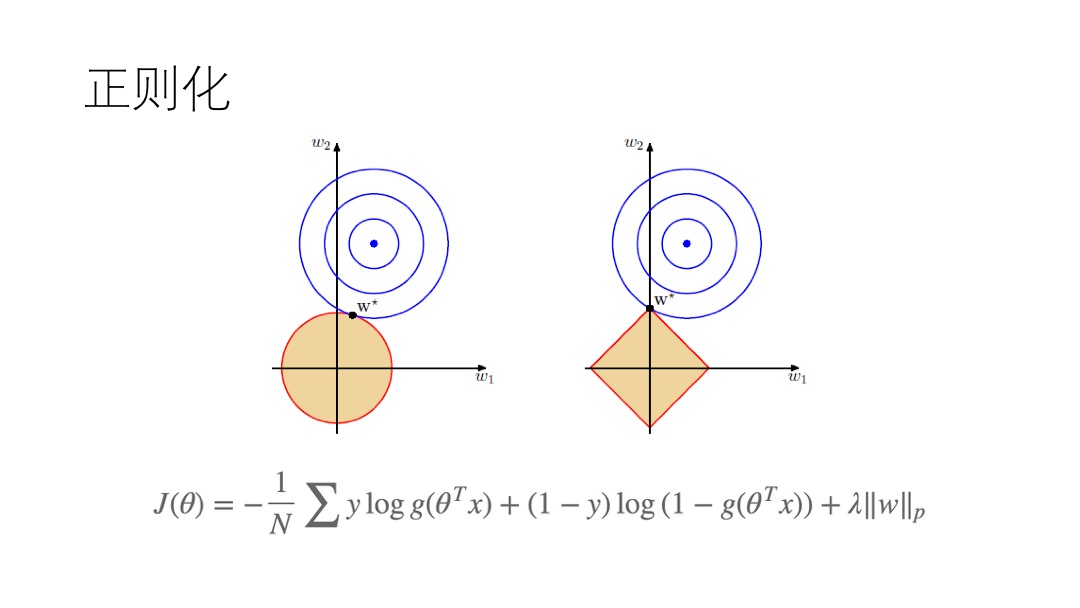
<p><img src="/post_image/LRppt/幻灯片04.jpeg" alt="image"></p>
<p><img src="/post_image/LRppt/幻灯片05.jpeg" alt="image"></p>
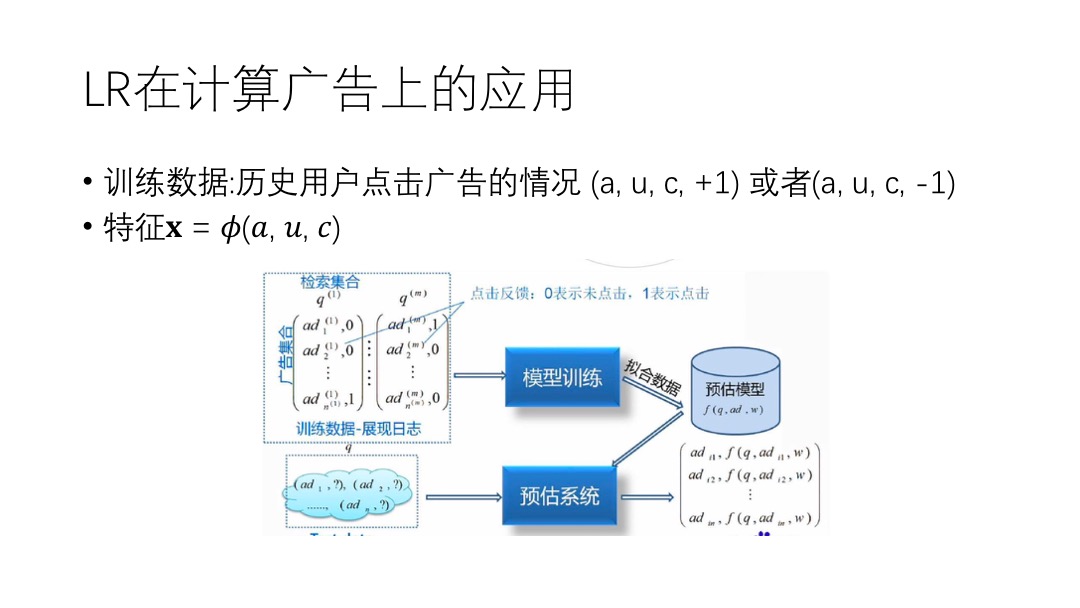
<p><img src="/post_image/LRppt/幻灯片06.jpeg" alt="image"></p>
<p><img src="/post_image/LRppt/幻灯片07.jpeg" alt="image"></p>
<p><img src="/post_image/LRppt/幻灯片08.jpeg" alt="image"></p>
<p><img src="/post_image/LRppt/幻灯片09.jpeg" alt="image"></p>
<p><img src="/post_image/LRppt/幻灯片10.jpeg" alt="image"></p>
<p><img src="/post_image/LRppt/幻灯片11.jpeg" alt="image"></p>
<p><img src="/post_image/LRppt/幻灯片12.jpeg" alt="image"></p>
<p><img src="/post_image/LRppt/幻灯片13.jpeg" alt="image"></p>
<p><img src="/post_image/LRppt/幻灯片14.jpeg" alt="image"></p>
<p><img src="/post_image/FeaPPT/幻灯片1.jpeg" alt="image"></p>
<p><img src="/post_image/FeaPPT/幻灯片2.jpeg" alt="image"></p>
<p><img src="/post_image/FeaPPT/幻灯片3.jpeg" alt="image"></p>
<p><img src="/post_image/FeaPPT/幻灯片4.jpeg" alt="image"></p>
<p><img src="/post_image/FeaPPT/幻灯片5.jpeg" alt="image"></p>
<p><img src="/post_image/FeaPPT/幻灯片6.jpeg" alt="image"></p>
<p><img src="/post_image/FeaPPT/幻灯片7.jpeg" alt="image"></p>
]]></content>
    
    <summary type="html">
    
      &lt;p&gt;&lt;img src=&quot;/post_image/LRppt/幻灯片01.jpeg&quot; alt=&quot;image&quot;&gt;&lt;/p&gt;
    
    </summary>
    
      <category term="Tech" scheme="http://mjackie.github.io/categories/Tech/"/>
    
    
      <category term="算法" scheme="http://mjackie.github.io/tags/%E7%AE%97%E6%B3%95/"/>
    
      <category term="机器学习" scheme="http://mjackie.github.io/tags/%E6%9C%BA%E5%99%A8%E5%AD%A6%E4%B9%A0/"/>
    
      <category term="计算广告" scheme="http://mjackie.github.io/tags/%E8%AE%A1%E7%AE%97%E5%B9%BF%E5%91%8A/"/>
    
      <category term="特征" scheme="http://mjackie.github.io/tags/%E7%89%B9%E5%BE%81/"/>
    
  </entry>
  
  <entry>
    <title>推荐系统笔记</title>
    <link href="http://mjackie.github.io/Tech/cjw7jxocz0037idkfw4e1hezq/"/>
    <id>http://mjackie.github.io/Tech/cjw7jxocz0037idkfw4e1hezq/</id>
    <published>2018-05-27T02:50:00.000Z</published>
    <updated>2018-06-29T06:41:13.071Z</updated>
    
    <content type="html"><![CDATA[<h3 id="基于物品的协同过滤推荐算法"><a href="#基于物品的协同过滤推荐算法" class="headerlink" title="基于物品的协同过滤推荐算法"></a>基于物品的协同过滤推荐算法</h3><ol>
<li>根据行为列表，计算用户、物品评分矩阵</li>
<li>根据用户物品评分矩阵，计算物品物品相似度矩阵</li>
<li>物品物品相似度矩阵 * 用户物品评分矩阵 = 推荐列表</li>
<li>推荐列表中，用户之前有过的行为置0</li>
</ol>
<h3 id="基于用户的协同过滤推荐算法"><a href="#基于用户的协同过滤推荐算法" class="headerlink" title="基于用户的协同过滤推荐算法"></a>基于用户的协同过滤推荐算法</h3><ol>
<li>根据行为列表，计算物品、用户评分矩阵</li>
<li>根据用户物品评分矩阵，计算用户用户相似度矩阵</li>
<li>用户用户相似度矩阵 * 物品用户评分矩阵 = 推荐列表</li>
<li>推荐列表中，用户之前有过的行为置0</li>
</ol>
<a id="more"></a>
<h3 id="基于内容的推荐算法"><a href="#基于内容的推荐算法" class="headerlink" title="基于内容的推荐算法"></a>基于内容的推荐算法</h3><p>用1表示物品具有某个特征，0表示不具有某个特征</p>
<ol>
<li>构建 <code>Item-Profile</code> 矩阵</li>
<li>构建 <code>Item-User</code> 评分矩阵</li>
<li><code>Item-User</code> * <code>Item-Profile</code> = <code>User Profile</code> （用户对不同标签感兴趣的程度）</li>
<li>对 <code>Item-Profile</code> 与 <code>User Profile</code> 求余弦相似度</li>
<li>推荐列表中，用户之前有过的行为置0</li>
</ol>
]]></content>
    
    <summary type="html">
    
      &lt;h3 id=&quot;基于物品的协同过滤推荐算法&quot;&gt;&lt;a href=&quot;#基于物品的协同过滤推荐算法&quot; class=&quot;headerlink&quot; title=&quot;基于物品的协同过滤推荐算法&quot;&gt;&lt;/a&gt;基于物品的协同过滤推荐算法&lt;/h3&gt;&lt;ol&gt;
&lt;li&gt;根据行为列表，计算用户、物品评分矩阵&lt;/li&gt;
&lt;li&gt;根据用户物品评分矩阵，计算物品物品相似度矩阵&lt;/li&gt;
&lt;li&gt;物品物品相似度矩阵 * 用户物品评分矩阵 = 推荐列表&lt;/li&gt;
&lt;li&gt;推荐列表中，用户之前有过的行为置0&lt;/li&gt;
&lt;/ol&gt;
&lt;h3 id=&quot;基于用户的协同过滤推荐算法&quot;&gt;&lt;a href=&quot;#基于用户的协同过滤推荐算法&quot; class=&quot;headerlink&quot; title=&quot;基于用户的协同过滤推荐算法&quot;&gt;&lt;/a&gt;基于用户的协同过滤推荐算法&lt;/h3&gt;&lt;ol&gt;
&lt;li&gt;根据行为列表，计算物品、用户评分矩阵&lt;/li&gt;
&lt;li&gt;根据用户物品评分矩阵，计算用户用户相似度矩阵&lt;/li&gt;
&lt;li&gt;用户用户相似度矩阵 * 物品用户评分矩阵 = 推荐列表&lt;/li&gt;
&lt;li&gt;推荐列表中，用户之前有过的行为置0&lt;/li&gt;
&lt;/ol&gt;
    
    </summary>
    
      <category term="Tech" scheme="http://mjackie.github.io/categories/Tech/"/>
    
    
      <category term="机器学习" scheme="http://mjackie.github.io/tags/%E6%9C%BA%E5%99%A8%E5%AD%A6%E4%B9%A0/"/>
    
      <category term="计算广告" scheme="http://mjackie.github.io/tags/%E8%AE%A1%E7%AE%97%E5%B9%BF%E5%91%8A/"/>
    
      <category term="大数据" scheme="http://mjackie.github.io/tags/%E5%A4%A7%E6%95%B0%E6%8D%AE/"/>
    
  </entry>
  
  <entry>
    <title>特征工程</title>
    <link href="http://mjackie.github.io/Tech/cjw7jxod8003sidkfplnxtz1s/"/>
    <id>http://mjackie.github.io/Tech/cjw7jxod8003sidkfplnxtz1s/</id>
    <published>2018-05-10T02:50:00.000Z</published>
    <updated>2018-06-29T06:41:23.142Z</updated>
    
    <content type="html"><![CDATA[<h3 id="根据特征来源分类"><a href="#根据特征来源分类" class="headerlink" title="根据特征来源分类"></a>根据特征来源分类</h3><ul>
<li>场景: 当时场景，如何时何地，使用何种设备，使用什么浏览器等</li>
<li>广告: 包括广告主特征，广告自身的特征如campaign、创意、类型，是否重定向等</li>
<li>媒体: 包括媒体(网页、app等)的特征、广告位的特征等</li>
<li>用户: 包括用户画像，用户浏览历史等</li>
</ul>
<h3 id="根据特征取值分类"><a href="#根据特征取值分类" class="headerlink" title="根据特征取值分类"></a>根据特征取值分类</h3><h4 id="连续（continuous）特征"><a href="#连续（continuous）特征" class="headerlink" title="连续（continuous）特征"></a>连续（continuous）特征</h4><p>连续特征 除了归一化（去中心，方差归一），不用做太多特殊处理，可以直接把连续特征扔到模型里使用。</p>
<a id="more"></a>
<h4 id="无序类别（categorical）特征"><a href="#无序类别（categorical）特征" class="headerlink" title="无序类别（categorical）特征"></a>无序类别（categorical）特征</h4><p>无序特征 可以使用One-hot（也叫One-of-k）的方法把每个无序特征转化为一个数值向量。比如一个无序特征color有三种取值：<code>red</code>，<code>green</code>，<code>blue</code>。那么可以用一个长度为3的向量来表示它，向量中的各个值分别对应于<code>red</code>，<code>green</code>，<code>blue</code>。如：</p>
<pre><code>color取值        向量表示
red            (1, 0, 0)
green        (0, 1, 0)
blue        (0, 0, 1)
</code></pre><h4 id="有序类别（ordinal）特征"><a href="#有序类别（ordinal）特征" class="headerlink" title="有序类别（ordinal）特征"></a>有序类别（ordinal）特征</h4><p>有序特征 有些特征虽然也像无序特征那样只取限定的几个值，但是这些值之间有顺序的含义。例如一个人的状态status有三种取值：<code>bad</code>, <code>normal</code>, <code>good</code>，显然<code>bad</code> &lt; <code>normal</code> &lt; <code>good</code></p>
<pre><code>status取值    向量表示
bad            (1, 0, 0)
normal        (1, 1, 0)
good        (1, 1, 1)
</code></pre><h3 id="特征工程"><a href="#特征工程" class="headerlink" title="特征工程"></a>特征工程</h3><h4 id="原因"><a href="#原因" class="headerlink" title="原因"></a>原因</h4><p>以线性分类器Linear Regression (LinearReg)为例，它是通过特征的线性加权来预测因变量。但大部分实际情况下，实际环境下都不会是这么简单的线性关系，甚至连单调关系都不会有。那么直接把特征扔进LinearReg模型是怎么也得不到好结果的。很多人会想着既然线性分类器搞不定，那就直接找个非线性的好了，比如高斯核的SVM。我们确实可以通过这种简单换算法的方式解决这个简单的问题。但非线性模型的时间复杂度较高，对于大规模实时应用，预测时间是不可忍受的。</p>
<h4 id="离散化"><a href="#离散化" class="headerlink" title="离散化"></a>离散化</h4><ul>
<li>等距离</li>
<li>等样本</li>
<li>画图观察</li>
<li>树模型离散</li>
</ul>
<h4 id="交叉（笛卡尔积）"><a href="#交叉（笛卡尔积）" class="headerlink" title="交叉（笛卡尔积）"></a>交叉（笛卡尔积）</h4><h4 id="后验特征"><a href="#后验特征" class="headerlink" title="后验特征"></a>后验特征</h4><h3 id="单特征选择方法"><a href="#单特征选择方法" class="headerlink" title="单特征选择方法"></a>单特征选择方法</h3><ul>
<li>简单统计方法，统计特征取值的覆盖面和平衡度,对dominant取值现象很显著的特征，要选择性地舍弃该特征或者是归并某些取值集到一个新的值，从而达到平衡的目的。</li>
<li>特征选择指标，特征选择主要有两个目的，一是去除冗余的特征，也就是特征之间可能是互相冗余的；二是去无用，有些特征对CTR预估这个任务贡献度很小或没有，对于这类特征选择，要小小地做，宁不足而不过分，因为单特征对任务贡献度小，很有可能后面再组合特征生成时与其他特征组合生成很有效的组合特征，所以做得不能太过。<ul>
<li>去冗余。主要是特征间的相关性，如Pearson相关性，或者指数回归(从泰勒定理的角度它可以模拟高阶的多项式特征)。</li>
<li>去无用。主要是信息增益比。</li>
</ul>
</li>
</ul>
<h3 id="Reference"><a href="#Reference" class="headerlink" title="Reference"></a>Reference</h3><p><a href="http://breezedeus.github.io/2014/11/15/breezedeus-feature-processing.html" target="_blank" rel="noopener">http://breezedeus.github.io/2014/11/15/breezedeus-feature-processing.html</a></p>
]]></content>
    
    <summary type="html">
    
      &lt;h3 id=&quot;根据特征来源分类&quot;&gt;&lt;a href=&quot;#根据特征来源分类&quot; class=&quot;headerlink&quot; title=&quot;根据特征来源分类&quot;&gt;&lt;/a&gt;根据特征来源分类&lt;/h3&gt;&lt;ul&gt;
&lt;li&gt;场景: 当时场景，如何时何地，使用何种设备，使用什么浏览器等&lt;/li&gt;
&lt;li&gt;广告: 包括广告主特征，广告自身的特征如campaign、创意、类型，是否重定向等&lt;/li&gt;
&lt;li&gt;媒体: 包括媒体(网页、app等)的特征、广告位的特征等&lt;/li&gt;
&lt;li&gt;用户: 包括用户画像，用户浏览历史等&lt;/li&gt;
&lt;/ul&gt;
&lt;h3 id=&quot;根据特征取值分类&quot;&gt;&lt;a href=&quot;#根据特征取值分类&quot; class=&quot;headerlink&quot; title=&quot;根据特征取值分类&quot;&gt;&lt;/a&gt;根据特征取值分类&lt;/h3&gt;&lt;h4 id=&quot;连续（continuous）特征&quot;&gt;&lt;a href=&quot;#连续（continuous）特征&quot; class=&quot;headerlink&quot; title=&quot;连续（continuous）特征&quot;&gt;&lt;/a&gt;连续（continuous）特征&lt;/h4&gt;&lt;p&gt;连续特征 除了归一化（去中心，方差归一），不用做太多特殊处理，可以直接把连续特征扔到模型里使用。&lt;/p&gt;
    
    </summary>
    
      <category term="Tech" scheme="http://mjackie.github.io/categories/Tech/"/>
    
    
      <category term="机器学习" scheme="http://mjackie.github.io/tags/%E6%9C%BA%E5%99%A8%E5%AD%A6%E4%B9%A0/"/>
    
      <category term="计算广告" scheme="http://mjackie.github.io/tags/%E8%AE%A1%E7%AE%97%E5%B9%BF%E5%91%8A/"/>
    
      <category term="大数据" scheme="http://mjackie.github.io/tags/%E5%A4%A7%E6%95%B0%E6%8D%AE/"/>
    
  </entry>
  
  <entry>
    <title>计算广告</title>
    <link href="http://mjackie.github.io/Tech/cjw7jxod1003cidkfl7s34036/"/>
    <id>http://mjackie.github.io/Tech/cjw7jxod1003cidkfl7s34036/</id>
    <published>2018-04-14T02:50:00.000Z</published>
    <updated>2018-06-29T06:58:23.805Z</updated>
    
    <content type="html"><![CDATA[<h3 id="LR"><a href="#LR" class="headerlink" title="LR"></a>LR</h3><ol>
<li>变量范围是[-∞ ,+∞]；同时和其他“广义线性回归”相比，值域是[0,1]，因此形式上类似一个概率函数，适合分类问题；</li>
<li>可扩展性好，适合海量的特征；训练工具多样、可选</li>
<li>online learning，能够进行增量学习；</li>
<li>线性模型，解释性强。当出现很大的波动（如发现某一天的预测结果非常差）时，这样的模型方便查找原因，越简单，解释性越好，就越方便debug</li>
</ol>
<p>这些优点都让logisticregression在做ctr预估的时候特别有优势，尤其是可扩展性，可以简单地增加特征，不需要太多的工作。</p>
<a id="more"></a>
<h3 id="FM"><a href="#FM" class="headerlink" title="FM"></a>FM</h3><h3 id="GBDT"><a href="#GBDT" class="headerlink" title="GBDT"></a>GBDT</h3><h3 id="MLR"><a href="#MLR" class="headerlink" title="MLR"></a>MLR</h3><h3 id="DNN"><a href="#DNN" class="headerlink" title="DNN"></a>DNN</h3><h3 id="商业模式"><a href="#商业模式" class="headerlink" title="商业模式"></a>商业模式</h3><p>1.CPM，按展现付费，品牌广告<br>2.CPC，按点击付费，效果广告<br>3.CPA，按转化付费，效果广告<br>4.CPS，按销售分成，效果广告</p>
<h3 id="算分排序"><a href="#算分排序" class="headerlink" title="算分排序"></a>算分排序</h3><p>算分排序这个东西能综合考虑老板和用户的需求，具体操作方式是，一个用户来了，对于想向这个用户投的广告，都打一个分，根据这个分进行倒排序，排在最前面的广告就是对这两方最合适的广告。</p>
<pre><code>Score=bid*ctr
- bid表示广告的出价
- ctr的含义比较丰富
  既表示了用户对广告的喜欢程度
  也表示了广告的质量
  还表示了这个广告的期望的点击率
  还希望这个ctr跟广告真实的点击率也是一致的
</code></pre><p>算分排序<strong>平衡了老板与用户</strong>的需求，也就平衡了收益和用户体验。</p>
<h3 id="扣费方法"><a href="#扣费方法" class="headerlink" title="扣费方法"></a>扣费方法</h3><ul>
<li>广义一阶价格（GFP）: 广告主开多少价，在广告投放后就收多少钱。</li>
<li>广义二阶价格（GSP）: 一个广告支付的钱是排在下一个位置的广告的出价</li>
</ul>
<h3 id="相关概念"><a href="#相关概念" class="headerlink" title="相关概念"></a>相关概念</h3><ul>
<li>广告组</li>
<li>广告计划：管理关键词/创意的单位。</li>
<li>广告创意：广告展现的最终形式，包括创意素材、创意标题、附加创意、应用来源等。</li>
</ul>
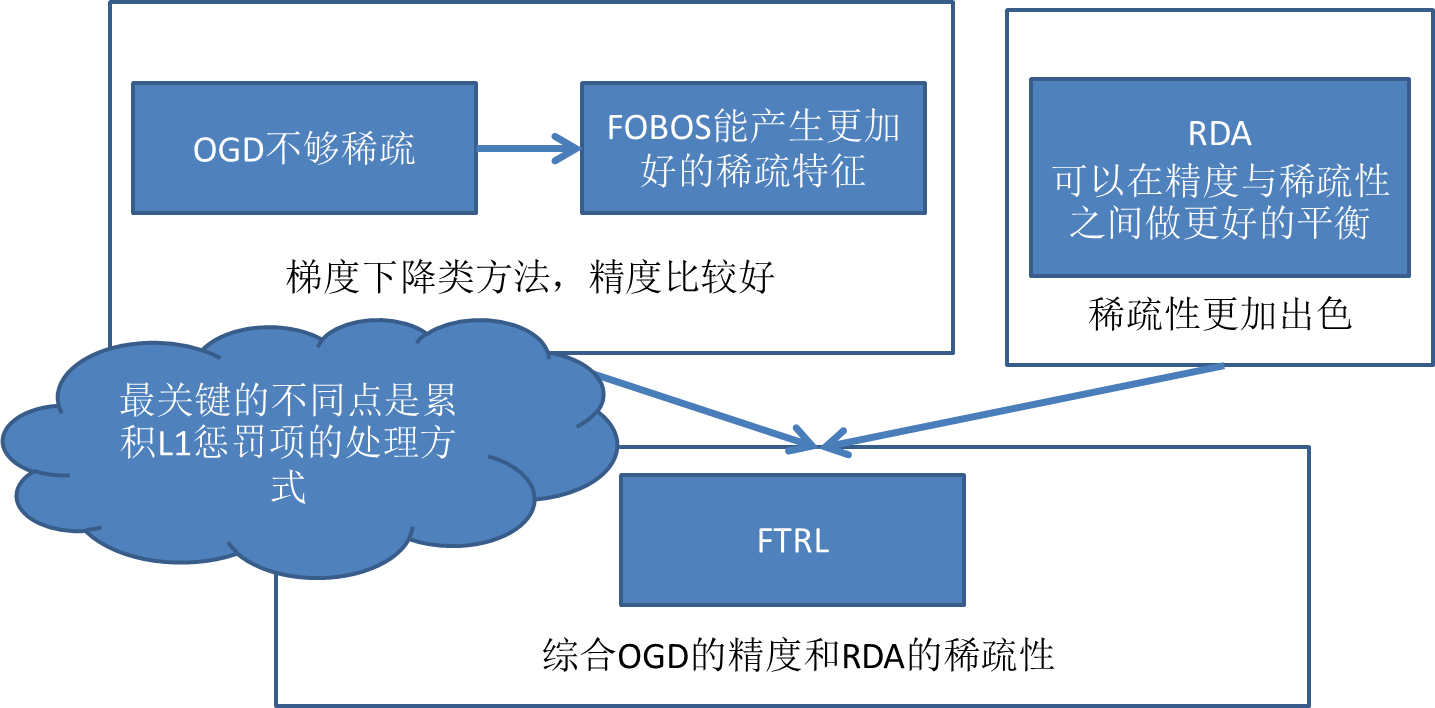
<h3 id="FTRL-算法"><a href="#FTRL-算法" class="headerlink" title="FTRL 算法"></a>FTRL 算法</h3><p>FTRL 是综合了OGD的精度和RDA的稀疏性，适合在线增量学习，在处理诸如逻辑回归之类的带非光滑正则化项（例如1范数，做模型复杂度控制和稀疏化）的凸优化问题上性能非常出色。<br><img src="/post_image/ftrl.png" alt="img"></p>
<h3 id="AUC"><a href="#AUC" class="headerlink" title="AUC"></a>AUC</h3><ul>
<li>横轴：False Positive Rate（假阳率）FPR=FP/(TN+FP)</li>
<li><p>纵轴：True Positive Rate（真阳率）TPR=TP/(TP+FN)</p>
</li>
<li><p>为什么用AUC</p>
<blockquote>
<p>因为ROC曲线有个很好的特性：当测试集中的正负样本的分布变化的时候，ROC曲线能够保持不变。在实际的数据集中经常会出现类不平衡（class imbalance）现象，即负样本比正样本多很多（或者相反），而且测试数据中的正负样本的分布也可能随着时间变化。AUC对样本的比例变化有一定的容忍性。AUC的值通常在0.6-0.85之间。</p>
</blockquote>
</li>
</ul>
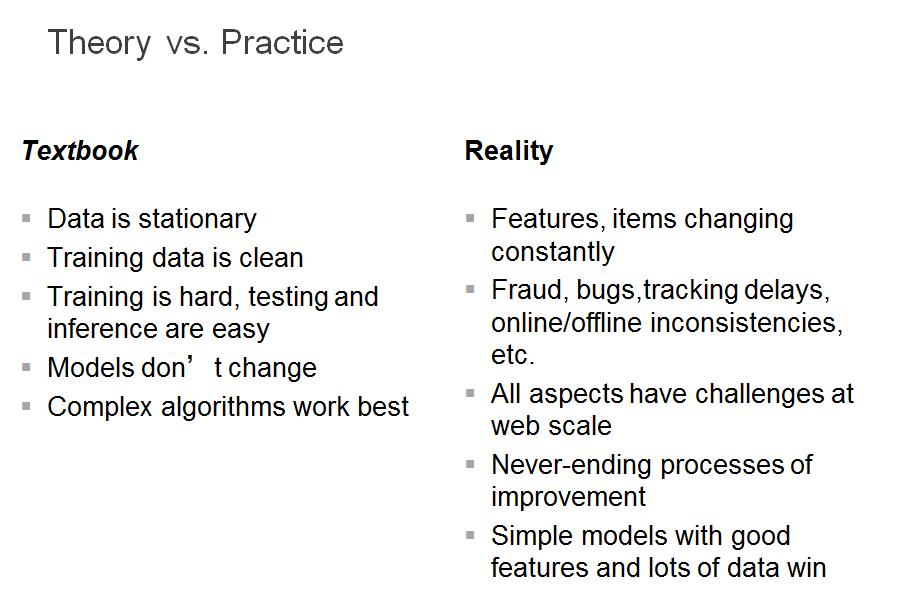
<h3 id="学术与工程的区别"><a href="#学术与工程的区别" class="headerlink" title="学术与工程的区别"></a>学术与工程的区别</h3><p><img src="/post_image/Theory&amp;Practice.jpg" alt="img"></p>
]]></content>
    
    <summary type="html">
    
      &lt;h3 id=&quot;LR&quot;&gt;&lt;a href=&quot;#LR&quot; class=&quot;headerlink&quot; title=&quot;LR&quot;&gt;&lt;/a&gt;LR&lt;/h3&gt;&lt;ol&gt;
&lt;li&gt;变量范围是[-∞ ,+∞]；同时和其他“广义线性回归”相比，值域是[0,1]，因此形式上类似一个概率函数，适合分类问题；&lt;/li&gt;
&lt;li&gt;可扩展性好，适合海量的特征；训练工具多样、可选&lt;/li&gt;
&lt;li&gt;online learning，能够进行增量学习；&lt;/li&gt;
&lt;li&gt;线性模型，解释性强。当出现很大的波动（如发现某一天的预测结果非常差）时，这样的模型方便查找原因，越简单，解释性越好，就越方便debug&lt;/li&gt;
&lt;/ol&gt;
&lt;p&gt;这些优点都让logisticregression在做ctr预估的时候特别有优势，尤其是可扩展性，可以简单地增加特征，不需要太多的工作。&lt;/p&gt;
    
    </summary>
    
      <category term="Tech" scheme="http://mjackie.github.io/categories/Tech/"/>
    
    
      <category term="机器学习" scheme="http://mjackie.github.io/tags/%E6%9C%BA%E5%99%A8%E5%AD%A6%E4%B9%A0/"/>
    
      <category term="计算广告" scheme="http://mjackie.github.io/tags/%E8%AE%A1%E7%AE%97%E5%B9%BF%E5%91%8A/"/>
    
      <category term="大数据" scheme="http://mjackie.github.io/tags/%E5%A4%A7%E6%95%B0%E6%8D%AE/"/>
    
  </entry>
  
  <entry>
    <title>Spark 笔记</title>
    <link href="http://mjackie.github.io/Tech/cjw7jxoco002bidkfbcy6pxny/"/>
    <id>http://mjackie.github.io/Tech/cjw7jxoco002bidkfbcy6pxny/</id>
    <published>2018-03-29T02:50:00.000Z</published>
    <updated>2018-06-29T07:15:01.825Z</updated>
    
    <content type="html"><![CDATA[<h3 id="Spark-特点"><a href="#Spark-特点" class="headerlink" title="Spark 特点"></a>Spark 特点</h3><ul>
<li>Spark是快速的. Spark是基于内存的计算，扩充了MapReduce.</li>
<li>Spark是通用的.容纳了其他分布式系统的功能.批处理，迭代计算，交互查询和流处理.降低了维护成本.</li>
<li>Spark是高度开放的.提供了JAVA,Python,Scala,SQL的API和丰富的内置库.和其他大数据工具整合很好,hadoop,kafca.</li>
</ul>
<h3 id="Spark-组件"><a href="#Spark-组件" class="headerlink" title="Spark 组件"></a>Spark 组件</h3><ul>
<li>Spark Core</li>
<li>Spark SQL</li>
<li>Spark Streaming</li>
<li>Spark Mlib</li>
<li>Spark Graphx</li>
<li>Cluster Manager</li>
</ul>
<blockquote>
<p>Spark 组件紧密集成的优点</p>
<ul>
<li>Spark底层优化了，基于Spark底层的组件，也得到相应的优化</li>
<li>节省了各组件部署，测试时间</li>
<li>向Spark增加新组件时，其他组件可立即共享新组件功能</li>
</ul>
</blockquote>
<a id="more"></a>
<h3 id="Spark-与-Hadoop-比较"><a href="#Spark-与-Hadoop-比较" class="headerlink" title="Spark 与 Hadoop 比较"></a>Spark 与 Hadoop 比较</h3><ul>
<li>Hadoop主要应用于离线处理，对实时性要求不高的场景</li>
<li>Spark主要应用于对实时性要求较高的场景，机器学习等领域</li>
</ul>
<h3 id="Spark-Shell"><a href="#Spark-Shell" class="headerlink" title="Spark Shell"></a>Spark Shell</h3><ul>
<li>处理分布在集群上的数据</li>
<li>加载到节点内存中，运行速度是秒级的</li>
<li>快速迭代计算，实时查询，分析一般可以在Shell中完成</li>
<li>提供了 Python Shell(bin/pyspark) 和 Scala Shell(bin/spark-shell)</li>
<li>Scala Shell 修改日志级别 <code>log4j.rootCategory = WARN, console</code></li>
</ul>
<h3 id="Spark-开发环境搭建"><a href="#Spark-开发环境搭建" class="headerlink" title="Spark 开发环境搭建"></a>Spark 开发环境搭建</h3><ul>
<li>下载 Spark</li>
<li>下载 Intellj IDEA(注册码地址: <code>http://idea.lanyus.com</code>)</li>
<li><p>插件安装：Plugins,搜索Scala直接安装，插件中有scala和sbt</p>
<p>  //配置免密登录<br>  touch authorized_keys<br>  cat id_rsa.pub &gt; authorized_keys<br>  chmod 600 authorized_keys</p>
</li>
</ul>
<blockquote>
<p>Spark与Scala版本匹配</p>
<ul>
<li>Spark1.6.2 - Scala2.10</li>
<li>Spark2.0.0 - Scala2.11</li>
</ul>
</blockquote>
<h3 id="项目创建"><a href="#项目创建" class="headerlink" title="项目创建"></a>项目创建</h3><pre><code>//java home 目录, jdk与scala版本
 /Library/Java/JavaVirtualMachines/jdk1.8.0_171.jdk/Contents/Home/bin

//配置sbt
libraryDependencies += &quot;org.apache.spark&quot; % &quot;spark-core_2.11&quot; % &quot;2.0.2&quot;

//写代码

//配置jar包
进入 File &gt; Project Structure &gt; Artifacts &gt; + &gt; JARs &gt; From Module... &gt; 第二个选项

//build
</code></pre><h3 id="Spark-相关命令"><a href="#Spark-相关命令" class="headerlink" title="Spark 相关命令"></a>Spark 相关命令</h3><pre><code>启动 master
./sbin/start_master.sh
:quit

启动 worker
./bin/spark-class

hdfs dfs -rm -R /user/algo/liujiaqi/wordcount-output-spark/

提交作业
//单机
spark-submit --master yarn-client --class WordCount myspark.jar

//集群
spark-submit --master yarn-cluster --conf spark.storage.memoryFraction=0.7 --conf spark.shuffle.memoryFraction=0.3 --conf spark.broadcast.blockSize=4096 --conf spark.broadcast.factory=org.apache.spark.broadcast.TorrentBroadcastFactory --conf spark.broadcast.compress=true --conf spark.serializer=org.apache.spark.serializer.JavaSerializer --conf spark.akka.threads=8 --conf spark.default.parallelism=63 --conf spark.port.maxRetries=100 --class WordCount  myspark.jar

//查看结果
hdfs dfs -cat /user/algo/liujiaqi/wordcount-output-spark/part-00000

//查看日志
yarn logs -applicationId xxxx
</code></pre><h3 id="RDDs-弹性分布式数据集"><a href="#RDDs-弹性分布式数据集" class="headerlink" title="RDDs 弹性分布式数据集"></a>RDDs 弹性分布式数据集</h3><ul>
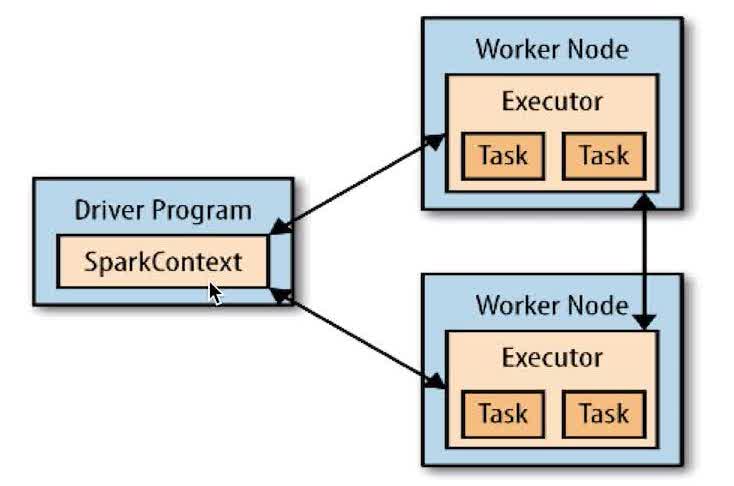
<li><p>Driver programs: 包含程序main方法，RDDs的定义和操作。管理很多节点，称为executors。<br>image</p>
</li>
<li><p>SparkContex: Driver programs通过SparkContex对象访问Spark，SparkContex代表和一个集群的连接,在Shell中SparkContex自动创建好了，就是sc</p>
</li>
</ul>
<h4 id="RDDs"><a href="#RDDs" class="headerlink" title="RDDs"></a>RDDs</h4><p><img src="/post_image/RDDs.jpg" alt="image"></p>
<ul>
<li>并行的分布在整个集群中，是Spark分发数据和计算的基础数据类</li>
<li>一个RDD是一个不可改变的分布式集合对象</li>
<li>Spark 中所有的计算都是通过RDDs的创建，转换，操作完成的</li>
<li>一个RDD内部由许多Partitions组成</li>
</ul>
<h4 id="RDDs-创建方法"><a href="#RDDs-创建方法" class="headerlink" title="RDDs 创建方法"></a>RDDs 创建方法</h4><ol>
<li><p>把一个存在的集合传给SparkContex的parallelize()方法</p>
<pre><code>val rdd = sc.parallelize(Array(1,2,3,4),4)
//第一个参数待处理的集合，第二个参数为分区个数
</code></pre></li>
<li><p>加载外部数据集</p>
<pre><code>val addText = sc.textFile(&quot;helloSpark.txt&quot;);
</code></pre></li>
</ol>
<h4 id="Scala-基础知识"><a href="#Scala-基础知识" class="headerlink" title="Scala 基础知识"></a>Scala 基础知识</h4><ul>
<li>变量声明: 必须用 val(不可修改) 或 var（可改）</li>
<li><p>匿名函数与类型推断</p>
<pre><code>lines.filter(line.contains(&quot;world&quot;));
//定义一个匿名函数，接受一个参数line
</code></pre></li>
</ul>
<h4 id="基本操作Transformation"><a href="#基本操作Transformation" class="headerlink" title="基本操作Transformation"></a>基本操作Transformation</h4><ul>
<li><code>map()</code>: 把函数应用到RDD的每一个元素，返回新RDD</li>
<li><code>filter()</code>: 返回只包含满足filter()函数的元素的新RDD</li>
<li><code>flatMap()</code>: 对每个输入元素，输出多个输出元素，flat是压扁的意思，将RDD元素压扁后返回新RDD</li>
<li>支持数据集合运算，例如并集交集计算</li>
</ul>
<h4 id="基本操作Action"><a href="#基本操作Action" class="headerlink" title="基本操作Action"></a>基本操作Action</h4><ul>
<li><code>reduce()</code>: 接收一个函数，作用在RDD两个类型相同的元素上，返回新元素，实现累加计数等</li>
<li><code>collect()</code>: 遍历整个RDD，向Driver programs返回RDD内容，需要单机内存能够容纳下，大数据时用<code>saveAsTextFile</code></li>
<li><code>take(n)</code>: 返回RDD的n个元素（同时尝试访问最少partition），返回结果无需，测试使用</li>
<li><code>top(n)</code>: 排序（根据RDD中数据比较器），前n个</li>
<li><code>foreach()</code>: 遍历每个元素，但不返回本地，可以配合println(),友好的打印出数据</li>
<li><code>reduceByKey</code></li>
<li><code>groupByKey</code></li>
<li><code>combineByKey()</code>: 最常用的key的聚合函数，返回类型可以与输入类型不一样</li>
</ul>
<h4 id="RDDs特性"><a href="#RDDs特性" class="headerlink" title="RDDs特性"></a>RDDs特性</h4><ul>
<li>血统关系图: Spark维护着RDDs间的依赖关系和创建关系，叫做血统关系图，使用血统关系图计算RDD需求，恢复丢失的数据</li>
<li>延迟计算: Spark对RDDs的计算是在第一次使用action操作的时候，可以减少数据的传输</li>
<li>持久化: 默认每次在RDDs上进行action操作时，Spark都重新计算RDDs.若想重复利用一个RDD,可以使用<code>RDD.persist()</code>, <code>unpersist()</code>从缓存中移除</li>
</ul>
<h3 id="DataFrame-amp-DataSet"><a href="#DataFrame-amp-DataSet" class="headerlink" title="DataFrame &amp; DataSet"></a>DataFrame &amp; DataSet</h3><blockquote>
<p>RDD</p>
<ol>
<li>RDD一般和spark mlib同时使用</li>
<li>RDD不支持sparksql操作</li>
</ol>
<p>DataFrame</p>
<ol>
<li>与RDD和Dataset不同，DataFrame每一行的类型固定为Row，只有通过解析才能获取各个字段的值<pre><code>testDF.foreach{
  line =&gt;
    val col1=line.getAs[String](&quot;col1&quot;)
    val col2=line.getAs[String](&quot;col2&quot;)
}
</code></pre></li>
<li>DataFrame与Dataset一般与spark ml同时使用</li>
<li>DataFrame与Dataset均支持sparksql的操作，比如select，groupby之类，还能注册临时表/视窗，进行sql语句操作，如<pre><code>dataDF.createOrReplaceTempView(&quot;tmp&quot;)
spark.sql(&quot;select  ROW,DATE from tmp where DATE is not null order by DATE&quot;).show(100,false)
</code></pre></li>
<li>DataFrame与Dataset支持一些特别方便的保存方式，比如保存成csv，可以带上表头，这样每一列的字段名一目了然</li>
</ol>
<p>DataSet</p>
</blockquote>
<ul>
<li>这里主要对比Dataset和DataFrame，因为Dataset和DataFrame拥有完全相同的成员函数，区别只是每一行的数据类型不同.</li>
<li>DataFrame也可以叫Dataset[Row],每一行的类型是Row，不解析，每一行究竟有哪些字段，各个字段又是什么类型都无从得知</li>
<li>而Dataset中，每一行是什么类型是不一定的，在自定义了case class之后可以很自由的获得每一行的信息</li>
</ul>
<h4 id="代码"><a href="#代码" class="headerlink" title="代码"></a>代码</h4><pre><code>var lines = sc.textFile(&quot;liu&quot;)
lines.foreach(println)
lines.count()
var lines2 = lines.foreach(println)
var lines3 = lines.map(word=&gt;(word,1))
var lines4 = lines.fileter(word=&gt;word.contains(&quot;hello&quot;))
print(lines.first())
var lines2 = lines.map(line=&gt;(line.split(&quot;\t&quot;)(34),line))
</code></pre><h3 id="方法"><a href="#方法" class="headerlink" title="方法"></a>方法</h3><pre><code>newAPIHadoopRDD(path,format,key,value)
</code></pre>]]></content>
    
    <summary type="html">
    
      &lt;h3 id=&quot;Spark-特点&quot;&gt;&lt;a href=&quot;#Spark-特点&quot; class=&quot;headerlink&quot; title=&quot;Spark 特点&quot;&gt;&lt;/a&gt;Spark 特点&lt;/h3&gt;&lt;ul&gt;
&lt;li&gt;Spark是快速的. Spark是基于内存的计算，扩充了MapReduce.&lt;/li&gt;
&lt;li&gt;Spark是通用的.容纳了其他分布式系统的功能.批处理，迭代计算，交互查询和流处理.降低了维护成本.&lt;/li&gt;
&lt;li&gt;Spark是高度开放的.提供了JAVA,Python,Scala,SQL的API和丰富的内置库.和其他大数据工具整合很好,hadoop,kafca.&lt;/li&gt;
&lt;/ul&gt;
&lt;h3 id=&quot;Spark-组件&quot;&gt;&lt;a href=&quot;#Spark-组件&quot; class=&quot;headerlink&quot; title=&quot;Spark 组件&quot;&gt;&lt;/a&gt;Spark 组件&lt;/h3&gt;&lt;ul&gt;
&lt;li&gt;Spark Core&lt;/li&gt;
&lt;li&gt;Spark SQL&lt;/li&gt;
&lt;li&gt;Spark Streaming&lt;/li&gt;
&lt;li&gt;Spark Mlib&lt;/li&gt;
&lt;li&gt;Spark Graphx&lt;/li&gt;
&lt;li&gt;Cluster Manager&lt;/li&gt;
&lt;/ul&gt;
&lt;blockquote&gt;
&lt;p&gt;Spark 组件紧密集成的优点&lt;/p&gt;
&lt;ul&gt;
&lt;li&gt;Spark底层优化了，基于Spark底层的组件，也得到相应的优化&lt;/li&gt;
&lt;li&gt;节省了各组件部署，测试时间&lt;/li&gt;
&lt;li&gt;向Spark增加新组件时，其他组件可立即共享新组件功能&lt;/li&gt;
&lt;/ul&gt;
&lt;/blockquote&gt;
    
    </summary>
    
      <category term="Tech" scheme="http://mjackie.github.io/categories/Tech/"/>
    
    
      <category term="机器学习" scheme="http://mjackie.github.io/tags/%E6%9C%BA%E5%99%A8%E5%AD%A6%E4%B9%A0/"/>
    
      <category term="计算广告" scheme="http://mjackie.github.io/tags/%E8%AE%A1%E7%AE%97%E5%B9%BF%E5%91%8A/"/>
    
      <category term="大数据" scheme="http://mjackie.github.io/tags/%E5%A4%A7%E6%95%B0%E6%8D%AE/"/>
    
  </entry>
  
  <entry>
    <title>Hadoop 笔记</title>
    <link href="http://mjackie.github.io/Tech/cjw7jxocn0028idkfwzobnbz0/"/>
    <id>http://mjackie.github.io/Tech/cjw7jxocn0028idkfwzobnbz0/</id>
    <published>2018-03-24T02:50:00.000Z</published>
    <updated>2018-06-29T07:13:48.914Z</updated>
    
    <content type="html"><![CDATA[<h2 id="Hadoop基础及演练"><a href="#Hadoop基础及演练" class="headerlink" title="Hadoop基础及演练"></a>Hadoop基础及演练</h2><h3 id="Hadoop-优点"><a href="#Hadoop-优点" class="headerlink" title="Hadoop 优点"></a>Hadoop 优点</h3><ul>
<li>高扩展</li>
<li>低成本</li>
<li>成熟的生态圈<blockquote>
<ul>
<li>HIVE 降低了Hadoop使用门槛，可以将SQL语句转化为Hadoop任务</li>
<li>HBase 是一个存储结构化数据的分布式数据库，放弃了事务特性，追求更高的特战，HBase提供数据的随机读写和实时访问，实现了对表数据的读写功能</li>
<li>Zookeeper 监控Hadoop集群的一个状态，管理集群配置，维护节点间数据的一致性</li>
</ul>
</blockquote>
</li>
</ul>
<h3 id="Hadoop安装"><a href="#Hadoop安装" class="headerlink" title="Hadoop安装"></a>Hadoop安装</h3><ol>
<li>安装JDK</li>
<li>安装Hadoop</li>
<li><p>配置Hadoop</p>
<p>conf/start-all.sh</p>
<pre><code>jps 查看本地启动进程
</code></pre></li>
</ol>
<h3 id="HDFS-优点"><a href="#HDFS-优点" class="headerlink" title="HDFS 优点"></a>HDFS 优点</h3><ul>
<li>适合大文件存储，支持TB、PB级的数据存储，并有副本策略</li>
<li>可以构建在廉价的机器上，并有一定的容错和恢复机制</li>
<li>支持流式数据访问，一次写入，多次读取最高效</li>
</ul>
<h3 id="HDFS-缺点"><a href="#HDFS-缺点" class="headerlink" title="HDFS 缺点"></a>HDFS 缺点</h3><ul>
<li>不适合大量小文件存储</li>
<li>不适合并发写入，不支持文件随机修改</li>
<li>不支持随机读低延时的访问方式</li>
</ul>
<a id="more"></a>
<h3 id="HDFS-写流程"><a href="#HDFS-写流程" class="headerlink" title="HDFS 写流程"></a>HDFS 写流程</h3><ol>
<li>客户端向NameNode发起写数据请求</li>
<li>分块写入DataNode节点，DataNode自动完成副本备份</li>
<li>DataNode向NameNode汇报存储完成，NameNode通知客户端</li>
</ol>
<h3 id="HDFS-读流程"><a href="#HDFS-读流程" class="headerlink" title="HDFS 读流程"></a>HDFS 读流程</h3><ol>
<li>客户端向NameNode发起读数据请求</li>
<li>NameNode找出距离最近的DataNode节点信息</li>
<li>客户端从DataNode分块下载文件</li>
</ol>
<h3 id="HDFS-Shell命令"><a href="#HDFS-Shell命令" class="headerlink" title="HDFS Shell命令"></a>HDFS Shell命令</h3><p>很多命令和Linux是一致的<br>​<br>    ./hdfs dfs -help    #查看帮助文档<br>    hdfs dfs -ls /    #查看根目录<br>    hdfs dfs -du -h    #查看文件大小<br>    hdfs dfs -text #查看文件<br>    hdfs dfs -mkdir /test    #创建test目录<br>    hdfs dfs -copyFromLocal /home/hadoop/mk.txt /test/<br>    hdfs dfs -cat /test/mk.txt<br>    hdfs dfs -copyToLocal /test/mk.txt /home/hadoop/mk2.txt<br>    hdfs dfs -chmod 777 /test/mk.txt</p>
<h3 id="lzop"><a href="#lzop" class="headerlink" title="lzop"></a>lzop</h3><pre><code>//使用lzop命令解压并查看
lzop -cd xxx.lzo |more

//压缩命令：
lzop xxx.log （生成xxx.log.lzo）

//列出test.lzo中各个文件的压缩信息
lzop -l test.lzo 
</code></pre><h3 id="程序操作HDFS"><a href="#程序操作HDFS" class="headerlink" title="程序操作HDFS"></a>程序操作HDFS</h3><p>通过相应的API，调用相应的方法即可</p>
<h3 id="YARN"><a href="#YARN" class="headerlink" title="YARN"></a>YARN</h3><p>Hadoop 2.0 之后的资源管理器，移除了原有的JobTracker和TaskTracker,所有的MapReduce需要通过YARN进行调度。</p>
<ul>
<li>ResourceManager: 分配调度资源，启动监控ApplicationManager，监控NodeManager</li>
<li>ApplicationManager: 为MR程序申请资源，分配任务，负责数据切片，监控任务执行，容错</li>
<li>NodeManager: 管理单个节点的资源，处理ResourceManager，ApplicationManager的命令</li>
</ul>
<h3 id="MapReduce-编程模型"><a href="#MapReduce-编程模型" class="headerlink" title="MapReduce 编程模型"></a>MapReduce 编程模型</h3><ol>
<li>输入一个大的模型，通过Split之后，将其切分为多个分片。</li>
<li>Map阶段每个文件分片由单独的机器处理（需要编码）</li>
<li>Shuffle阶段.Map输入到Reduce输出的过程，涉及到网络传输</li>
<li>Reduce阶段将各个机器的结果汇总，并得到最终的结果（需要编码）</li>
</ol>
<p>Hadoop 1.x 默认block大小64M<br>Hadoop 2.x 默认block大小128M<br>可以在hdfs-site.xml中设置参数：dfs.block.size</p>
<h4 id="map任务个数"><a href="#map任务个数" class="headerlink" title="map任务个数"></a>map任务个数</h4><p>map任务个数是受多条件制约的，一般一个DataNode的map任务数量控制在10到100比较合适</p>
<ul>
<li>可增大mapred.map.tasks；减少map个数</li>
<li>可增大mapred.min.split.size</li>
<li>如果要减少map个数，但有很多小文件，可将小文件合并为大文件，再使用上条准则</li>
</ul>
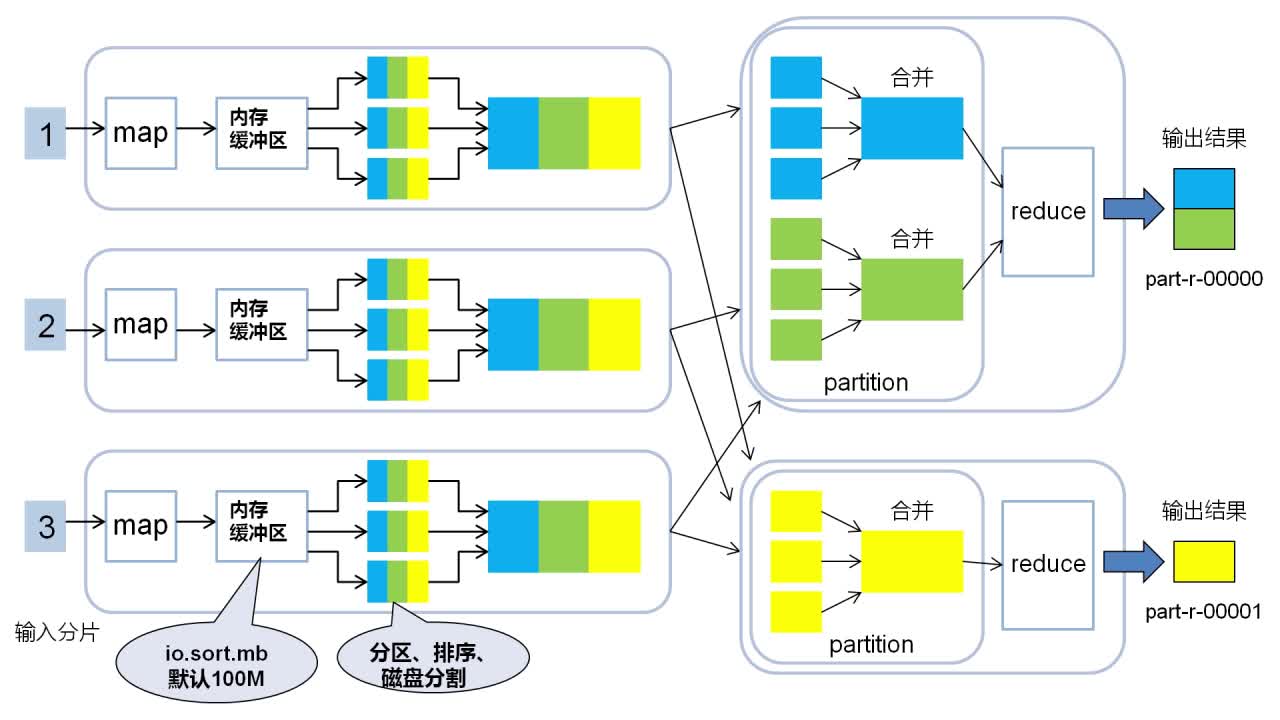
<p>数据经过Map端输出后会进行网络混洗，经Shuffle后进入Reduce，在大数据量的情况下可能会造成巨大的网络开销。故可以在本地先按照key进行一轮排序与合并，在进行网络混洗，这个过程就是Combine.</p>
<p>图<br>partition任务,reduce任务,输出文件三者的数量总是相等的。所有数据默认会按照key值升序排序。</p>
<h4 id="reduce任务个数"><a href="#reduce任务个数" class="headerlink" title="reduce任务个数"></a>reduce任务个数</h4><p>reduce任务不像Map任务那样受多个因素制约,大数据情况下，reduce数量不宜过少</p>
<ul>
<li>可通过调节参数 mapred.reduce.tasks</li>
<li>可在代码中调用 job.setNumReduceTasks(int n)</li>
</ul>
<h3 id="问题"><a href="#问题" class="headerlink" title="问题"></a>问题</h3><ol>
<li>如何通过Hadoop存储小文件？<blockquote>
<p>Hadoop Archives 出现就是为了缓解大量小文件消耗NameNode内存的问题，HAR文件是通过在HDFS上构建一个分层文件系统来工作；使用SequenceFile，用文件名（filename）作为key，并且文件内容（file contents）作为value；可以通过Hbase开发一个对象存储服务;可以采用压缩、合并小文件的策略，例如设置文件输入类型为CombineFileInputFormat格式</p>
</blockquote>
</li>
<li>当有节点故障的时候，集群是如何继续提供服务的，如何读？如何写？</li>
<li>哪些是影响MapReduce性能的因素？</li>
</ol>
<h3 id="HBase"><a href="#HBase" class="headerlink" title="HBase"></a>HBase</h3><ul>
<li>高可靠，高性能，面向列，可伸缩，实时读写的<strong>分布式数据库</strong></li>
<li>利用HDFS作为其文件存储系统，支持MR程序读取数据</li>
<li>存储非结构化和半结构化数据</li>
<li>RowKey: 数据唯一标识，按字典排序</li>
<li>ColumnFamily: 列族，多个列的集合，最多不超过三个</li>
<li>TimeStamp: 支持多版本数据同时存在</li>
</ul>
<h3 id="HIVE"><a href="#HIVE" class="headerlink" title="HIVE"></a>HIVE</h3><p>show databases;<br>use database;<br>show tables;<br>desc table;<br>dfs -ls 目录；<br>! 操作系统命令<br>select * from gen_yp_show_log_det_hour limit 5;<br>source mysql.sql;<br>hive -S #进入静默模式</p>
<h3 id="Spark"><a href="#Spark" class="headerlink" title="Spark"></a>Spark</h3><ul>
<li><strong>基于内存计算</strong>的大数据并行计算框架</li>
<li>Spark是MapReduce的替代方案，兼容HDFS，Hive等数据源</li>
<li>抽象出分布式内存存储数据结构，弹性分布式数据集RDD</li>
<li>基于事件驱动，通过线程池复用线程提高性能</li>
</ul>
<h3 id="MapReduce"><a href="#MapReduce" class="headerlink" title="MapReduce"></a>MapReduce</h3><p><img src="/post_image/map-reduce.jpg" alt="image"></p>
<p>既可以直接编写相应JAVA处理程序，也可用Python等其他语言编写Map,Reduce处理过程，利用Hadoop进行执行</p>
<ol>
<li>编写 WordCount.java 程序</li>
<li><p>编译 WordCount.java</p>
<pre><code>javac -classpath -d
</code></pre></li>
<li><p>打包<br>jar -cvf wordcount.jar *.class</p>
</li>
<li>提交作业<br>hdfs dfs -copyFromLocal<pre><code>hadoop jar
yarn logs -applicationId xxxx    //查看日志
</code></pre><h3 id="Hadoop分布式缓存"><a href="#Hadoop分布式缓存" class="headerlink" title="Hadoop分布式缓存"></a>Hadoop分布式缓存</h3>在执行MapReduce时，可能Mapper之间需要共享一些信息，如果信息量不大，可以将其从HDFS加载到内存中，这就是Hadoop分布式缓存机制</li>
</ol>
<p>加载到内存发生在Job执行之前，每个从节点各自都缓存一份相同的共享数据。如果数据量过大，可以将其分批缓存，重复执行作业。</p>
<ol>
<li><p>在main方法中加载共享文件的HDFS路径，路径可以是目录也可以是文件。可以在路径末尾追加“#”+别名，在map阶段可以使用该别名</p>
<pre><code>String cache = &quot;hdfs://10.105.***.***:8020/cache/file&quot;;    //目录或文件
cache = cache + &quot;#myfile&quot;;     //myfile是文件别名
job.addCacheFile(new Path(cache).toUri(),conf)    //添加到job设置
</code></pre></li>
<li><p>在Mapper类或Reducer的setup方法中，用输入流获取分布式缓存中的文件</p>
<p>//该方法只执行一次，在map方法循环之前</p>
<pre><code>protected void setup（Context context） throws IOException,InterruptedException{
    FileReader reader = new FileReader(&quot;myfile&quot;);
    BufferedReader br = new BufferedReader(reader);
     <figure class="highlight plain"><table><tr><td class="gutter"><pre><span class="line">1</span><br><span class="line">2</span><br><span class="line">3</span><br><span class="line">4</span><br><span class="line">5</span><br><span class="line">6</span><br></pre></td><td class="code"><pre><span class="line">        &#125;</span><br><span class="line"></span><br><span class="line">### Mac Eclipse Hadoop-plus配置</span><br><span class="line">将插件jar包放在Eclipse的 **dropins** 文件夹下</span><br><span class="line">- 查看端口</span><br><span class="line">&gt; hdfs端口号在：```$HADOOP_HOME/conf/core-site.xml中</span><br></pre></td></tr></table></figure>
</code></pre></li>
</ol>
<blockquote>
<p>mr端口号在：<code>$HADOOP_HOME/conf/mapred-site.xml中</code></p>
</blockquote>
<pre><code>dfs.datanode.ipc.address  JobTracker端口，默认50020
fs.defaultFS    HDFS端口，默认8020
</code></pre><h3 id="Python-MapReduce"><a href="#Python-MapReduce" class="headerlink" title="Python MapReduce"></a>Python MapReduce</h3><pre><code> cat 0318part-00001|python mapper.py 
cat 0318part-00001|python mapper.py |sort -k1,1|python reducer.py 
</code></pre><h3 id="yarn"><a href="#yarn" class="headerlink" title="yarn"></a>yarn</h3><pre><code>//查看日志
yarn logs -applicationId appid
//查看状态
yarn application -status
//杀掉任务
yarn application -kill appid
</code></pre>]]></content>
    
    <summary type="html">
    
      &lt;h2 id=&quot;Hadoop基础及演练&quot;&gt;&lt;a href=&quot;#Hadoop基础及演练&quot; class=&quot;headerlink&quot; title=&quot;Hadoop基础及演练&quot;&gt;&lt;/a&gt;Hadoop基础及演练&lt;/h2&gt;&lt;h3 id=&quot;Hadoop-优点&quot;&gt;&lt;a href=&quot;#Hadoop-优点&quot; class=&quot;headerlink&quot; title=&quot;Hadoop 优点&quot;&gt;&lt;/a&gt;Hadoop 优点&lt;/h3&gt;&lt;ul&gt;
&lt;li&gt;高扩展&lt;/li&gt;
&lt;li&gt;低成本&lt;/li&gt;
&lt;li&gt;成熟的生态圈&lt;blockquote&gt;
&lt;ul&gt;
&lt;li&gt;HIVE 降低了Hadoop使用门槛，可以将SQL语句转化为Hadoop任务&lt;/li&gt;
&lt;li&gt;HBase 是一个存储结构化数据的分布式数据库，放弃了事务特性，追求更高的特战，HBase提供数据的随机读写和实时访问，实现了对表数据的读写功能&lt;/li&gt;
&lt;li&gt;Zookeeper 监控Hadoop集群的一个状态，管理集群配置，维护节点间数据的一致性&lt;/li&gt;
&lt;/ul&gt;
&lt;/blockquote&gt;
&lt;/li&gt;
&lt;/ul&gt;
&lt;h3 id=&quot;Hadoop安装&quot;&gt;&lt;a href=&quot;#Hadoop安装&quot; class=&quot;headerlink&quot; title=&quot;Hadoop安装&quot;&gt;&lt;/a&gt;Hadoop安装&lt;/h3&gt;&lt;ol&gt;
&lt;li&gt;安装JDK&lt;/li&gt;
&lt;li&gt;安装Hadoop&lt;/li&gt;
&lt;li&gt;&lt;p&gt;配置Hadoop&lt;/p&gt;
&lt;p&gt;conf/start-all.sh&lt;/p&gt;
&lt;pre&gt;&lt;code&gt;jps 查看本地启动进程
&lt;/code&gt;&lt;/pre&gt;&lt;/li&gt;
&lt;/ol&gt;
&lt;h3 id=&quot;HDFS-优点&quot;&gt;&lt;a href=&quot;#HDFS-优点&quot; class=&quot;headerlink&quot; title=&quot;HDFS 优点&quot;&gt;&lt;/a&gt;HDFS 优点&lt;/h3&gt;&lt;ul&gt;
&lt;li&gt;适合大文件存储，支持TB、PB级的数据存储，并有副本策略&lt;/li&gt;
&lt;li&gt;可以构建在廉价的机器上，并有一定的容错和恢复机制&lt;/li&gt;
&lt;li&gt;支持流式数据访问，一次写入，多次读取最高效&lt;/li&gt;
&lt;/ul&gt;
&lt;h3 id=&quot;HDFS-缺点&quot;&gt;&lt;a href=&quot;#HDFS-缺点&quot; class=&quot;headerlink&quot; title=&quot;HDFS 缺点&quot;&gt;&lt;/a&gt;HDFS 缺点&lt;/h3&gt;&lt;ul&gt;
&lt;li&gt;不适合大量小文件存储&lt;/li&gt;
&lt;li&gt;不适合并发写入，不支持文件随机修改&lt;/li&gt;
&lt;li&gt;不支持随机读低延时的访问方式&lt;/li&gt;
&lt;/ul&gt;
    
    </summary>
    
      <category term="Tech" scheme="http://mjackie.github.io/categories/Tech/"/>
    
    
      <category term="机器学习" scheme="http://mjackie.github.io/tags/%E6%9C%BA%E5%99%A8%E5%AD%A6%E4%B9%A0/"/>
    
      <category term="计算广告" scheme="http://mjackie.github.io/tags/%E8%AE%A1%E7%AE%97%E5%B9%BF%E5%91%8A/"/>
    
      <category term="大数据" scheme="http://mjackie.github.io/tags/%E5%A4%A7%E6%95%B0%E6%8D%AE/"/>
    
  </entry>
  
  <entry>
    <title>算法课程笔记</title>
    <link href="http://mjackie.github.io/Tech/cjw7jxod9003widkfo4lpzzez/"/>
    <id>http://mjackie.github.io/Tech/cjw7jxod9003widkfo4lpzzez/</id>
    <published>2018-01-29T18:47:00.000Z</published>
    <updated>2018-02-23T18:49:33.239Z</updated>
    
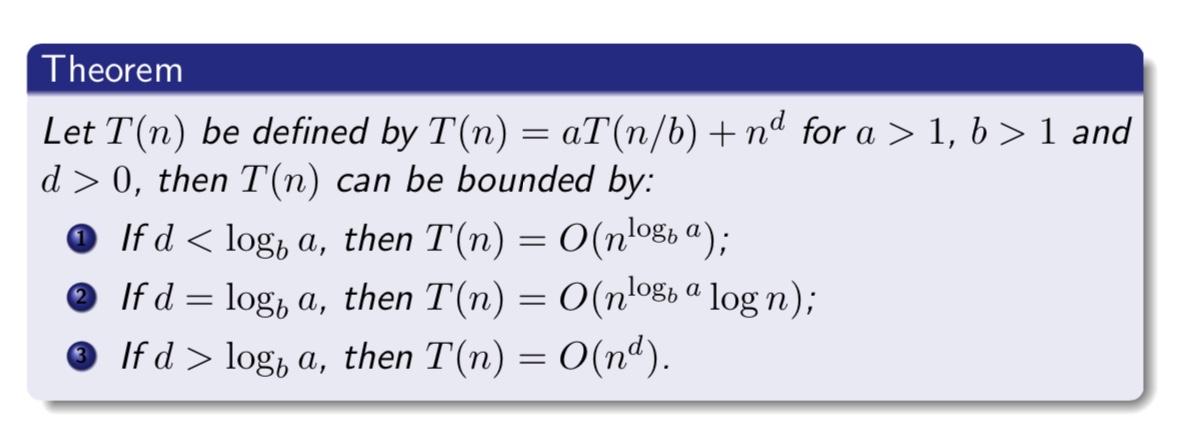
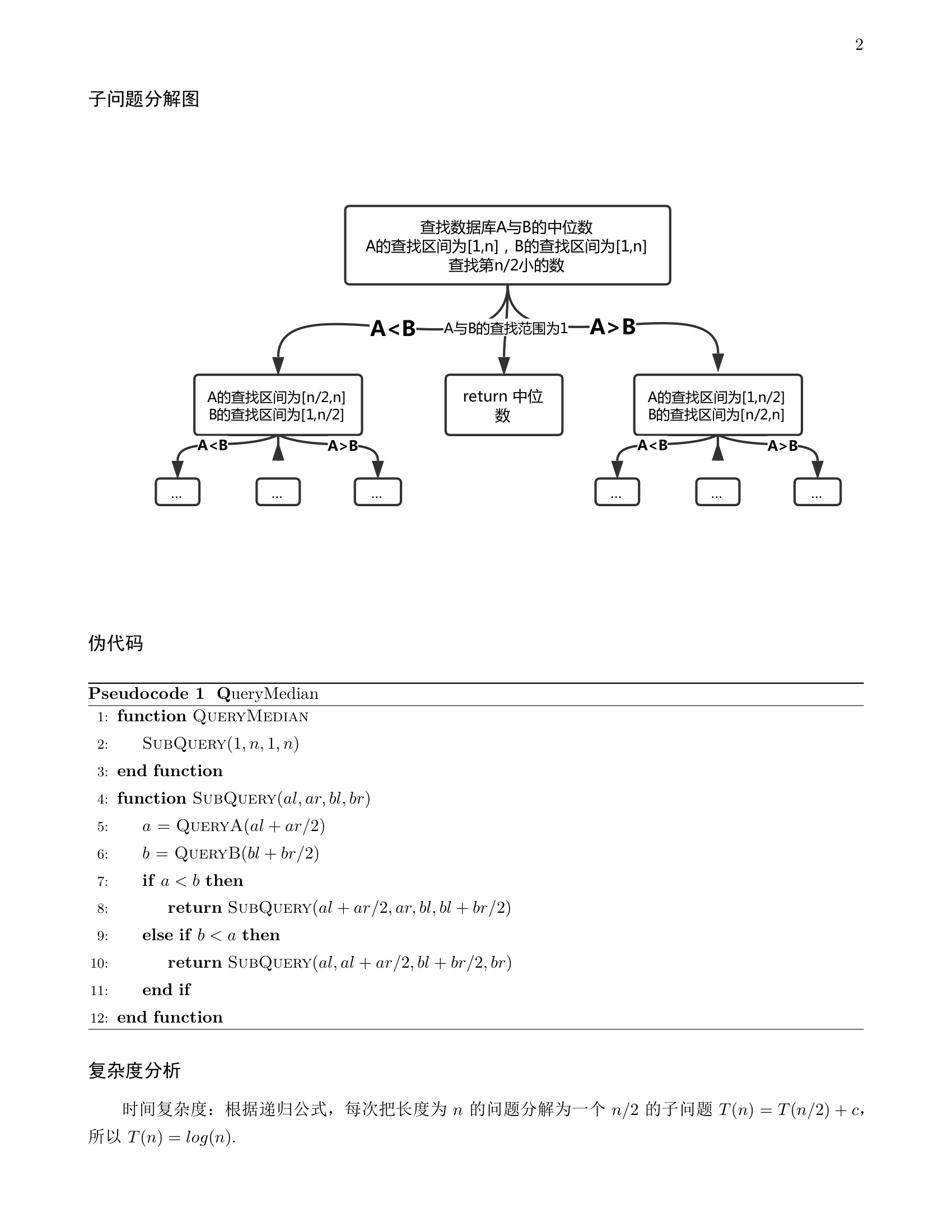
    <content type="html"><![CDATA[<h3 id="分治"><a href="#分治" class="headerlink" title="分治"></a>分治</h3><p>分治问题复杂度计算</p>
<h3 id=""><a href="#" class="headerlink" title=""></a><img src="/post_image/algo-note/DC.jpeg" alt="DC"></h3><a id="more"></a>
<h3 id="网络流"><a href="#网络流" class="headerlink" title="网络流"></a>网络流</h3><h4 id="最短路径算法复杂度"><a href="#最短路径算法复杂度" class="headerlink" title="最短路径算法复杂度"></a>最短路径算法复杂度</h4><ul>
<li>Dijkstra：O(n2)适用于权值为非负的图的单源最短路径，用斐波那契堆的复杂度O(E+VlgV)</li>
</ul>
<ul>
<li>BellmanFord：适用于权值有负值的图的单源最短路径，并且能够检测负圈，复杂度O(VE)</li>
</ul>
<ul>
<li>SPFA：适用于权值有负值，且没有负圈的图的单源最短路径，论文中的复杂度O(kE)，k为每个节点进入Queue的次数，且k一般&lt;=2，但此处的复杂度证明是有问题的，其实SPFA的最坏情况应该是O(VE).</li>
</ul>
<ul>
<li>Floyd：每对节点之间的最短路径。Floyd-Warshall算法的时间复杂度为O(N3)，空间复杂度为O(N2)</li>
</ul>
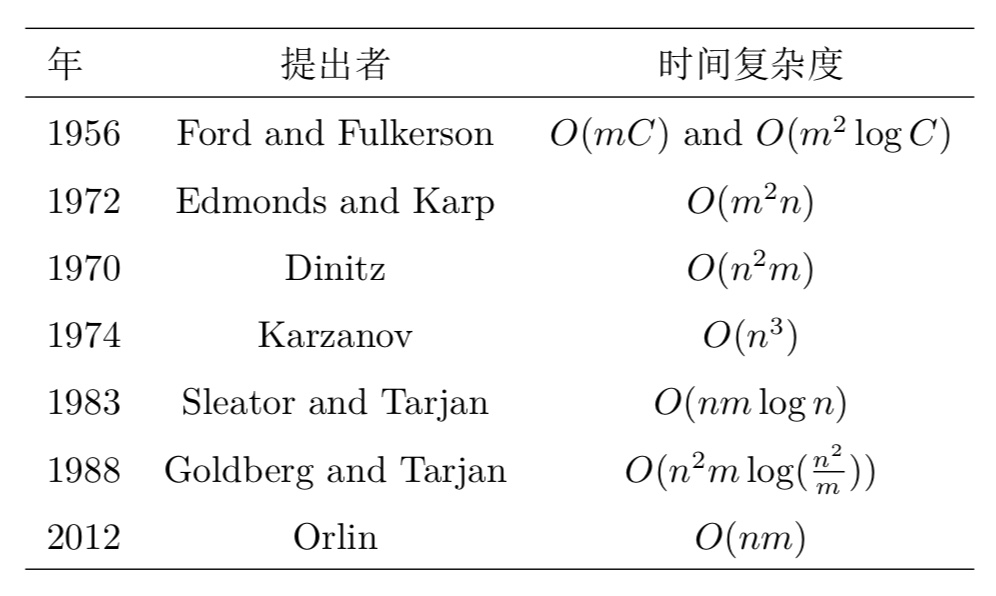
<h4 id="最大流算法复杂度"><a href="#最大流算法复杂度" class="headerlink" title="最大流算法复杂度"></a>最大流算法复杂度</h4><p>n表示节点数，m表示边数</p>
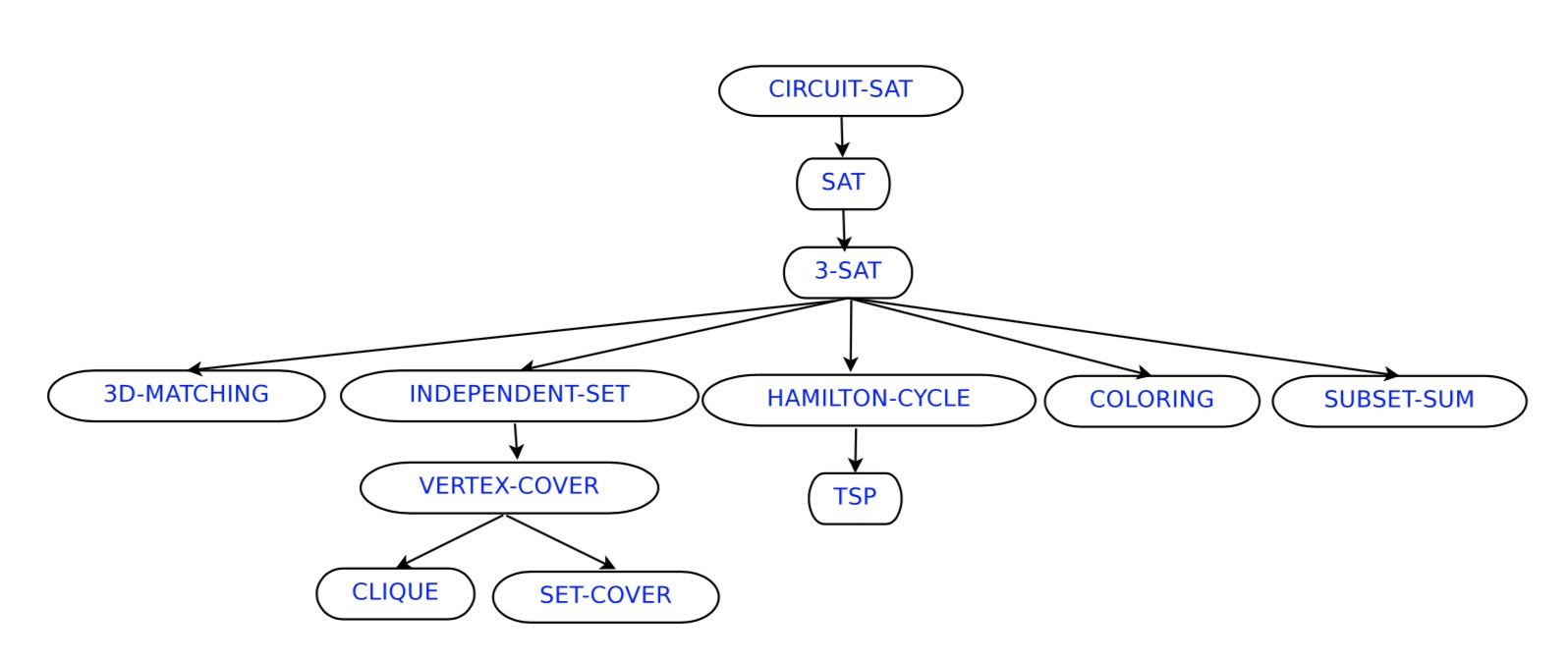
<h4 id="-1"><a href="#-1" class="headerlink" title=""></a><img src="/post_image/algo-note/MaxFlow.jpeg" alt="MaxFlow"></h4><h3 id="NPC问题"><a href="#NPC问题" class="headerlink" title="NPC问题"></a>NPC问题</h3><p><strong>证明一个问题是 NPC问题。先证明它至少是一个NP问题，再证明其中一个已知的NPC问题能约化到它，这样就可以说它是NPC问题了</strong></p>
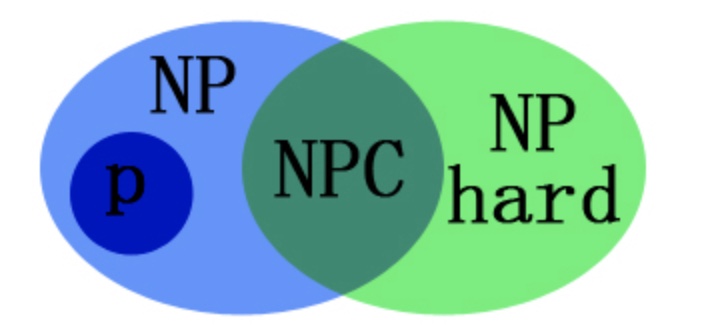
<h4 id="问题分类"><a href="#问题分类" class="headerlink" title="问题分类"></a>问题分类</h4><p><img src="/post_image/algo-note/p-np-npc-nphard.jpeg" alt="p-np-npc-nphard"></p>
<ul>
<li>P: <strong>能在多项式时间内解决的问题</strong></li>
</ul>
<ul>
<li>NP: 不能在多项式时间内解决或不确定能不能在多项式时间内解决，但<strong>能在多项式时间验证的问题</strong></li>
</ul>
<ul>
<li>NPC: NP完全问题，<strong>所有NP问题在多项式时间内都能约化(Reducibility)到它的NP问题</strong>，即解决了此NPC问题，所有NP问题也都得到解决</li>
</ul>
<ul>
<li>NP hard:NP难问题，<strong>所有NP问题在多项式时间内都能约化(Reducibility)到它的问题(不一定是NP问题)</strong></li>
</ul>
<h4 id="问题难度"><a href="#问题难度" class="headerlink" title="问题难度"></a>问题难度</h4><p><img src="/post_image/algo-note/problem.jpeg" alt="problem"></p>
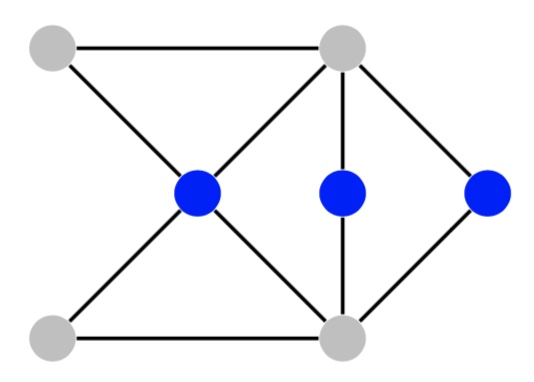
<h4 id="Independent-Set-Problem"><a href="#Independent-Set-Problem" class="headerlink" title="Independent Set Problem"></a>Independent Set Problem</h4><p>Suppose you have n friends, and some pairs of them don’t get along. How to invite at least k of them to dinner if you don’t want any interpersonal tension?</p>
<blockquote>
<p>Input: Given a graph G =&lt; V, E &gt;, and an integer k,</p>
<p>Output: is there a set of nodes S⊆V, |S|=k , such that no two nodes in S are joined by an edge?</p>
</blockquote>
<p><img src="/post_image/algo-note/isp.jpeg" alt="isp"></p>
<p>The three nodes in blue are independent.</p>
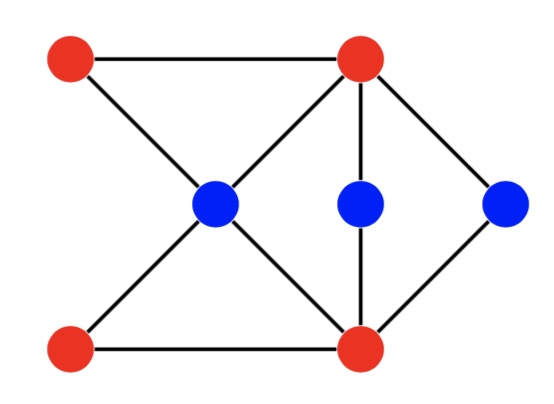
<h4 id="Vertex-Cover-Problem"><a href="#Vertex-Cover-Problem" class="headerlink" title="Vertex Cover Problem"></a>Vertex Cover Problem</h4><p>Given n sites connected with paths, how many guards (or</p>
<p>cameras) should be deployed on sites to surveille all the paths?</p>
<blockquote>
<p>Input: Given a graph G =&lt; V, E &gt;, and an integer k,</p>
<p>Output: is there a set of nodes S ⊆ V, |S| = k, such that eachedge has at least one of its endpoints in S?</p>
</blockquote>
<p><img src="/post_image/algo-note/vcp.jpeg" alt="vcp"></p>
<p>the complement of an independent set (in blue) forms a vertex cover (in red)</p>
<h4 id="SAT-Satisfiability-Problem"><a href="#SAT-Satisfiability-Problem" class="headerlink" title="SAT (Satisfiability) Problem"></a>SAT (Satisfiability) Problem</h4><p>expressing constraints on a set of variables (in AI), verifying whether a circuit has the desired functionality (in VLSI), etc.</p>
<blockquote>
<p>Input: Given a CNF φ = C1 ∧C2…∧Ck;</p>
<p>Output: Is there an assignment of all xi such that all clauses Cj.are satisfied?</p>
<p>Example:</p>
<p>CNF: (x1 ∨¬x2)∧(¬x1 ∨¬x3)∧(x2 ∨¬x3)</p>
<p>TRUE assignment: x1 = FALSE, x2 = FALSE, x3 = FALSE;</p>
</blockquote>
<h4 id="3SAT-Problem"><a href="#3SAT-Problem" class="headerlink" title="3SAT  Problem"></a>3SAT  Problem</h4><p>每个 Ci 含有三个变量</p>
<h4 id="Hamilton-Cycle-Problem"><a href="#Hamilton-Cycle-Problem" class="headerlink" title="Hamilton Cycle Problem"></a>Hamilton Cycle Problem</h4><blockquote>
<p>Input: Given a graph G =&lt; V, E &gt;</p>
<p>Output: Is there a cycle visiting every node exactly once?</p>
</blockquote>
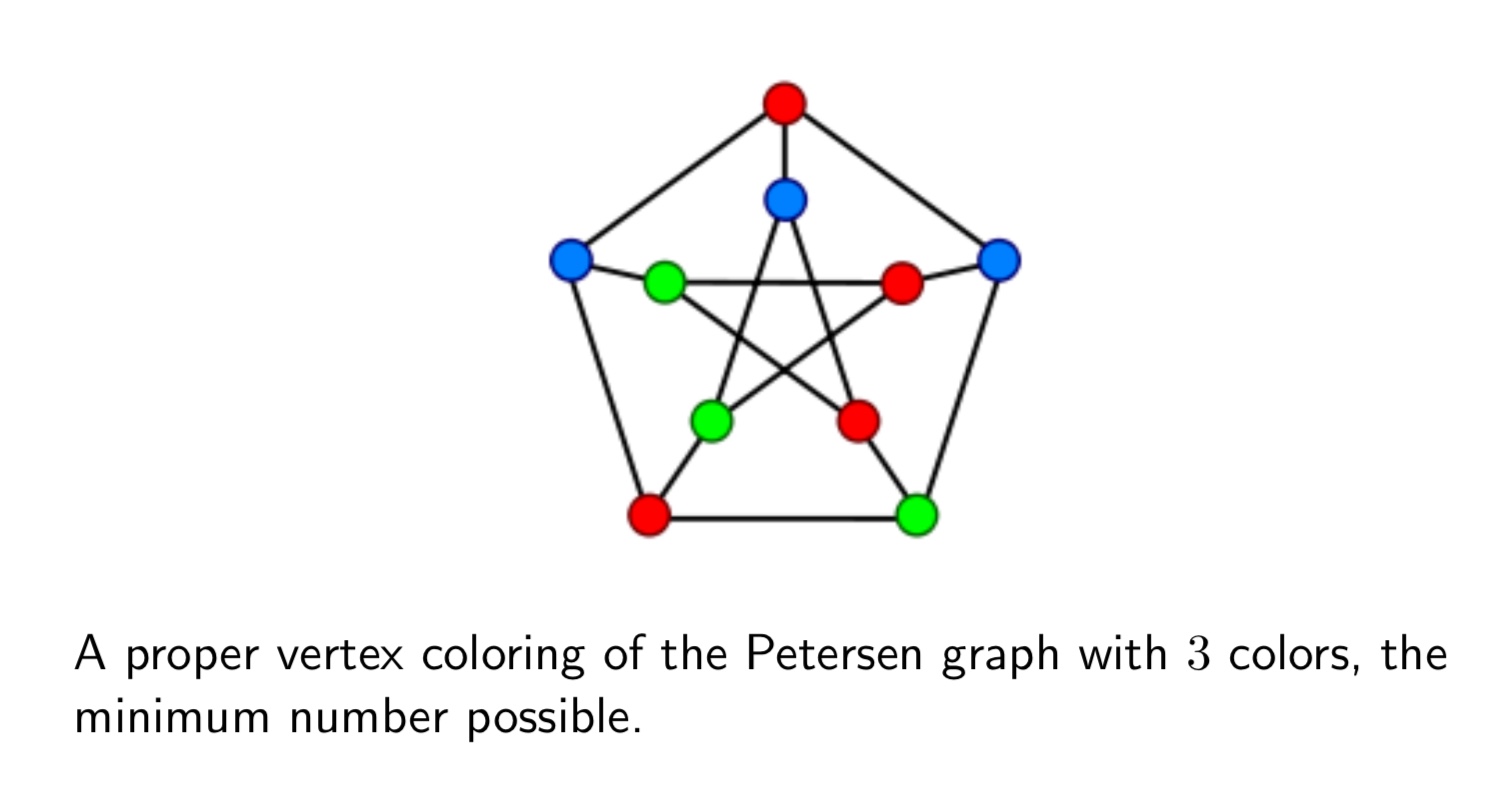
<h4 id="3-Coloring"><a href="#3-Coloring" class="headerlink" title="3 Coloring"></a>3 Coloring</h4><blockquote>
<p>Output: Is there a k−coloring of G such that each node has a color, but the two endpoints of an edge have different colors?</p>
</blockquote>
<p><img src="/post_image/algo-note/3color.jpeg" alt="3color"></p>
<h4 id="SubsetSum-problem"><a href="#SubsetSum-problem" class="headerlink" title="SubsetSum problem"></a>SubsetSum problem</h4><blockquote>
<p>Input: Given n numbers S = w1, w2, …, wn, and an objective value W;</p>
<p>Output: is there a subset S′ ⊆ S such that the sum of S′ is W?</p>
</blockquote>
<h4 id="Clique-problem"><a href="#Clique-problem" class="headerlink" title="Clique problem"></a>Clique problem</h4><blockquote>
<p> Input: Graph G =&lt; V, E &gt;, an integer k; </p>
<p> Output: is there a clique of size k? Here, a clique refers to a subset of vertices that are all connected.</p>
</blockquote>
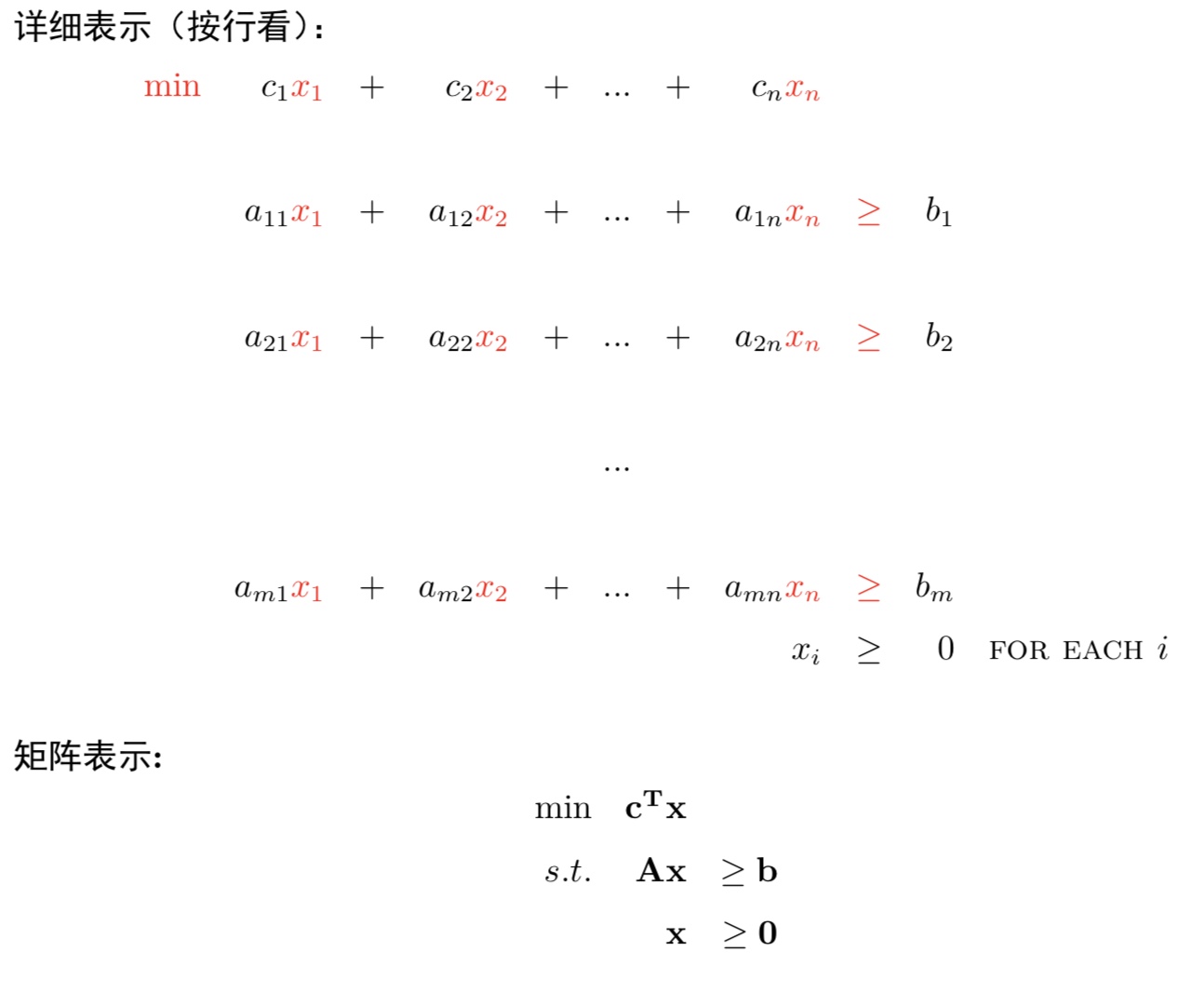
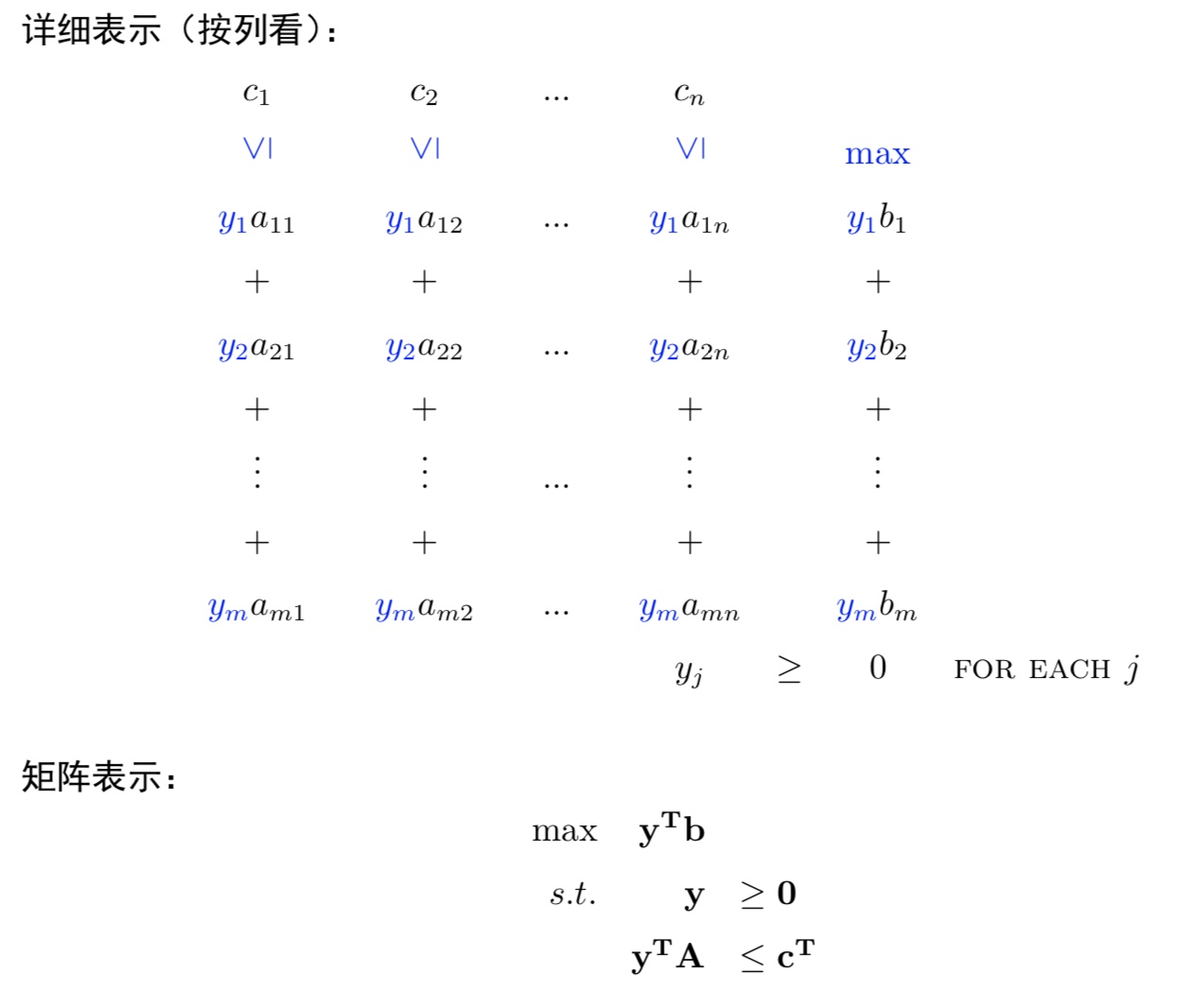
<h3 id="线性规划"><a href="#线性规划" class="headerlink" title="线性规划"></a>线性规划</h3><h4 id="原始问题"><a href="#原始问题" class="headerlink" title="原始问题"></a>原始问题</h4><p><img src="/post_image/algo-note/original.jpeg" alt="original"></p>
<h4 id="对偶问题"><a href="#对偶问题" class="headerlink" title="对偶问题"></a>对偶问题</h4><p><img src="/post_image/algo-note/dual.jpeg" alt="dual"></p>
]]></content>
    
    <summary type="html">
    
      &lt;h3 id=&quot;分治&quot;&gt;&lt;a href=&quot;#分治&quot; class=&quot;headerlink&quot; title=&quot;分治&quot;&gt;&lt;/a&gt;分治&lt;/h3&gt;&lt;p&gt;分治问题复杂度计算&lt;/p&gt;
&lt;h3 id=&quot;&quot;&gt;&lt;a href=&quot;#&quot; class=&quot;headerlink&quot; title=&quot;&quot;&gt;&lt;/a&gt;&lt;img src=&quot;/post_image/algo-note/DC.jpeg&quot; alt=&quot;DC&quot;&gt;&lt;/h3&gt;
    
    </summary>
    
      <category term="Tech" scheme="http://mjackie.github.io/categories/Tech/"/>
    
    
      <category term="算法" scheme="http://mjackie.github.io/tags/%E7%AE%97%E6%B3%95/"/>
    
  </entry>
  
  <entry>
    <title>卜东波算法课程作业</title>
    <link href="http://mjackie.github.io/Tech/cjw7jxocy0031idkf2ty70ta3/"/>
    <id>http://mjackie.github.io/Tech/cjw7jxocy0031idkf2ty70ta3/</id>
    <published>2018-01-24T02:50:00.000Z</published>
    <updated>2018-02-22T14:22:59.931Z</updated>
    
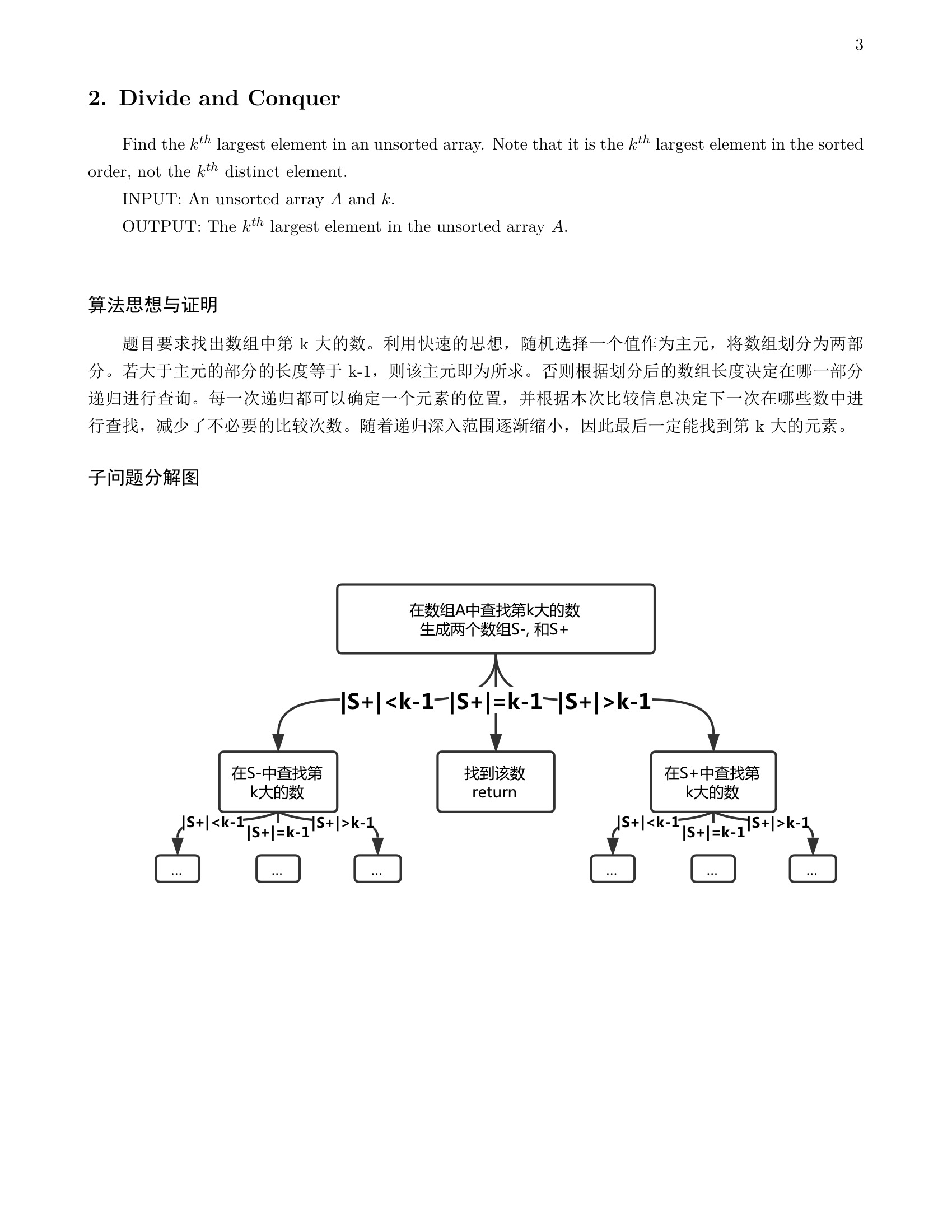
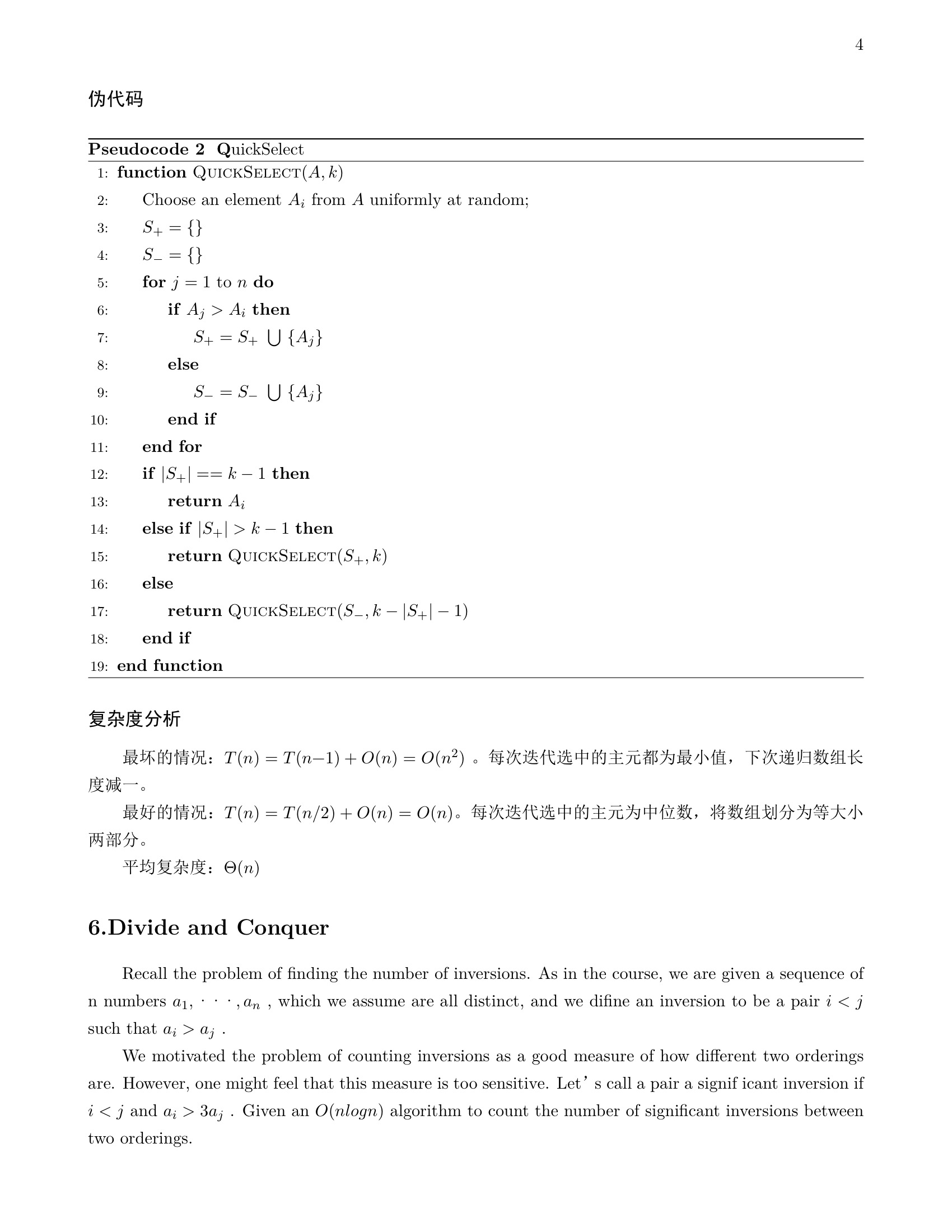
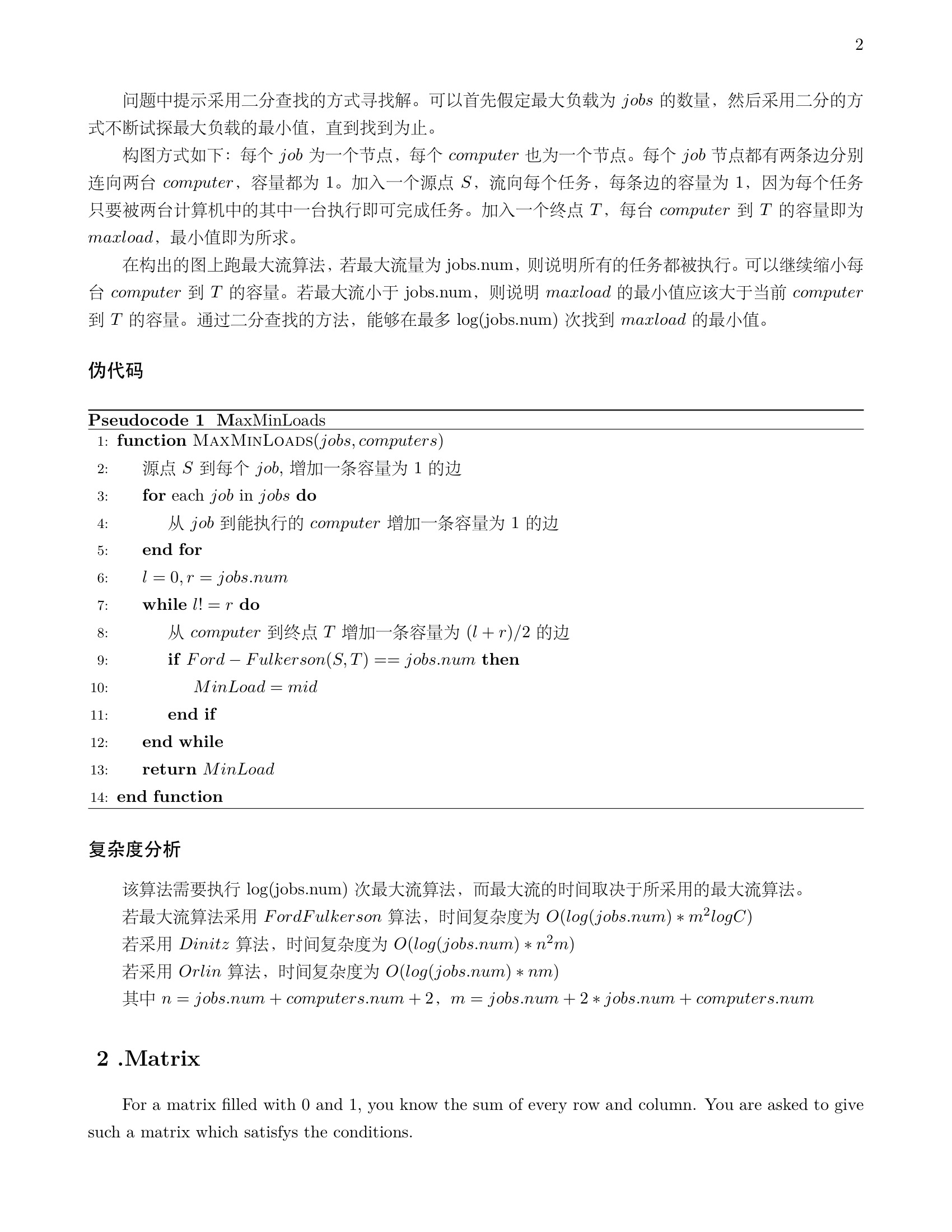
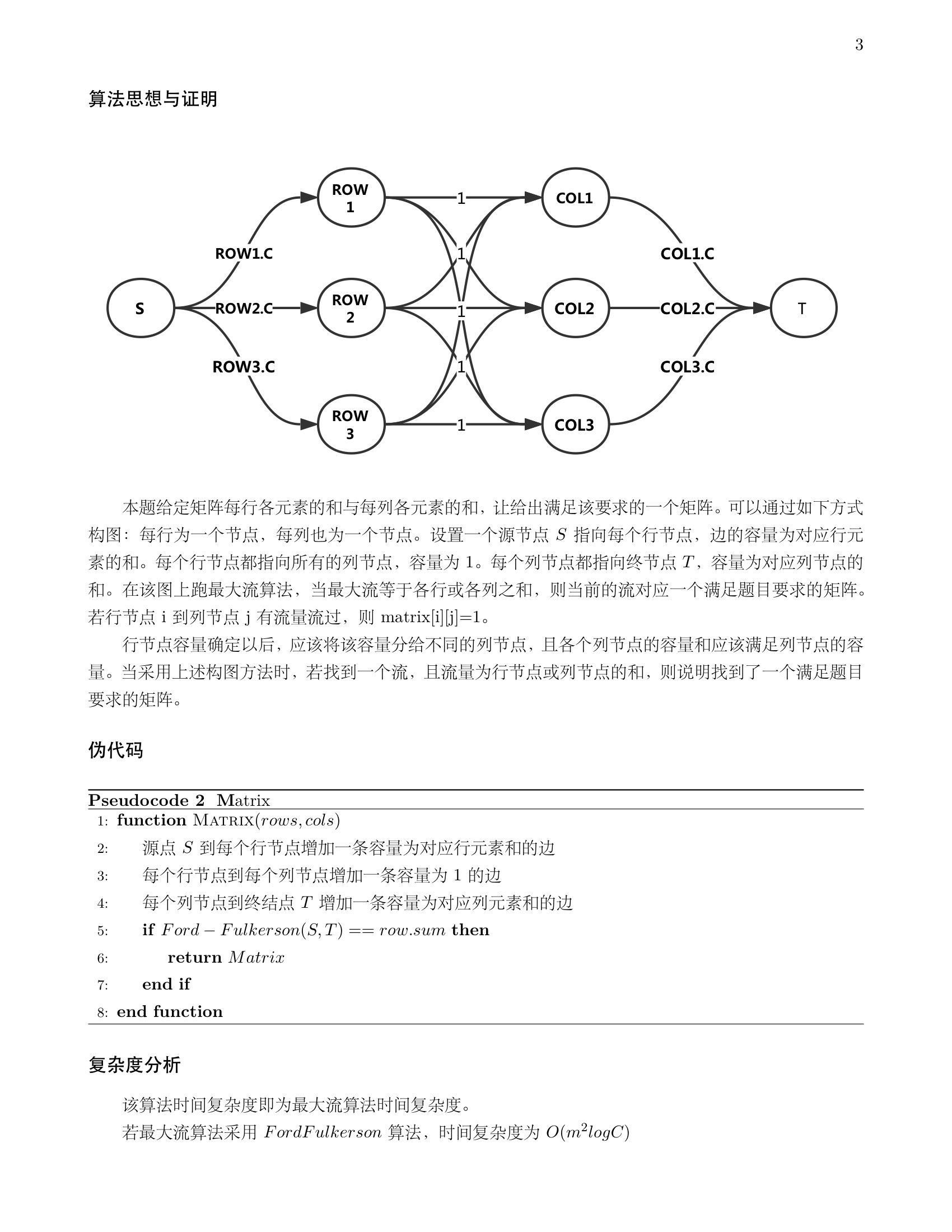
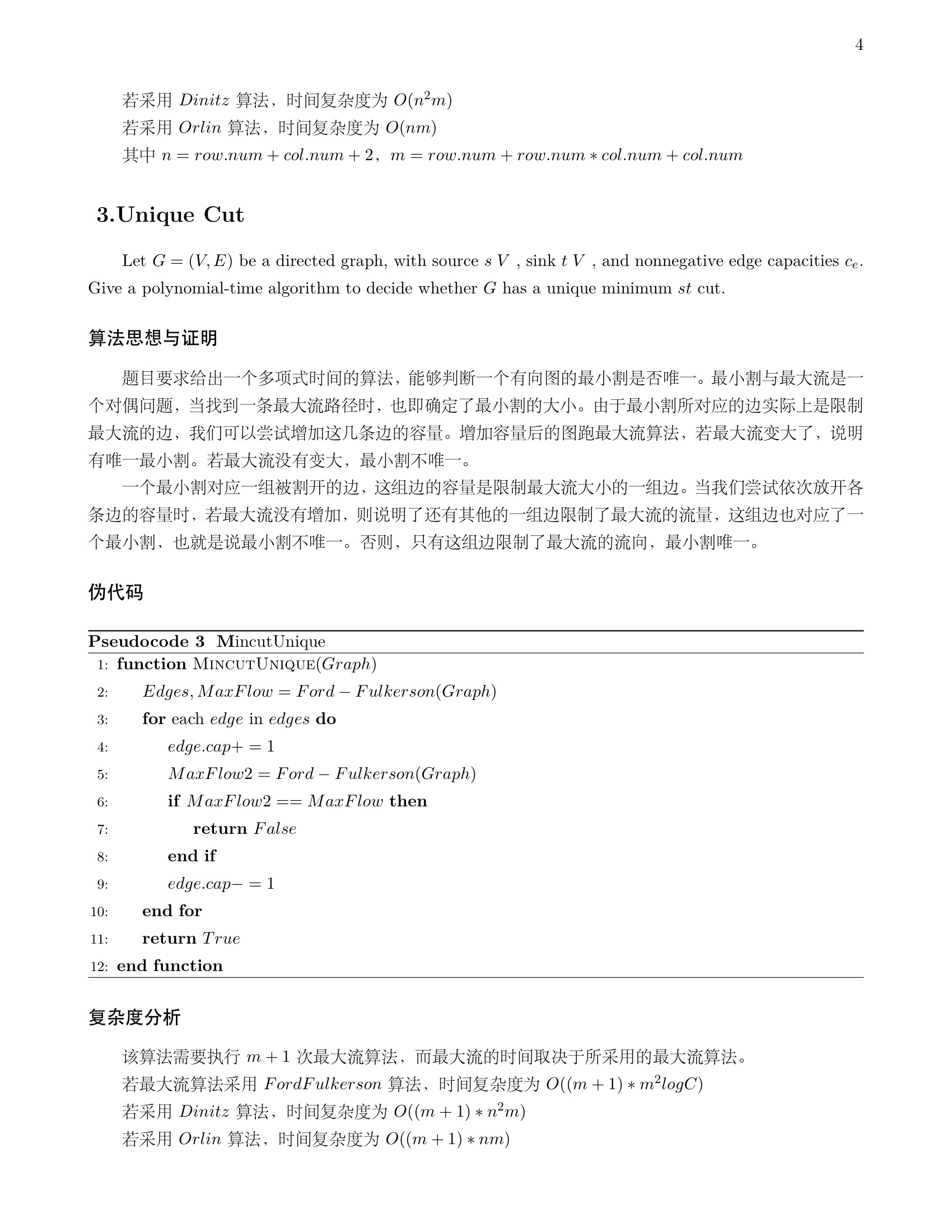
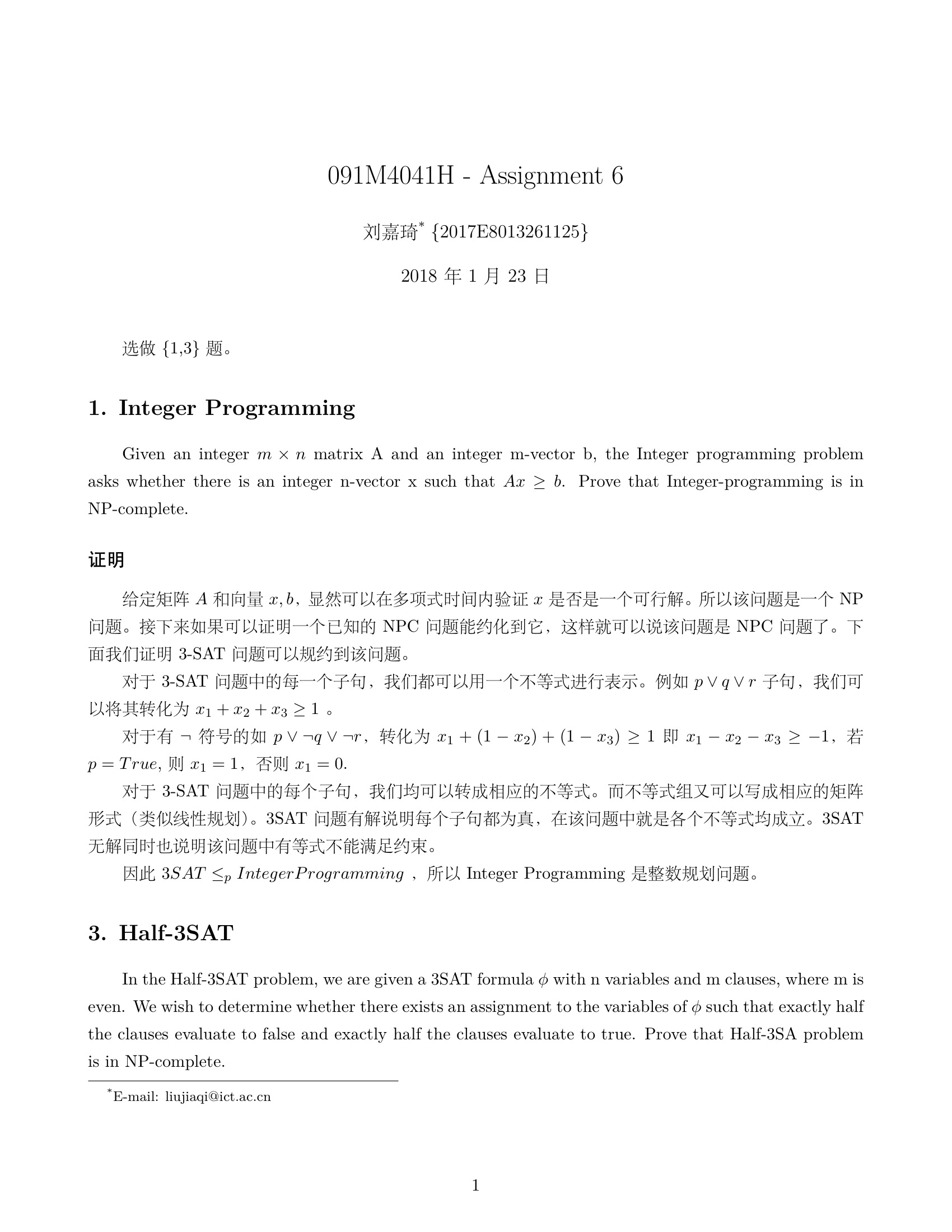
    <content type="html"><![CDATA[<p>本学期的算法课程作业，一共6次，用LaTex完成。卜老师的算法课深入浅出，本学期的所有课程都由卜老师亲自授课，课程内容不仅包含面试中常见的分治、动规、贪心等方法，还详细介绍了线性规划、网络流、NP问题等内容。非常高质量密度的一门课，感谢卜东波老师。</p>
<p><img src="/post_image/bdb-assign-answer/a_1.jpeg" alt="image"></p>
<a id="more"></a>
<p><img src="/post_image/bdb-assign-answer/a_2.jpeg" alt="image"></p>
<p><img src="/post_image/bdb-assign-answer/a_3.jpeg" alt="image"></p>
<p><img src="/post_image/bdb-assign-answer/a_4.jpeg" alt="image"></p>
<p><img src="/post_image/bdb-assign-answer/a_5.jpeg" alt="image"></p>
<p><img src="/post_image/bdb-assign-answer/a_6.jpeg" alt="image"></p>
<p><img src="/post_image/bdb-assign-answer/a_7.jpeg" alt="image"></p>
<p><img src="/post_image/bdb-assign-answer/a_8.jpeg" alt="image"></p>
<p><img src="/post_image/bdb-assign-answer/a_9.jpeg" alt="image"></p>
<p><img src="/post_image/bdb-assign-answer/a_10.jpeg" alt="image"></p>
<p><img src="/post_image/bdb-assign-answer/a_11.jpeg" alt="image"></p>
<p><img src="/post_image/bdb-assign-answer/a_12.jpeg" alt="image"></p>
<p><img src="/post_image/bdb-assign-answer/a_13.jpeg" alt="image"></p>
<p><img src="/post_image/bdb-assign-answer/a_14.jpeg" alt="image"></p>
<p><img src="/post_image/bdb-assign-answer/a_15.jpeg" alt="image"></p>
<p><img src="/post_image/bdb-assign-answer/a_16.jpeg" alt="image"></p>
<p><img src="/post_image/bdb-assign-answer/a_17.jpeg" alt="image"></p>
<p><img src="/post_image/bdb-assign-answer/a_18.jpeg" alt="image"></p>
<p><img src="/post_image/bdb-assign-answer/a_19.jpeg" alt="image"></p>
<p><img src="/post_image/bdb-assign-answer/a_20.jpeg" alt="image"></p>
<p><img src="/post_image/bdb-assign-answer/a_21.jpeg" alt="image"></p>
<p><img src="/post_image/bdb-assign-answer/a_22.jpeg" alt="image"></p>
<p><img src="/post_image/bdb-assign-answer/a_23.jpeg" alt="image"></p>
<p><img src="/post_image/bdb-assign-answer/a_24.jpeg" alt="image"></p>
<p><img src="/post_image/bdb-assign-answer/a_25.jpeg" alt="image"></p>
<p><img src="/post_image/bdb-assign-answer/a_26.jpeg" alt="image"></p>
<p><img src="/post_image/bdb-assign-answer/a_27.jpeg" alt="image"></p>
<p><img src="/post_image/bdb-assign-answer/a_28.jpeg" alt="image"></p>
<p><img src="/post_image/bdb-assign-answer/a_29.jpeg" alt="image"></p>
<p><img src="/post_image/bdb-assign-answer/a_30.jpeg" alt="image"></p>
]]></content>
    
    <summary type="html">
    
      &lt;p&gt;本学期的算法课程作业，一共6次，用LaTex完成。卜老师的算法课深入浅出，本学期的所有课程都由卜老师亲自授课，课程内容不仅包含面试中常见的分治、动规、贪心等方法，还详细介绍了线性规划、网络流、NP问题等内容。非常高质量密度的一门课，感谢卜东波老师。&lt;/p&gt;
&lt;p&gt;&lt;img src=&quot;/post_image/bdb-assign-answer/a_1.jpeg&quot; alt=&quot;image&quot;&gt;&lt;/p&gt;
    
    </summary>
    
      <category term="Tech" scheme="http://mjackie.github.io/categories/Tech/"/>
    
    
      <category term="算法" scheme="http://mjackie.github.io/tags/%E7%AE%97%E6%B3%95/"/>
    
      <category term="latex" scheme="http://mjackie.github.io/tags/latex/"/>
    
  </entry>
  
  <entry>
    <title>基于Lucene、Servlet新闻搜索引擎</title>
    <link href="http://mjackie.github.io/Tech/cjw7jxoc5000xidkfy9avk3pr/"/>
    <id>http://mjackie.github.io/Tech/cjw7jxoc5000xidkfy9avk3pr/</id>
    <published>2018-01-06T12:50:00.000Z</published>
    <updated>2018-02-23T18:43:12.027Z</updated>
    
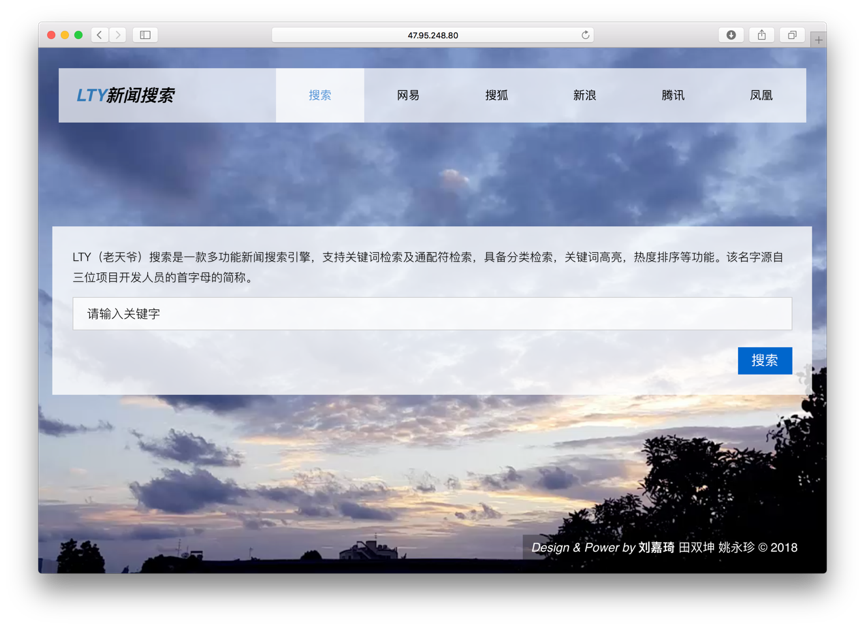
    <content type="html"><![CDATA[<p>GitHub地址：<a href="https://github.com/mJackie/LTY-Search" target="_blank" rel="noopener">https://github.com/mJackie/LTY-Search</a><br>详细文档参见 <a href="https://github.com/mJackie/LTY-Search/blob/master/%E8%AE%BE%E8%AE%A1%E6%96%87%E6%A1%A3.pdf" target="_blank" rel="noopener">设计文档</a><br><img src="/post_image/LTY-Search/index.png" alt="image"></p>
<a id="more"></a>
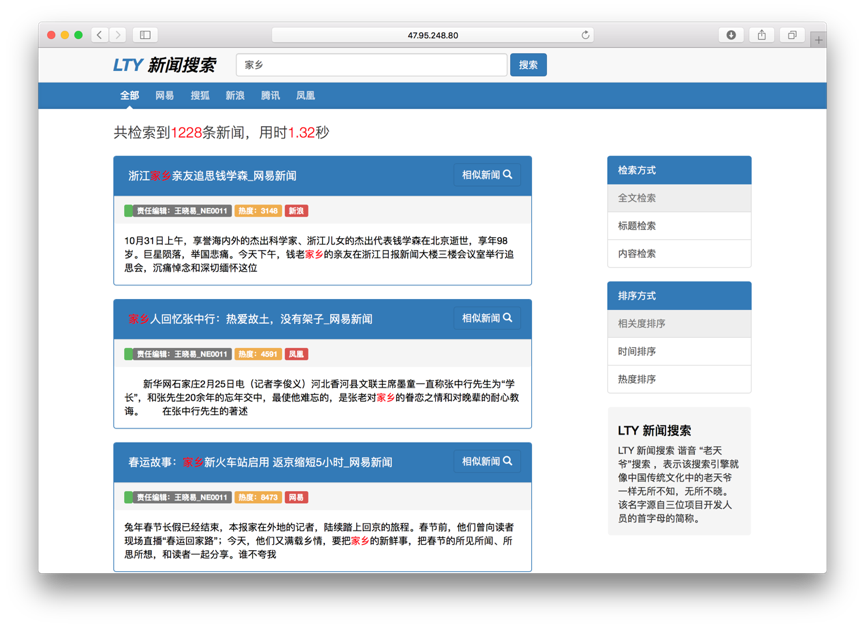
<p><img src="/post_image/LTY-Search/result.png" alt="image"></p>
<h4 id="作业要求"><a href="#作业要求" class="headerlink" title="作业要求"></a>作业要求</h4><p>(1-7个选课学生组成1队)，完成以下任务(12月份末考查)：</p>
<p>新闻及评论搜索：定向采集不少于4个中文社会新闻网站或频道，实现这些网站新闻信息及评论信息的自动爬取、抽取、索引和检索。</p>
<ol>
<li>新闻网页数目不少于10万页。每个新闻网页及其评论能在1天内更新。</li>
<li>支持关键词检索及通配符检索。检索时间平均不超过2秒。</li>
<li>能按相关度、时间、热度(需要自己定义)等属性对检索结果进行排序。能对评论的贬褒进行分析。</li>
<li>具备查询自动补齐、相关搜索推荐、snippet生成、结果预览(鼠标移到相关结果，能预览)等功能。</li>
<li>每条检索结果下面可以对相似新闻进行查找。</li>
<li>首页中列举当前最热的社会新闻。</li>
</ol>
<h4 id="演示地址"><a href="#演示地址" class="headerlink" title="演示地址"></a>演示地址</h4><p><a href="http://47.95.248.80:8089/Search/index" target="_blank" rel="noopener">http://47.95.248.80:8089/Search/index</a></p>
<h4 id="技术"><a href="#技术" class="headerlink" title="技术"></a>技术</h4><ul>
<li>爬虫:<code>Python</code> , <code>Scrapy</code> </li>
<li>后端:  <code>Lucene</code>,<code>JAVA Servlet</code> </li>
<li>前端: <code>Bootstrap</code> <code>,JQuery</code></li>
<li>服务器: <code>Tomact</code></li>
</ul>
<h4 id="实现功能"><a href="#实现功能" class="headerlink" title="实现功能"></a>实现功能</h4><ul>
<li>新闻网页数目不少于10万页</li>
<li>支持关键词检索及通配符检索。检索时间平均不超过2秒</li>
<li>能按相关度、时间、热度(需要自己定义)等属性对检索结果进行排序</li>
<li>具备snippet生成、结果预览(鼠标点击新闻标题，能预览)等功能</li>
<li>每条检索结果下面可以对相似新闻进行查找</li>
<li>首页中列举当前最热的社会新闻</li>
</ul>
<h4 id="创新点"><a href="#创新点" class="headerlink" title="创新点"></a>创新点</h4><ul>
<li>垂直检索（分类检索，可以只检索对应网站、栏目的新闻内容）</li>
<li>三种检索方式（全文检索、按标题检索、按内容检索）</li>
<li>响应式布局</li>
<li>检索结果首图展示（检索结果页显示该新闻中的首张图片）</li>
<li>关键词高亮（关键字标红显示）</li>
</ul>
]]></content>
    
    <summary type="html">
    
      &lt;p&gt;GitHub地址：&lt;a href=&quot;https://github.com/mJackie/LTY-Search&quot; target=&quot;_blank&quot; rel=&quot;noopener&quot;&gt;https://github.com/mJackie/LTY-Search&lt;/a&gt;&lt;br&gt;详细文档参见 &lt;a href=&quot;https://github.com/mJackie/LTY-Search/blob/master/%E8%AE%BE%E8%AE%A1%E6%96%87%E6%A1%A3.pdf&quot; target=&quot;_blank&quot; rel=&quot;noopener&quot;&gt;设计文档&lt;/a&gt;&lt;br&gt;&lt;img src=&quot;/post_image/LTY-Search/index.png&quot; alt=&quot;image&quot;&gt;&lt;/p&gt;
    
    </summary>
    
      <category term="Tech" scheme="http://mjackie.github.io/categories/Tech/"/>
    
    
      <category term="lucene" scheme="http://mjackie.github.io/tags/lucene/"/>
    
      <category term="servlet" scheme="http://mjackie.github.io/tags/servlet/"/>
    
  </entry>
  
  <entry>
    <title>垃圾短信识别系统</title>
    <link href="http://mjackie.github.io/Tech/cjw7jxoc3000ridkf4tzd9gnl/"/>
    <id>http://mjackie.github.io/Tech/cjw7jxoc3000ridkf4tzd9gnl/</id>
    <published>2017-12-31T02:50:00.000Z</published>
    <updated>2018-02-23T18:42:51.493Z</updated>
    
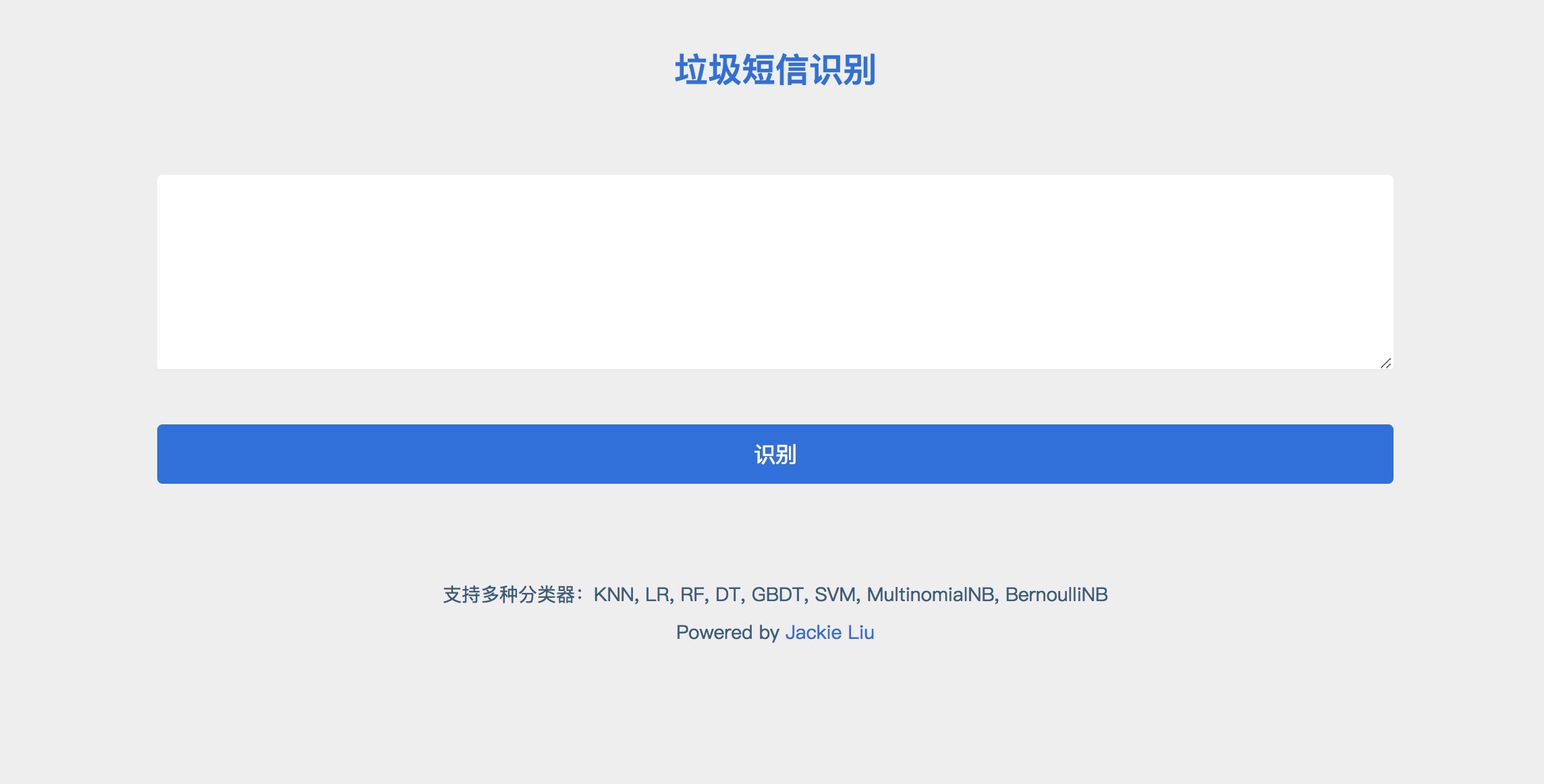
    <content type="html"><![CDATA[<p>GitHub地址：<a href="https://github.com/mJackie/SpamMessage" target="_blank" rel="noopener">https://github.com/mJackie/SpamMessage</a><br>实现一个垃圾短信识别系统，在给定的数据集上验证效果.<br><img src="/post_image/SpamMessage/index.jpeg" alt="image"></p>
<a id="more"></a>
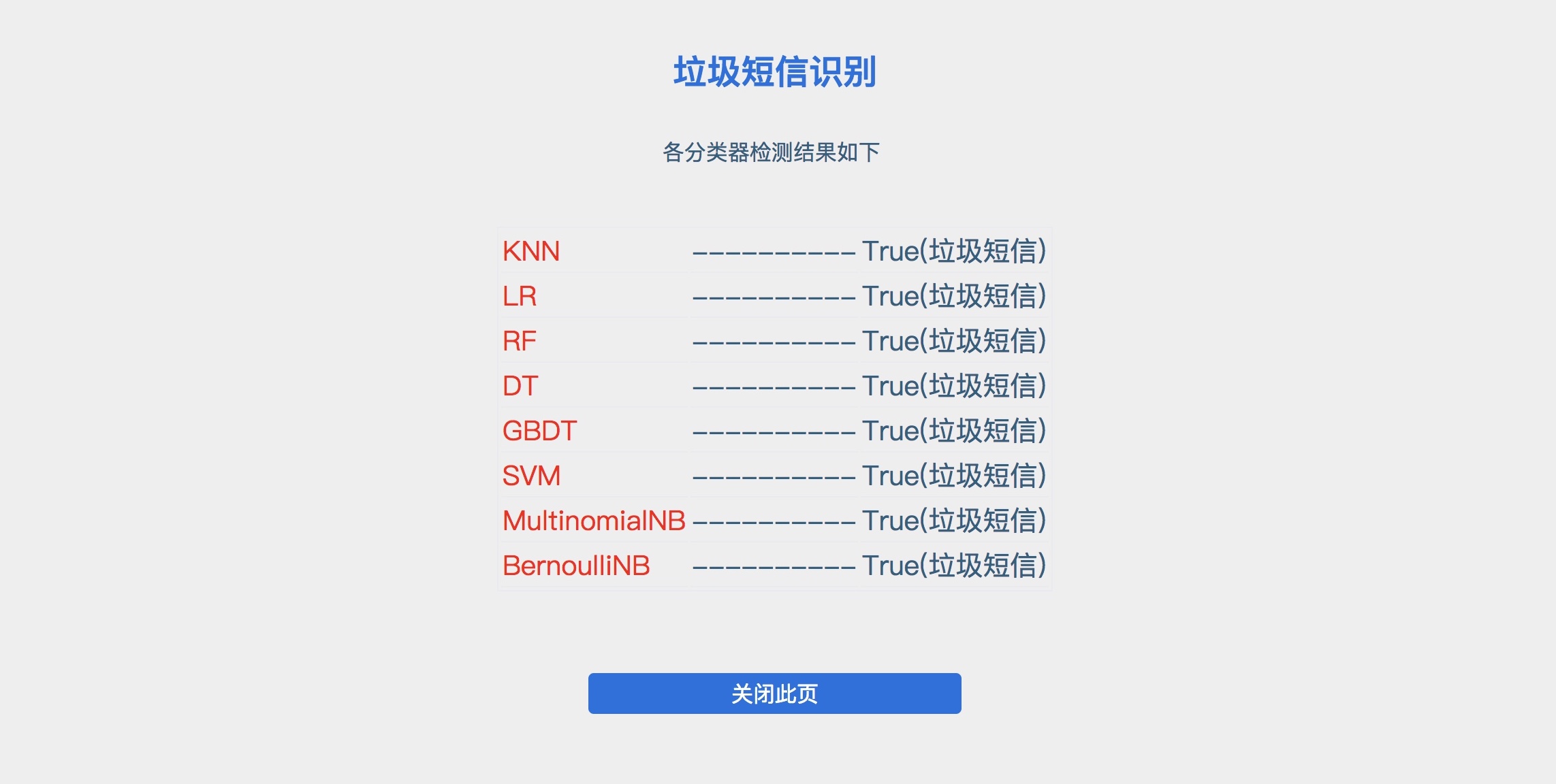
<p><img src="/post_image/SpamMessage/result.jpeg" alt="image"></p>
<h4 id="短信数据"><a href="#短信数据" class="headerlink" title="短信数据"></a>短信数据</h4><ul>
<li>标签域: 1表示垃圾短信/0表示正常短信</li>
<li>文本域: 短信源文本(进行了一些处理)</li>
</ul>
<h4 id="分类算法"><a href="#分类算法" class="headerlink" title="分类算法"></a>分类算法</h4><ul>
<li>KNN: K最近邻</li>
<li>LR: 逻辑回归</li>
<li>RF: 随机森林</li>
<li>DT: 决策树</li>
<li>GBDT: 梯度提升决策树</li>
<li>SVM: 支持向量机</li>
<li>MultinomialNB: 多项式分布朴素贝叶斯</li>
<li>BernoulliNB:  伯努利分布朴素贝叶斯</li>
</ul>
<h4 id="环境依赖"><a href="#环境依赖" class="headerlink" title="环境依赖"></a>环境依赖</h4><ul>
<li>Classfier（模型训练）<ul>
<li><a href="https://www.python.org/downloads/" target="_blank" rel="noopener">Python 2.7.x</a></li>
<li><a href="http://scikit-learn.org/stable/documentation.html#" target="_blank" rel="noopener">Scikit-learn</a></li>
<li><a href="https://github.com/fxsjy/jieba" target="_blank" rel="noopener">jieba</a> （已集成至项目内，无需安装）</li>
</ul>
</li>
<li>Sites (演示Demo)<ul>
<li><a href="http://php.net/" target="_blank" rel="noopener">Apache + PHP</a></li>
<li><a href="https://www.python.org/downloads/" target="_blank" rel="noopener">Python 2.7.x</a></li>
</ul>
</li>
</ul>
<h4 id="项目结构"><a href="#项目结构" class="headerlink" title="项目结构"></a>项目结构</h4><pre><code>.
├──Classfier（模型训练）
│  ├── DataProcess(数据预处理)
│  │   ├── jieba(结巴分词库)
│  │   ├── DataPreprocess.py(数据预处理)
│  │   └── message.txt(训练数据)
│  │
│  └── Classifiers.py(分类器)
│ 
├── Sites (演示Demo)
│   ├── Model
│   │   ├── jieba(结巴分词库)
│   │   ├── all_raw(结巴分词库)
│   │   │   ├── model(训练出的模型)
│   │   │   └── vec_tfidf(训练阶段生成的词向量)  
│   │   │
│   │   └── demoAPI.py(demo调用Python接口)
│   │
│   ├── index.php(主页)
│   └── result.php(结果显示页面)
│
└── README.md
</code></pre><h4 id="使用说明"><a href="#使用说明" class="headerlink" title="使用说明"></a>使用说明</h4><h5 id="首先对数据进行预处理，命令如下："><a href="#首先对数据进行预处理，命令如下：" class="headerlink" title="首先对数据进行预处理，命令如下："></a>首先对数据进行预处理，命令如下：</h5><pre><code>$ cd Classfier/DataProcess
$ python DataPreprocess.py
</code></pre><blockquote>
<p>DataPreprocess.py 中主要参数变量含义如下：</p>
<ul>
<li>n_components: 降维到n_components维</li>
<li>data_lines: 预处理的短信条数</li>
<li>data_type: 预处理类型 <code>{raw, pca, nmf, pca&amp;nmf}</code></li>
</ul>
</blockquote>
<h5 id="训练分类器，命令如下："><a href="#训练分类器，命令如下：" class="headerlink" title="训练分类器，命令如下："></a>训练分类器，命令如下：</h5><pre><code>$ cd ..
$ python Classifiers.py
</code></pre><blockquote>
<p>注意修改代码中相关路径，Classifiers.py 中主要参数变量含义如下：</p>
<ul>
<li>takeup: 测试数据占总数据的比例</li>
</ul>
</blockquote>
<h5 id="配置演示Demo"><a href="#配置演示Demo" class="headerlink" title="配置演示Demo"></a>配置演示Demo</h5><ol>
<li>将数据预处理阶段生成的词向量 <code>vec_tfidf</code> 文件 放置 <code>Sites/Model/all_raw</code> 目录下</li>
<li>将训练阶段生成的模型文件放置<code>Sites/Model/all_raw/model</code> 目录下</li>
<li>将 <code>Sites</code> 目录下文件放置 apache 相应网站目录下</li>
<li>访问 index.php</li>
</ol>
]]></content>
    
    <summary type="html">
    
      &lt;p&gt;GitHub地址：&lt;a href=&quot;https://github.com/mJackie/SpamMessage&quot; target=&quot;_blank&quot; rel=&quot;noopener&quot;&gt;https://github.com/mJackie/SpamMessage&lt;/a&gt;&lt;br&gt;实现一个垃圾短信识别系统，在给定的数据集上验证效果.&lt;br&gt;&lt;img src=&quot;/post_image/SpamMessage/index.jpeg&quot; alt=&quot;image&quot;&gt;&lt;/p&gt;
    
    </summary>
    
      <category term="Tech" scheme="http://mjackie.github.io/categories/Tech/"/>
    
    
      <category term="算法" scheme="http://mjackie.github.io/tags/%E7%AE%97%E6%B3%95/"/>
    
      <category term="机器学习" scheme="http://mjackie.github.io/tags/%E6%9C%BA%E5%99%A8%E5%AD%A6%E4%B9%A0/"/>
    
  </entry>
  
  <entry>
    <title>perl解析pcap文件</title>
    <link href="http://mjackie.github.io/Tech/cjw7jxod00039idkfk3uhvtv8/"/>
    <id>http://mjackie.github.io/Tech/cjw7jxod00039idkfk3uhvtv8/</id>
    <published>2017-11-25T10:24:00.000Z</published>
    <updated>2018-02-22T03:41:26.819Z</updated>
    
    <content type="html"><![CDATA[<p>关于<code>Pcap</code>文件解析的方法网上有很多相关文章，<code>Pcap</code>文件的格式以及使用<code>Wireshark</code>查看Pcap文件的方法也都有详细教程。然而利用<code>Perl</code>脚本语言对<code>Pcap</code>文件进行解析的相关代码和文章并没有。本文介绍了如何使用<code>Perl</code>脚本语言对<code>Pcap</code>文件进行解析。</p>
<h4 id="模块安装"><a href="#模块安装" class="headerlink" title="模块安装"></a>模块安装</h4><p> <code>Net::Pcap</code> 模块封装了用于解析Pcap文件的一些方法，首先介绍如何使用CPAN安装 <code>Net::Pcap</code>模块。</p>
<pre><code>//CPAN相关命令
//获得帮助　 
cpan&gt;h　 

//列出CPAN上所有模块的列表　 
cpan&gt;m　 

//安装模块　 
cpan&gt;install　Net::Pcap 

//退出　 
cpan&gt;q　 
</code></pre><p>　<br><a id="more"></a></p>
<h4 id="读取Pcap文件"><a href="#读取Pcap文件" class="headerlink" title="读取Pcap文件"></a>读取Pcap文件</h4><p><code>pcap_loop($pcap, $count, \&amp;callback, $user_data)</code><br>从pcap读取count个包,并且调用使用参数user_data调取callback函数。如果count为负，则循环读取直到错误发生。</p>
<pre><code>my $pcap = pcap_open_offline($fileDir, \$err) || die &quot;failed to open pcap file $pcap!&quot;;
while(1)
{
    $ret = pcap_loop($pcap, -1, \&amp;load_pcap, $this);
    if($ret == -1)
    {
        print &quot;error on processing packets in pcap file: $@!\n&quot;;
        die &quot;error on processing packets in pcap file: $@!\n&quot;;
        last;
    }
    elsif($ret == 0 || $ret == -2)
    {
        print &quot;end of pcap processing: $@!\n&quot;;
        last;
    }
}
</code></pre><h4 id="解析数据包"><a href="#解析数据包" class="headerlink" title="解析数据包"></a>解析数据包</h4><p>网络数据包格式如下图所示：<br><img src="/post_image/pcap.png" alt="image"></p>
<p><code>unpack (packformat, formatstr)</code> 函数将以机器格式存贮的值转化成Perl中值。packformat代表解析格式，formatstr为要解析的对象。</p>
<p>通过判断各个位置上的值从而确定包的类型。通过记录连接的状态，确定TCP三次握手的建立与解除。具体代码如下：</p>
<pre><code>foreach my $event (sort(keys(%{$packets})))
    {
        print &quot;testlog: a new packet begin----------------------- \n&quot;;

        my $packet = $packets-&gt;{$event}-&gt;{pkt};
        my $proto = unpack(&quot;H*&quot;, substr($packet, 12, 2));
        if($proto eq &quot;0800&quot;) #ipv4
        {
            $count ++;
            my $off = 14;
            my $iphl = (unpack(&quot;C&quot;, substr($packet, $off, 1)) &amp; 0x0f); # header length  , &lt;&lt;2 is the actual length
            my $ip_payload_len = unpack(&quot;n&quot;, substr($packet, $off + 2, 2)); #total length
            #print &quot;testlog: packet total length: &quot;. $ip_payload_len .&quot;\n&quot;;
            $proto = unpack(&quot;C&quot;, substr($packet, $off + 9, 1)); #net proto

            my $sip = inet_ntoa(substr($packet, $off + 12, 4)); #source ip addr
            my $dip = inet_ntoa(substr($packet, $off + 16, 4)); #dest ip addr

            # chop the padding bytes off
            $packet = substr($packet, 0, $off + $ip_payload_len); #a full packet

            if($iphl &gt; 5)
            {print &quot;Warning: ip packet with ip option\n&quot;;}

            my $ipPayloadLen = unpack(&quot;n&quot;, substr($packet, $off + 2, 2)) - ($iphl &lt;&lt; 2); #total length - header length 

            # skip ipv4 header
            $off += ($iphl &lt;&lt; 2);
            if($proto == 6)        # tcp session
            {
                my $tcp_hdrl = unpack(&quot;C&quot;, substr($packet, $off + 12, 1)) &gt;&gt; 2; # tcp header length , &lt;&lt;2 is the actual length
                my $tcp_flag = unpack(&quot;C&quot;, substr($packet, $off + 13, 1)); #tcp flag
                #print $tcp_flag . &quot;\n&quot;;
                my $sport = unpack(&quot;n&quot;, substr($packet, $off, 2));    #source port
                my $dport = unpack(&quot;n&quot;, substr($packet, $off + 2, 2));    #dest port

                if($ipPayloadLen - $tcp_hdrl &lt; 0) # eq 0
                {
                    print &quot;invalid tcp packet: $proto packet not supported!\n&quot;;    
                    last;
                }

                my $c = &quot;$sip:$sport&lt;-&gt;$dip:$dport&quot;;
                my $s = &quot;$dip:$dport&lt;-&gt;$sip:$sport&quot;;

                # recode session state
                if(!defined($session))
                {
                    print &quot;testlog: session will be defined! \n&quot;;
                    $session = {
                        id =&gt; $c,
                        cstate =&gt; &quot;closed&quot;,
                        sip =&gt; $sip,
                        dip =&gt; $dip,
                        sport =&gt; $sport,
                        dport =&gt; $dport
                    };
                }

                if($tcp_flag &amp; 0x04)
                {
                    print &quot;Warning: tcp session with RST, need mannual checking!Stop session analyzing: $frameID!\n&quot;;
                    $session-&gt;{cstate} = &quot;closed&quot;;
                }
                print &quot;testlog: session state: &quot;. $session-&gt;{cstate} .&quot;\n&quot;;
                if($session-&gt;{cstate} eq &quot;closed&quot;)    # open session
                {
                    if(($tcp_flag &amp; 0x02))        # syn open sesstion
                    {
                        $session-&gt;{cstate} = &quot;syn_sent&quot;;
                    }
                    else
                    {
                        if(length(substr($packet, $off + $tcp_hdrl)) &gt; 0)
                        {print &quot;Warning: tcp session disordered on closed, need mannual checking!Stop session analyzing: $sip : $sport &lt;-&gt; $dip : $dport \n&quot;;}
                    }

                }
                elsif($session-&gt;{cstate} eq &quot;syn_sent&quot;)
                {
                    #print ($tcp_flag);
                    #print &quot;\n&quot;;
                    if(($tcp_flag &amp; 0x12)==0x12){
                        print &quot;ok&quot;;
                    };
                    print &quot;\n&quot;;
                    if(($tcp_flag &amp; 0x02) &amp;&amp; ($sip eq $session-&gt;{sip}) &amp;&amp; ($sport eq $session-&gt;{sport})) # syn from client retransmission
                    {print &quot;tcp retransmission detected!\n&quot;;}
                    elsif(($tcp_flag &amp; 0x12) &amp;&amp; ($sip eq $session-&gt;{dip}) &amp;&amp; ($sport eq $session-&gt;{dport}))    # syn_ack from server
                    {$session-&gt;{cstate} = &quot;syn_rcvd&quot;;}
                    else
                    {
                        print &quot;Warning: tcp session disordered on syn_sent, need mannual checking!Stop session analyzing!\n&quot;;
                    }

                }
                elsif($session-&gt;{cstate} eq &quot;syn_rcvd&quot;)
                {
                    if(($tcp_flag &amp; 0x10) &amp;&amp; ($sip eq $session-&gt;{sip}) &amp;&amp; ($sport eq $session-&gt;{sport}))  # ack from client
                    {
                        $session-&gt;{cstate} = &quot;connected&quot;;         # won&apos;t check ack
                        print(FD &quot;CONNECT twoarm 1 0 tcp $dip $dport $sip $sport\n\n&quot;);
                    }
                    else
                    {print &quot;Warning: none ack packet on syn_rcvd!\n&quot;;}
                }
                elsif($session-&gt;{cstate} eq &quot;connected&quot;)
                {
                    #print &quot;testlog: $sip ---- $session-&gt;{sip} ----- $session-&gt;{dip}&quot;;
                    if($sip eq $session-&gt;{sip} &amp;&amp; ($sport eq $session-&gt;{sport}))        # from client
                    {
                        if($tcp_flag &amp; 0x01)
                        {
                            $session-&gt;{FIN} += 1;
                            $session-&gt;{FINFrom} = 1; # this is the second FIN, disconnect begin from server
                        }
                        else
                        {
                            if(length(substr($packet, $off + $tcp_hdrl)) &gt; 0) #TCP payload is not empty
                            {
                                $str_temp = unpack(&apos;H*&apos;,substr($packet, $off + $tcp_hdrl));
                                my @str_temp2 = split(//, $str_temp);
                                my $str_temp3;
                                for($i=0; $i&lt;@str_temp2; $i=$i+2){
                                    $str_temp3 = $str_temp3 . &quot;\\x&quot; . $str_temp2[$i] . $str_temp2[$i+1];
                                }
                                print &quot;$str_temp3 \n&quot;;
                                print(FD &quot;SEND 0 #\&quot;$str_temp3\&quot; NOW\n\n&quot;);
                            }
                        }
                    }
                    elsif($sip eq $session-&gt;{dip} &amp;&amp; ($sport eq $session-&gt;{dport}))
                    {
                        if($tcp_flag &amp; 0x01)
                        {
                            $session-&gt;{FIN} += 1;
                            $session-&gt;{FINFrom} = 0; # this is the second FIN, disconnect begin from client
                        }
                        else
                        {
                            if(length(substr($packet, $off + $tcp_hdrl)) &gt; 0)
                            {
                                $str_temp = unpack(&apos;H*&apos;,substr($packet, $off + $tcp_hdrl));
                                my @str_temp2 = split(//, $str_temp);
                                my $str_temp3;
                                for($i=0; $i&lt;@str_temp2; $i=$i+2){
                                    $str_temp3 = $str_temp3 . &quot;\\x&quot; . $str_temp2[$i] . $str_temp2[$i+1];
                                }
                                print &quot;$str_temp3 \n&quot;;
                                print(FD &quot;SEND 1 #\&quot;$str_temp3\&quot; NOW\n\n&quot;);
                            }
                        }
                    }
                    else
                    {
                        print &quot;invalid packet on connected tcp session\n&quot;;
                    }
                }
                if($session-&gt;{cstate} eq &quot;connected&quot; &amp;&amp; $session-&gt;{FIN} == 2)
                {
                    $FINFrom = $session-&gt;{FINFrom};
                    print(FD &quot;DISCONNECT $FINFrom\n&quot;);
                    $session-&gt;{cstate} = &quot;closed&quot;;
                    delete($session-&gt;{FIN});
                }
            }
        }
    }
</code></pre><h4 id="相关文章"><a href="#相关文章" class="headerlink" title="相关文章"></a>相关文章</h4><p><a href="https://metacpan.org/pod/Net::Pcap" target="_blank" rel="noopener">https://metacpan.org/pod/Net::Pcap</a><br><a href="http://blog.csdn.net/eroswang/arti" target="_blank" rel="noopener">http://blog.csdn.net/eroswang/arti</a><br><a href="http://blog.sina.com.cn/s/blog_4936c31d010115hj.htmlcle/details/2032564" target="_blank" rel="noopener">http://blog.sina.com.cn/s/blog_4936c31d010115hj.htmlcle/details/2032564</a></p>
]]></content>
    
    <summary type="html">
    
      &lt;p&gt;关于&lt;code&gt;Pcap&lt;/code&gt;文件解析的方法网上有很多相关文章，&lt;code&gt;Pcap&lt;/code&gt;文件的格式以及使用&lt;code&gt;Wireshark&lt;/code&gt;查看Pcap文件的方法也都有详细教程。然而利用&lt;code&gt;Perl&lt;/code&gt;脚本语言对&lt;code&gt;Pcap&lt;/code&gt;文件进行解析的相关代码和文章并没有。本文介绍了如何使用&lt;code&gt;Perl&lt;/code&gt;脚本语言对&lt;code&gt;Pcap&lt;/code&gt;文件进行解析。&lt;/p&gt;
&lt;h4 id=&quot;模块安装&quot;&gt;&lt;a href=&quot;#模块安装&quot; class=&quot;headerlink&quot; title=&quot;模块安装&quot;&gt;&lt;/a&gt;模块安装&lt;/h4&gt;&lt;p&gt; &lt;code&gt;Net::Pcap&lt;/code&gt; 模块封装了用于解析Pcap文件的一些方法，首先介绍如何使用CPAN安装 &lt;code&gt;Net::Pcap&lt;/code&gt;模块。&lt;/p&gt;
&lt;pre&gt;&lt;code&gt;//CPAN相关命令
//获得帮助　 
cpan&amp;gt;h　 

//列出CPAN上所有模块的列表　 
cpan&amp;gt;m　 

//安装模块　 
cpan&amp;gt;install　Net::Pcap 

//退出　 
cpan&amp;gt;q　 
&lt;/code&gt;&lt;/pre&gt;&lt;p&gt;　&lt;br&gt;
    
    </summary>
    
      <category term="Tech" scheme="http://mjackie.github.io/categories/Tech/"/>
    
    
      <category term="perl" scheme="http://mjackie.github.io/tags/perl/"/>
    
      <category term="pcap" scheme="http://mjackie.github.io/tags/pcap/"/>
    
  </entry>
  
  <entry>
    <title>图像透视变换</title>
    <link href="http://mjackie.github.io/Tech/cjw7jxod6003lidkf13f3ukrp/"/>
    <id>http://mjackie.github.io/Tech/cjw7jxod6003lidkf13f3ukrp/</id>
    <published>2017-10-07T04:46:00.000Z</published>
    <updated>2017-10-16T15:58:17.000Z</updated>
    
    <content type="html"><![CDATA[<p>透视变换（Perspective Transformation)是指利用透视中心、像点、目标点三点共线的条件，按透视旋转定律使承影面（透视面）绕迹线（透视轴）旋转某一角度，破坏原有的投影光线束，仍能保持承影面上投影几何图形不变的变换。</p>
<p>记得本科时上的《计算机图形学》上学过图像的变换矩阵，当时还不知道有什么用，现在派上用场了。</p>
<p>透视变换的通用公式是：</p>
<p><img src="/post_image/toushibianhuan/1.png" alt="image"><br>其中，u，v是原始坐标点，写成增广向量形式，w=1。对应的变换后坐标为  <code>x=x&#39;/w&#39;,y=y&#39;/w&#39;</code> 。变换矩阵中， <code>a11,a12,a21,a22</code> 表示线性变换， <code>a31,a32</code> 表示平移， <code>a13,a23</code> 表示透视变换。<br><a id="more"></a><br>重写变换公式可得：<br><img src="/post_image/toushibianhuan/6.png" alt="image"></p>
<p>图像原始坐标点已知，如果我们能够指定原始图像中几个点对应变换后的坐标。则可通过上述公式计算得到变换矩阵中各分量的值。从而通过变换矩阵得到变换后的图像。</p>
<p>由于正方形的特殊性，选择正方形作为中间过度。通过将任意四边形先变换到正方形，再由正方形变换到四边形。通过这种方式便可将一个任意四边形变换到另一个任意四边形。<br><img src="/post_image/toushibianhuan/2.png" alt="image"></p>
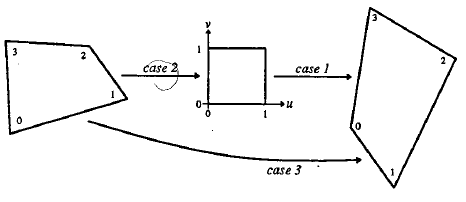
<p>具体实现代码如下：</p>
<pre><code>private PerspectiveTransform(float a11, float a21, float a31, float a12, float a22, float a32,float a13, float a23, float a33) {
   this.a11 = a11;
   this.a12 = a12;
   this.a13 = a13;
   this.a21 = a21;
   this.a22 = a22;
   this.a23 = a23;
   this.a31 = a31;
   this.a32 = a32;
   this.a33 = a33;
 }

 public static PerspectiveTransform quadrilateralToQuadrilateral(float x0, float y0, float x1, float y1, float x2, float y2, float x3, float y3, float x0p, float y0p, float x1p, float y1p, float x2p, float y2p, float x3p, float y3p) {

   PerspectiveTransform qToS = quadrilateralToSquare(x0, y0, x1, y1, x2, y2, x3, y3);
   PerspectiveTransform sToQ = squareToQuadrilateral(x0p, y0p, x1p, y1p, x2p, y2p, x3p, y3p);
   return sToQ.times(qToS);
 }

 public void transformPoints(float[] points) {
   int max = points.length;
   float a11 = this.a11;
   float a12 = this.a12;
   float a13 = this.a13;
   float a21 = this.a21;
   float a22 = this.a22;
   float a23 = this.a23;
   float a31 = this.a31;
   float a32 = this.a32;
   float a33 = this.a33;
   for (int i = 0; i &lt; max; i += 2) {
     float x = points[i];
     float y = points[i + 1];
     float denominator = a13 * x + a23 * y + a33;
     points[i] = (a11 * x + a21 * y + a31) / denominator;
     points[i + 1] = (a12 * x + a22 * y + a32) / denominator;
   }
 }

 public void transformPoints(float[] xValues, float[] yValues) {
   int n = xValues.length;
   for (int i = 0; i &lt; n; i ++) {
     float x = xValues[i];
     float y = yValues[i];
     float denominator = a13 * x + a23 * y + a33;
     xValues[i] = (a11 * x + a21 * y + a31) / denominator;
     yValues[i] = (a12 * x + a22 * y + a32) / denominator;
   }
 }

 public static PerspectiveTransform squareToQuadrilateral(float x0, float y0,
                                                          float x1, float y1,
                                                          float x2, float y2,
                                                          float x3, float y3) {
   float dx3 = x0 - x1 + x2 - x3;
   float dy3 = y0 - y1 + y2 - y3;
   if (dx3 == 0.0f &amp;&amp; dy3 == 0.0f) {
     // Affine
     return new PerspectiveTransform(x1 - x0, x2 - x1, x0,
                                     y1 - y0, y2 - y1, y0,
                                     0.0f,    0.0f,    1.0f);
   } else {
     float dx1 = x1 - x2;
     float dx2 = x3 - x2;
     float dy1 = y1 - y2;
     float dy2 = y3 - y2;
     float denominator = dx1 * dy2 - dx2 * dy1;
     float a13 = (dx3 * dy2 - dx2 * dy3) / denominator;
     float a23 = (dx1 * dy3 - dx3 * dy1) / denominator;
     return new PerspectiveTransform(x1 - x0 + a13 * x1, x3 - x0 + a23 * x3, x0, y1 - y0 + a13 * y1, y3 - y0 + a23 * y3, y0, a13, a23, 1.0f);
   }
 }

 public static PerspectiveTransform quadrilateralToSquare(float x0, float y0, float x1, float y1, float x2, float y2, float x3, float y3) {
   // Here, the adjoint serves as the inverse:
   return squareToQuadrilateral(x0, y0, x1, y1, x2, y2, x3, y3).buildAdjoint();
 }

 PerspectiveTransform buildAdjoint() {
   // Adjoint is the transpose of the cofactor matrix:
   return new PerspectiveTransform(a22 * a33 - a23 * a32,
       a23 * a31 - a21 * a33,
       a21 * a32 - a22 * a31,
       a13 * a32 - a12 * a33,
       a11 * a33 - a13 * a31,
       a12 * a31 - a11 * a32,
       a12 * a23 - a13 * a22,
       a13 * a21 - a11 * a23,
       a11 * a22 - a12 * a21);
 }

 PerspectiveTransform times(PerspectiveTransform other) {
   return new PerspectiveTransform(a11 * other.a11 + a21 * other.a12 + a31 * other.a13,
       a11 * other.a21 + a21 * other.a22 + a31 * other.a23,
       a11 * other.a31 + a21 * other.a32 + a31 * other.a33,
       a12 * other.a11 + a22 * other.a12 + a32 * other.a13,
       a12 * other.a21 + a22 * other.a22 + a32 * other.a23,
       a12 * other.a31 + a22 * other.a32 + a32 * other.a33,
       a13 * other.a11 + a23 * other.a12 + a33 * other.a13,
       a13 * other.a21 + a23 * other.a22 + a33 * other.a23,
       a13 * other.a31 + a23 * other.a32 + a33 * other.a33);

 }
</code></pre>]]></content>
    
    <summary type="html">
    
      &lt;p&gt;透视变换（Perspective Transformation)是指利用透视中心、像点、目标点三点共线的条件，按透视旋转定律使承影面（透视面）绕迹线（透视轴）旋转某一角度，破坏原有的投影光线束，仍能保持承影面上投影几何图形不变的变换。&lt;/p&gt;
&lt;p&gt;记得本科时上的《计算机图形学》上学过图像的变换矩阵，当时还不知道有什么用，现在派上用场了。&lt;/p&gt;
&lt;p&gt;透视变换的通用公式是：&lt;/p&gt;
&lt;p&gt;&lt;img src=&quot;/post_image/toushibianhuan/1.png&quot; alt=&quot;image&quot;&gt;&lt;br&gt;其中，u，v是原始坐标点，写成增广向量形式，w=1。对应的变换后坐标为  &lt;code&gt;x=x&amp;#39;/w&amp;#39;,y=y&amp;#39;/w&amp;#39;&lt;/code&gt; 。变换矩阵中， &lt;code&gt;a11,a12,a21,a22&lt;/code&gt; 表示线性变换， &lt;code&gt;a31,a32&lt;/code&gt; 表示平移， &lt;code&gt;a13,a23&lt;/code&gt; 表示透视变换。&lt;br&gt;
    
    </summary>
    
      <category term="Tech" scheme="http://mjackie.github.io/categories/Tech/"/>
    
    
      <category term="图像处理" scheme="http://mjackie.github.io/tags/%E5%9B%BE%E5%83%8F%E5%A4%84%E7%90%86/"/>
    
  </entry>
  
  <entry>
    <title>好好学习，天天向上！</title>
    <link href="http://mjackie.github.io/Life/cjw7jxocs002midkfjxe1sklj/"/>
    <id>http://mjackie.github.io/Life/cjw7jxocs002midkfjxe1sklj/</id>
    <published>2017-09-11T03:21:00.000Z</published>
    <updated>2017-09-11T13:45:47.000Z</updated>
    
    <content type="html"><![CDATA[<p>今天是17年9月11日，研究生正式上课的第一天。在这个时间节点上，总结过去半年的计算所实习经历，展望已经步入的研一校园生活。</p>
<p>半年的计算所实习生活收获良多，受益匪浅，是一段令人难忘的时光。总结起来可以概括为三点：</p>
<ul>
<li>科研工作的尝试</li>
</ul>
<p>从对科研工作的陌生与懵懂到了解与尝试，并试图提出自己的想法。在这个过程中，阅读文献的能力提高了，了解了期刊会议文章的组织结构。如何快速了解一篇文章的核心思想，找到自己的关注点。如何检索，下载自己所关注领域的文章。同时，自己的逻辑思维能力得到了锻炼，分析总结别人方法的优缺点，找到问题所在，并尝试提出自己的看法。这是一个不断尝试与修改的过程。每一个灵感的迸发与产生都是一次思维的升级。对科研工作也有了进一步的认识，科研所需的不仅仅是代码能力，学习能力的体现，而是一种综合能力的体现。写作能力，英语素质以及发现问题总结问题的能力都是科研中很重要的一部分。没有人会打开你的脑子看到你的想法，你要表达出来，写出来！</p>
<ul>
<li>工程项目的体会</li>
</ul>
<p>体会了一个实际项目从可行性分析到项目开发，性能优化，直到最后交付的过程。核心功能的开发时间反而比性能，可用性优化的时间要短。一个项目的完成，不仅仅是功能的实现，还要保证兼容性，性能，文档等多个方面的完成。在项目开发的过程中，自己读代码的能力也得到了明显的提升。阅读优秀的开源代码可以体会到别人的编程思想。读懂了别人的代码，才能在此基础上实现自己的需求。最后一点体会就是不要害怕困难，简单的问题，做着很开心，但收货往往很少。越是困难的问题，硬着头皮做下去，收获往往很大。</p>
<ul>
<li>小伙伴</li>
</ul>
<p>最大的收货莫过于朋友与友谊。还记得刚到所里的那几天，陌生的环境让我很不适应，大家仿佛都各行其是，似乎一下从学生阶段到了工作阶段，孤独感油然而生。渐渐的认识了许多同为大四提前入所的学生，和他们一起聚餐，一起出游，一起打游戏，让我渐渐找到了归属感。遇到他们，我真幸运！<br>特别要感谢我的导师张瀚文老师的关怀与指导，感谢课题组的每一位老师。</p>
<p>新学期，新气象。上周一连开了三个开学典礼，院里的，所里的和学校的，认识了许多新同学，熟悉了校园新环境。安逸的环境似乎让自己放松了警惕，也变得些许懒散。</p>
<p>时光易逝，要时刻督促自己不要浪费时光。希望在接下来的一年时间里能够</p>
<p>好好学习！</p>
<p>天天向上！</p>
]]></content>
    
    <summary type="html">
    
      &lt;p&gt;今天是17年9月11日，研究生正式上课的第一天。在这个时间节点上，总结过去半年的计算所实习经历，展望已经步入的研一校园生活。&lt;/p&gt;
&lt;p&gt;半年的计算所实习生活收获良多，受益匪浅，是一段令人难忘的时光。总结起来可以概括为三点：&lt;/p&gt;
&lt;ul&gt;
&lt;li&gt;科研工作的尝试&lt;/l
    
    </summary>
    
      <category term="Life" scheme="http://mjackie.github.io/categories/Life/"/>
    
    
  </entry>
  
  <entry>
    <title>利用Selenium爬取网络数据</title>
    <link href="http://mjackie.github.io/Tech/cjw7jxocv002ridkfn7mpthm2/"/>
    <id>http://mjackie.github.io/Tech/cjw7jxocv002ridkfn7mpthm2/</id>
    <published>2017-08-27T07:07:00.000Z</published>
    <updated>2017-08-31T09:03:31.000Z</updated>
    
    <content type="html"><![CDATA[<h4 id="Selenium-简介"><a href="#Selenium-简介" class="headerlink" title="Selenium 简介"></a>Selenium 简介</h4><p>Selenium 是一个用于Web应用程序测试的工具。Selenium 测试直接运行在浏览器中，就像真正的用户在操作一样。框架底层使用 JavaScript 模拟真实用户对浏览器进行操作。测试脚本执行时，浏览器自动按照脚本代码做出点击，输入，打开，验证等操作，就像真实用户所做的一样，从终端用户的角度测试应用程序。</p>
<h4 id="环境配置"><a href="#环境配置" class="headerlink" title="环境配置"></a>环境配置</h4><pre><code>sudo apt-get install python默认2.7.12
sudo apt-get update        #更新下apt-get库否则下载pip会出错
sudo apt-get install python-pip        #默认是8.1.1
sudo pip install selenium    #安装selenium
sudo apt-get install firefox
sudo apt-get install xvfb
sudo pip install pyvirtualdisplay
下载 geckodriver        https://github.com/mozilla/geckodriver/releases
sudo chmod a+w geckodriver
</code></pre><a id="more"></a>
<h4 id="相关方法"><a href="#相关方法" class="headerlink" title="相关方法"></a>相关方法</h4><ul>
<li><p>定位页面中的元素</p>
<pre><code>find_element_by_id
find_element_by_name
find_element_by_xpath
find_element_by_link_text
find_element_by_partial_link_text
find_element_by_tag_name
find_element_by_class_name
find_element_by_css_selector
</code></pre></li>
<li><p>定位多个元素</p>
<pre><code>find_elements_by_name
find_elements_by_xpath
find_elements_by_link_text
find_elements_by_partial_link_text
find_elements_by_tag_name
find_elements_by_class_name
find_elements_by_css_selector
</code></pre></li>
<li><p>操作元素方法</p>
<pre><code>clear 清除元素的内容
send_keys 模拟按键输入
click 点击元素
submit 提交表单
</code></pre></li>
</ul>
<h4 id="延时等到"><a href="#延时等到" class="headerlink" title="延时等到"></a>延时等到</h4><p>利用Selenium爬取网络数据时，遇到的最多的问题就是页面或浏览器选项卡未加载出来时，对页面进行操作的问题。常见得报错包括IndexError: list index out of range等。</p>
<p>一种解决办法是，在一些操作后加 <code>time.sleep(3)</code> 来使进程等待一段固定时长，再进行后续操作。更好的办法应该是等到页面加载完成后，自动进行后续操作。</p>
<ul>
<li><p>等待元素出现后再执行后续操作</p>
<p>  wait模块的WebDriverWait类是显性等待类，先看下它有哪些参数与方法：</p>
<pre><code>def __init__(self, driver, timeout, poll_frequency=POLL_FREQUENCY, ignored_exceptions=None):
      &quot;&quot;&quot;Constructor, takes a WebDriver instance and timeout in seconds.

         :Args:
          - driver - Instance of WebDriver (Ie, Firefox, Chrome or Remote)
          - timeout - Number of seconds before timing out
          - poll_frequency - sleep interval between calls
            By default, it is 0.5 second.
          - ignored_exceptions - iterable structure of exception classes ignored during calls.
            By default, it contains NoSuchElementException only.

         Example:
          from selenium.webdriver.support.ui import WebDriverWait \n
          element = WebDriverWait(driver, 10).until(lambda x: x.find_element_by_id(&quot;someId&quot;)) \n
          is_disappeared = WebDriverWait(driver, 30, 1, (ElementNotVisibleException)).\ \n
                      until_not(lambda x: x.find_element_by_id(&quot;someId&quot;).is_displayed())
      &quot;&quot;&quot;
</code></pre><p>  调用方法如下：</p>
<pre><code>WebDriverWait(driver, 超时时长, 调用频率, 忽略异常).until(可执行方法, 超时时返回的信息)
</code></pre><p>  示例代码：</p>
<pre><code>WebDriverWait(driver, 600).until(lambda x: x.find_elements_by_xpath(&quot;//div[@class=\&quot;col-9 search-2017-2 pr10 pl0\&quot;]/div&quot;))
</code></pre></li>
<li><p>等待新的页面（选项卡）打开后执行后续操作</p>
<pre><code>while len(driver.window_handles)&lt;2:        #如果选项卡数量小于2
    first.click()
    time.sleep(1)
</code></pre></li>
</ul>
<h4 id="参考文章"><a href="#参考文章" class="headerlink" title="参考文章"></a>参考文章</h4><ul>
<li><a href="http://www.jb51.net/article/92672.htm" target="_blank" rel="noopener">http://www.jb51.net/article/92672.htm</a></li>
<li><a href="http://www.cnblogs.com/yoyoketang/p/6517477.html" target="_blank" rel="noopener">http://www.cnblogs.com/yoyoketang/p/6517477.html</a></li>
<li><a href="http://yueyue-test.iteye.com/blog/1864887" target="_blank" rel="noopener">http://yueyue-test.iteye.com/blog/1864887</a></li>
<li><a href="http://blog.csdn.net/eastmount/article/details/48108259" target="_blank" rel="noopener">http://blog.csdn.net/eastmount/article/details/48108259</a></li>
</ul>
]]></content>
    
    <summary type="html">
    
      &lt;h4 id=&quot;Selenium-简介&quot;&gt;&lt;a href=&quot;#Selenium-简介&quot; class=&quot;headerlink&quot; title=&quot;Selenium 简介&quot;&gt;&lt;/a&gt;Selenium 简介&lt;/h4&gt;&lt;p&gt;Selenium 是一个用于Web应用程序测试的工具。Selenium 测试直接运行在浏览器中，就像真正的用户在操作一样。框架底层使用 JavaScript 模拟真实用户对浏览器进行操作。测试脚本执行时，浏览器自动按照脚本代码做出点击，输入，打开，验证等操作，就像真实用户所做的一样，从终端用户的角度测试应用程序。&lt;/p&gt;
&lt;h4 id=&quot;环境配置&quot;&gt;&lt;a href=&quot;#环境配置&quot; class=&quot;headerlink&quot; title=&quot;环境配置&quot;&gt;&lt;/a&gt;环境配置&lt;/h4&gt;&lt;pre&gt;&lt;code&gt;sudo apt-get install python默认2.7.12
sudo apt-get update        #更新下apt-get库否则下载pip会出错
sudo apt-get install python-pip        #默认是8.1.1
sudo pip install selenium    #安装selenium
sudo apt-get install firefox
sudo apt-get install xvfb
sudo pip install pyvirtualdisplay
下载 geckodriver        https://github.com/mozilla/geckodriver/releases
sudo chmod a+w geckodriver
&lt;/code&gt;&lt;/pre&gt;
    
    </summary>
    
      <category term="Tech" scheme="http://mjackie.github.io/categories/Tech/"/>
    
    
      <category term="Selenium" scheme="http://mjackie.github.io/tags/Selenium/"/>
    
      <category term="爬虫" scheme="http://mjackie.github.io/tags/%E7%88%AC%E8%99%AB/"/>
    
  </entry>
  
  <entry>
    <title>利用 VBA 处理 Excel 数据</title>
    <link href="http://mjackie.github.io/Tech/cjw7jxoc60010idkfexio7e7q/"/>
    <id>http://mjackie.github.io/Tech/cjw7jxoc60010idkfexio7e7q/</id>
    <published>2017-08-19T07:32:00.000Z</published>
    <updated>2017-08-22T09:12:24.000Z</updated>
    
    <content type="html"><![CDATA[<p>Visual Basic for Applications（VBA）是Visual Basic的一种宏语言，是微软开发出来在其桌面应用程序中执行通用的自动化(OLE)任务的编程语言。主要能用来扩展Windows的应用程序功能，特别是Microsoft Office软件。</p>
<p>VBA 编写的宏命令可以取代手动对 Excel 的大量操作，也可以实现 Excel 未提供的函数。相比其他语言， VBA 天然的支持 Excel 大规模数据处理，对 Excel 格式数据处理更快，省去了格式字符匹配等问题。同时 VBA 可与 Excel 中自带的函数混合使用，提高了易用性。</p>
<a id="more"></a>
<h3 id="示例一：不同文件间拷贝数据"><a href="#示例一：不同文件间拷贝数据" class="headerlink" title="示例一：不同文件间拷贝数据"></a>示例一：不同文件间拷贝数据</h3><pre><code>Sub Electric()
    Dim target As Workbook
    Set target = Workbooks(&quot;a.xlsm&quot;)

    Dim source As Workbook
    Set source = Workbooks(&quot;b.xlsx&quot;)

    For i = 6 To target.Sheets(&quot;2014&quot;).Cells(Rows.Count, 1).End(xlUp).Row
        For j = 3 To target.Sheets(&quot;2014&quot;).Cells(Rows.Count, 1).End(xlUp).Row
            If target.Sheets(&quot;2014&quot;).Cells(i, 3) = source.Sheets(&quot;2014&quot;).Cells(j, 1) Then   &apos;如果单元格内容相同
                target.Sheets(&quot;2014&quot;).Cells(i, 24) = source.Sheets(&quot;2014&quot;).Cells(j, 2)
                Exit For
            End If
        Next
    Next
End Sub
</code></pre><h3 id="示例二：筛选出连续-5-行数据的项"><a href="#示例二：筛选出连续-5-行数据的项" class="headerlink" title="示例二：筛选出连续 5 行数据的项"></a>示例二：筛选出连续 5 行数据的项</h3><pre><code>Sub Statistic()

    Dim target As Workbook
    Set target = Workbooks(&quot;data.xlsm&quot;)

    &apos;使用“高级筛选”功能将不重复公司Id数据显示在sheet4中
    target.Sheets(&quot;sheet3&quot;).Columns(2).AdvancedFilter 2, , target.Sheets(&quot;sheet8&quot;).Cells(1, 1), 1
    s1 = target.Sheets(&quot;sheet8&quot;).Cells(Rows.Count, 1).End(xlUp).Row
    &apos;下面代码用COUNTIF函数统计重复次数
    For i = 1 To s1
        target.Sheets(&quot;sheet8&quot;).Cells(i, 2) = WorksheetFunction.CountIf(target.Sheets(&quot;sheet3&quot;).Columns(2), target.Sheets(&quot;sheet8&quot;).Cells(i, 1))
    Next


End Sub
Sub SelectByYear()

    Dim target As Workbook
    Set target = Workbooks(&quot;data.xlsm&quot;)
    m = 1

    For i = 2 To target.Sheets(&quot;sheet8&quot;).Cells(Rows.Count, 1).End(xlUp).Row
        If target.Sheets(&quot;sheet8&quot;).Cells(i, 2) &gt; 5 Then &apos;筛选5年以上的数据
            sstr = target.Sheets(&quot;sheet8&quot;).Cells(i, 1)

                With Worksheets(3).Range(&quot;b:b&quot;)
                    Set c = .Find(what:=sstr)
                    If Not c Is Nothing Then
                        firstAddress = c.Address
                        Do
                            r = c.Row
                            target.Sheets(&quot;sheet3&quot;).Rows(r).copy target.Sheets(&quot;sheet9&quot;).Cells(m, 1)
                            m = m + 1
                            Set c = .FindNext(c)
                        Loop While Not c Is Nothing And c.Address &lt;&gt; firstAddress
                    End If
                End With
        End If
    Next

End Sub
</code></pre>]]></content>
    
    <summary type="html">
    
      &lt;p&gt;Visual Basic for Applications（VBA）是Visual Basic的一种宏语言，是微软开发出来在其桌面应用程序中执行通用的自动化(OLE)任务的编程语言。主要能用来扩展Windows的应用程序功能，特别是Microsoft Office软件。&lt;/p&gt;
&lt;p&gt;VBA 编写的宏命令可以取代手动对 Excel 的大量操作，也可以实现 Excel 未提供的函数。相比其他语言， VBA 天然的支持 Excel 大规模数据处理，对 Excel 格式数据处理更快，省去了格式字符匹配等问题。同时 VBA 可与 Excel 中自带的函数混合使用，提高了易用性。&lt;/p&gt;
    
    </summary>
    
      <category term="Tech" scheme="http://mjackie.github.io/categories/Tech/"/>
    
    
      <category term="vba" scheme="http://mjackie.github.io/tags/vba/"/>
    
      <category term="数据处理" scheme="http://mjackie.github.io/tags/%E6%95%B0%E6%8D%AE%E5%A4%84%E7%90%86/"/>
    
  </entry>
  
  <entry>
    <title>Zxing Camera 调用代码解析</title>
    <link href="http://mjackie.github.io/Tech/cjw7jxoc9001bidkf4cpj8hxb/"/>
    <id>http://mjackie.github.io/Tech/cjw7jxoc9001bidkf4cpj8hxb/</id>
    <published>2017-08-13T12:21:00.000Z</published>
    <updated>2017-08-15T13:19:40.000Z</updated>
    
    <content type="html"><![CDATA[<p>Zxing 是一个开源的，支持多种一维二维条码格式的图像处理类库，用 JAVA 实现，支持多种语言接口。同时提供了 android 摄像头调用相关类库，用于手持设备的扫码解码。</p>
<p>本文主要介绍了 Android 系统调用 Camera 实现扫码的过程解析。</p>
<h4 id="目录及相关类"><a href="#目录及相关类" class="headerlink" title="目录及相关类"></a>目录及相关类</h4><ul>
<li>activity: 扫码相关Activity<ul>
<li>CaptureActivity: 扫码主界面Activity</li>
<li>CaptureFragment: 承载预览界面SurfaceView 和取景框 ViewfinderView<a id="more"></a></li>
</ul>
</li>
<li>camera： 摄像头调用相关类<ul>
<li>AutoFocusCallback: 自动对焦后回调类</li>
<li>CameraConfigurationManager: Camera 配置管理与初始化</li>
<li>CameraManager: 封装了 Camera 操作相关方法，例如获取Camera图像，请求自动对焦等</li>
<li>PreviewCallback: 预览图像发生变化时的回调类</li>
</ul>
</li>
<li>decoding: 解码相关类<ul>
<li>CaptureActivityHandler: CaptureActivity 回调类，处理各种消息，例如：解码成功失败，对焦，请求预览图像等</li>
<li>DecodeHandler: 解码回调类，解码处理类，封装了调用 Zxing-core 的方法</li>
<li>DecodeThread: 解码线程，会根据解码类型调用 DecodeHandler</li>
</ul>
</li>
<li>view ： CaptureFragment中控件<ul>
<li>ViewfinderView: 取景框控件，绘制取景器，扫描线等</li>
</ul>
</li>
</ul>
<h4 id="扫码过程"><a href="#扫码过程" class="headerlink" title="扫码过程"></a>扫码过程</h4><ul>
<li>new CaptureActivity，初始化摄像头参数</li>
<li>new DecodeThread, 开始获取预览图像</li>
</ul>
<pre><code>decodeThread.start();
state = State.SUCCESS;
// Start ourselves capturing previews and decoding.
CameraManager.get().startPreview();
restartPreviewAndDecode();
</code></pre><ul>
<li>初始化PreviewCallback， 开始自动对焦， 绘制取景框</li>
</ul>
<pre><code>state = State.PREVIEW;      
CameraManager.get().requestPreviewFrame(decodeThread.getHandler(), R.id.decode);
CameraManager.get().requestAutoFocus(this, R.id.auto_focus);
fragment.drawViewfinder();
</code></pre><ul>
<li>循环执行自动对焦，获取预览图像到CaptureFragment</li>
<li>当预览图象发生变化时，会调用 PreviewCallback 中 onPreviewFrame() 方法, 获取图像 data 并发送 message 给DecodeHandler</li>
</ul>
<pre><code>Message message = previewHandler.obtainMessage(previewMessage, cameraResolution.x,cameraResolution.y, data);
message.sendToTarget();
</code></pre><ul>
<li>DecodeHandler 调用 decode 方法尝试解码，并发送解码结果message 给 CaptureActivityHandler。</li>
</ul>
<pre><code>if (rawResult != null) {
    long end = System.currentTimeMillis();
    Log.d(TAG, &quot;Found barcode (&quot; + (end - start) + &quot; ms):\n&quot; + rawResult.toString());
    Message message = Message.obtain(fragment.getHandler(), R.id.decode_succeeded, rawResult);
    Bundle bundle = new Bundle();
    bundle.putParcelable(DecodeThread.BARCODE_BITMAP, source.renderCroppedGreyscaleBitmap());
    message.setData(bundle);
    //Log.d(TAG, &quot;Sending decode succeeded message...&quot;);
    message.sendToTarget();
} else {
    Message message = Message.obtain(fragment.getHandler(), R.id.decode_failed);
    message.sendToTarget();
}
</code></pre><ul>
<li>CaptureActivityHandler 处理结果，解码失败继续尝试解码，解码成功返回结果进行跳转</li>
</ul>
<pre><code>if (message.what == R.id.decode_succeeded) {
        Log.d(TAG, &quot;Got decode succeeded message&quot;);
        state = State.SUCCESS;
        Bundle bundle = message.getData();
        Bitmap barcode = bundle == null ? null :
                (Bitmap) bundle.getParcelable(DecodeThread.BARCODE_BITMAP);

        fragment.handleDecode((Result) message.obj, barcode);

} else if (message.what == R.id.decode_failed) {

        state = State.PREVIEW;
        CameraManager.get().requestPreviewFrame(decodeThread.getHandler(), R.id.decode);
</code></pre>]]></content>
    
    <summary type="html">
    
      &lt;p&gt;Zxing 是一个开源的，支持多种一维二维条码格式的图像处理类库，用 JAVA 实现，支持多种语言接口。同时提供了 android 摄像头调用相关类库，用于手持设备的扫码解码。&lt;/p&gt;
&lt;p&gt;本文主要介绍了 Android 系统调用 Camera 实现扫码的过程解析。&lt;/p&gt;
&lt;h4 id=&quot;目录及相关类&quot;&gt;&lt;a href=&quot;#目录及相关类&quot; class=&quot;headerlink&quot; title=&quot;目录及相关类&quot;&gt;&lt;/a&gt;目录及相关类&lt;/h4&gt;&lt;ul&gt;
&lt;li&gt;activity: 扫码相关Activity&lt;ul&gt;
&lt;li&gt;CaptureActivity: 扫码主界面Activity&lt;/li&gt;
&lt;li&gt;CaptureFragment: 承载预览界面SurfaceView 和取景框 ViewfinderView
    
    </summary>
    
      <category term="Tech" scheme="http://mjackie.github.io/categories/Tech/"/>
    
    
      <category term="二维码" scheme="http://mjackie.github.io/tags/%E4%BA%8C%E7%BB%B4%E7%A0%81/"/>
    
      <category term="android" scheme="http://mjackie.github.io/tags/android/"/>
    
  </entry>
  
</feed>